Don’t Let Your Competitors Outpace You: Master AI-Assisted Mobile App Development in 2026
Mobile app teams are under pressure to release faster, support more devices, personalize user experiences, and maintain quality across Android, iOS, and cross-platform builds. At the same time, app development has become more complex. Teams now deal with multi-platform UIs, backend integrations, real-time data, AI features, changing app store policies, security checks, analytics, crash monitoring, and frequent updates.
To keep up, development teams are rethinking how much of the app lifecycle still needs to be handled manually. Repetitive tasks such as requirement documentation, boilerplate coding, test case generation, crash analysis, and release note preparation are now being supported by AI tools. This shift is already visible in developer workflows. Stack Overflow’s 2025 Developer Survey found that 84% of respondents are already using or planning to use AI tools in their development process, up from 76% the previous year. AI-assisted mobile app development fits right into this shift by helping teams reduce repetitive work, improve planning, speed up coding, expand testing coverage, analyze production issues, and support better decision-making.
It does not mean transferring end-to-end delivery to an AI tool. AI-assisted mobile app development works best when AI outputs are embedded into controlled engineering workflows, where product managers define scope, designers validate user flows, developers review generated code, QA teams verify test coverage, and DevOps teams monitor release stability. AI can accelerate analysis, code scaffolding, test creation, debugging, and documentation, but architecture, security, performance, compliance, and production readiness still require human-led technical review.
What is AI-Assisted Mobile App Development?
In practical terms, AI-assisted development works as an engineering support layer across the mobile app lifecycle. It can help product teams structure requirements, designers accelerate early interface exploration, developers generate and refactor code, QA teams expand test coverage, and DevOps teams analyze release and crash data.
It focuses on enhancing delivery efficiency and engineering quality, supporting the teams building the app, not just the users interacting with it. However, each AI-generated output still needs to pass through human review, technical validation, and project-specific governance before it becomes part of the product.
How AI Supports Each Stage of Mobile App Development
AI should not be added randomly to the development process. A coding assistant cannot replace requirement planning. Likewise, a UI generator cannot validate the back-end architecture.
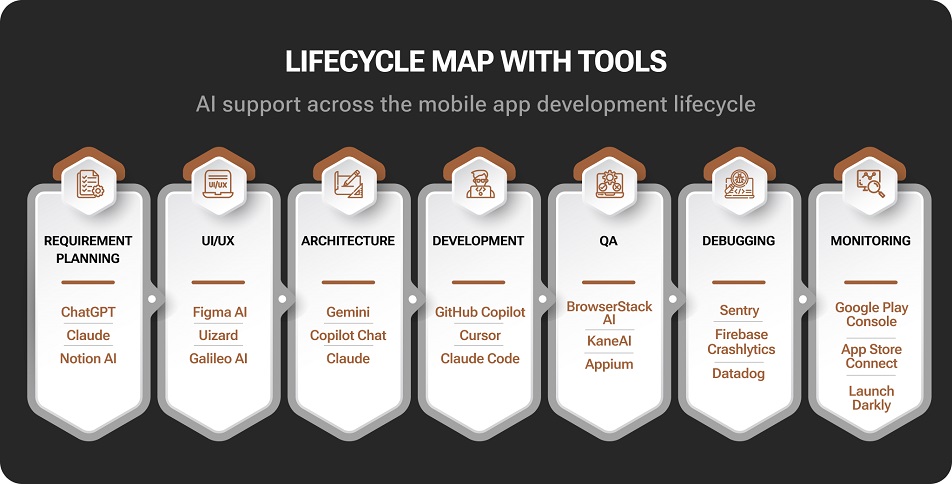
AI tools support different stages of mobile app development, from early planning to post-launch monitoring.
The right approach is to map AI tools to specific stages of the app development lifecycle.
1. Requirement Planning and Product Discovery
Many mobile app projects lose time and momentum before development even begins. Requirements come from stakeholder calls, app store reviews, customer support tickets, competitor apps, sales feedback, analytics dashboards, and internal documentation. Without structure, this becomes a long list of features with unclear priorities.
AI helps product and development teams turn scattered information into usable planning material.
AI Tools That Help
| Tool | How It Helps |
|---|---|
| ChatGPT, Claude, Gemini | Summarize stakeholder notes, create user stories, draft acceptance criteria, and identify missing edge cases |
| Atlassian Intelligence / Jira AI | Summarize Jira issues, project updates, product tasks, and development discussions |
| Notion AI | Convert rough notes into PRDs, feature briefs, meeting summaries, and task lists |
| Productboard AI features | Productboard AI features |
| Dovetail AI | Analyze user interviews, research notes, and feedback themes |
How AI Works in This Stage
We recently tackled a comprehensive optimization project for a FinTech mobile app where user feedback was scattered across app reviews, support logs, and drop-off analytics. AI acted as our central synthesis engine. Instead of manually parsing thousands of rows of data, we used AI to connect the dots between failed logins, OTP errors, and payment screen drop-offs. The result? The AI automatically categorized these isolated signals into clear, actionable discovery areas: Authentication, Payment Flows, and Communication, allowing our development team to fast-track critical UX fixes.
From there, the team can convert those discovery areas into optimization-ready requirements:
- Add OTP resend timer, alternate verification flow, and fallback messaging
- Improve expired-session handling without forcing users to restart the full journey
- Add a clear payment status screen with pending, failed, and successful transaction states
- Track failed login, OTP retry, session timeout, and payment confirmation events
- Create test cases for delayed OTP, expired sessions, payment timeout, and duplicate transaction attempts
- Define support escalation rules for unresolved payment or login issues
This makes AI-assisted mobile app development more grounded because AI is not just summarizing feedback; it is helping teams move from scattered inputs to structured requirements.
2. UI/UX Design and Prototyping
AI-assisted UI/UX design helps teams move faster from idea to visual direction. It is especially useful during early prototyping, MVP planning, design exploration, and user flow creation.
Instead of designing every first draft manually, UI/UX teams can use AI to generate wireframes, screen ideas, onboarding flows, UX copy, form labels, error messages, and accessibility checklists.
AI Tools That Help
| Tool | How It Helps |
|---|---|
| Figma AI | Helps find designs, rewrite copy, replace content, generate assets, and speed up design workflows |
| Uizard | Converts prompts, sketches, and screenshots into app wireframes and mockups |
| Galileo AI | Generates mobile UI screen concepts from text prompts |
| Visily | Creates wireframes, prototypes, and screen ideas from prompts or screenshots |
| ChatGPT/Claude | Drafts UX copy, onboarding text, form labels, empty states, and error messages |
How AI Works in This Stage
Consider this healthcare appointment booking app, for example. Our designers used AI to simultaneously create three onboarding flow options:
- User-first onboarding with symptom selection
- Doctor-first onboarding with specialist search
- Appointment-first onboarding with location and insurance filters
This helps the design team explore more ideas in less time. But AI-generated screens are only starting points. Designers still need to refine them in line with brand guidelines, user research, accessibility rules, Apple Human Interface Guidelines, Material Design principles, and platform-specific behavior.
Where AI Helps in Mobile UI/UX
| Design Task | AI-Assisted Output | Human Review Needed For |
|---|---|---|
| Wireframing | First-draft screen layouts | Flow logic, hierarchy, and platform fit |
| Onboarding | Step sequence and copy ideas | Drop-off reduction and product logic |
| Forms | Field suggestions and validation copy | Compliance, accessibility, and error states |
| Dashboards | Widget placement and layout options | User roles and data priority |
| eCommerce screens | Product page, cart, and checkout ideas | Conversion logic and brand consistency |
AI can create a screen, but a designer decides whether that screen should exist.
3. Architecture and Technology Decisions
Architecture decisions affect scalability, performance, security, cost, and long-term maintainability. AI can help compare options and document trade-offs, but final architecture decisions should stay with experienced engineers.
This is especially important in mobile app development because teams must account for device limitations, OS behavior, offline use, permissions, API reliability, app store rules, background processes, data privacy, and performance.
AI Tools That Help
| Tool | How It Helps |
|---|---|
| ChatGPT, Claude, Gemini | Compare architecture options, explain trade-offs, and draft technical decision documents |
| GitHub Copilot Chat | Explain existing codebases and suggest implementation approaches |
| Cursor/Claude Code | Inspect repositories, reason through code changes, and support refactoring plans |
| Gemini in Android Studio | Supports Android-specific coding, Gradle troubleshooting, Compose UI questions, and crash analysis workflows |
| Xcode intelligence features | Supports Apple-platform coding workflows with predictive completion and AI-assisted development |
How AI Works in This Stage
A team planning a healthcare appointment app may need to decide between Flutter, React Native, or native Android/iOS. AI can help compare these options based on:
- Development timeline
- UI complexity
- Video consultation support
- Appointment scheduling logic
- Push notifications
- Offline access to appointment details
- Data privacy requirements
- Integration with insurance or patient systems
- Team skill set
- Long-term maintenance
- Performance expectations
AI can also help draft a technical decision record explaining why the team selected Flutter for faster cross-platform delivery, React Native for faster JavaScript-based development, or native development for deeper platform-specific control.
AI can help compare these options, but senior developers still need to validate battery use, memory consumption, model size, latency, data privacy, and device compatibility.
4. Code Generation and Mobile App Development
Code generation is the most visible use of AI in mobile application development. AI coding assistants can help developers write repetitive code faster, create components, explain unfamiliar code, refactor functions, generate documentation, and create first-draft tests.
This shift is already visible in developer behavior. GitHub’s Octoverse 2025 report found that nearly 80% of new developers on GitHub use Copilot within their first week, showing how quickly AI coding support has become part of the default development experience.
Used well, these tools improve developer productivity. Used carelessly, they can introduce insecure, outdated, or poorly structured code.
AI Tools That Help
| Tool | How It Helps |
|---|---|
| GitHub Copilot | Code completion, chat-based help, PR summaries, and coding agent workflows |
| Cursor | AI-first code editor for repository-aware development and multi-file changes |
| Claude Code | Terminal-based coding agent for codebase inspection, edits, commands, and git workflows |
| Gemini in Android Studio | Android-focused support for Kotlin, Jetpack Compose, Gradle, and app quality workflows |
| Xcode intelligence features | Supports Swift and Apple-platform development with predictive and generative coding assistance |
How AI Works in This Stage
Not every development task is equally suited for AI-generated output. The level of suitability depends on how repeatable the task is, how much project context it needs, how easily the output can be tested, and what risk it creates if implemented incorrectly.
For example, boilerplate code, API models, UI component drafts, documentation, and unit test scaffolds usually follow predictable patterns. AI can support these areas with relatively high efficiency because developers can review the output quickly and validate it through existing build, lint, and test workflows.
Security-sensitive areas are different. Authentication, payment flows, encryption, token storage, and architecture decisions require deeper context around threat models, compliance needs, backend contracts, device behavior, and long-term maintainability. AI can still assist with drafts or explanations, but these outputs should not move forward without senior engineering review.
This is where AI-assisted mobile app development aligns with broader AI-enabled SDLC workflows: AI works best when it accelerates structured engineering tasks, while human teams retain control over risk, architecture, and production decisions.
AI Suitability by Development Task
| Development Task | AI Suitability |
|---|---|
| Boilerplate code | High |
| UI component drafts | High |
| API model classes | High |
| Documentation | High |
| Unit test scaffolds | Medium to high |
| Refactoring suggestions | Medium |
| Authentication logic | Low without expert review |
| Payment workflows | Low without expert review |
| Encryption and token storage | Low without expert review |
| Architecture decisions | Low without expert review |
The best use of AI in coding is not to blindly generate large parts of the app. It is meant to speed up repetitive work while keeping developers in control of production logic.
5. Testing and Quality Assurance
Testing is one of the strongest areas for AI-assisted app development. Mobile apps must work across devices, OS versions, screen sizes, networks, permissions, and user behaviors. Manually identifying every scenario is slow and often incomplete.
AI helps QA teams generate test cases, edge scenarios, regression flows, test data, bug summaries, and automation scripts faster.
AI Tools That Help
| Tool | How It Helps |
|---|---|
| BrowserStack Test Case Generator Agent | Converts PRDs, Jira tickets, PDFs, Confluence pages, screenshots, and Figma links into test cases |
| KaneAI by LambdaTest | Supports AI-assisted test creation, execution, and debugging |
| Maestro | Enables readable mobile UI test flows and can be combined with AI-generated test scenarios |
| Appium with AI-generated scripts | Supports cross-platform mobile test automation |
| GitHub Copilot/ChatGPT/Claude | Generates unit test scaffolds, regression cases, negative cases, and edge-case lists |
How AI Works in This Stage
In a recent project for a food delivery platform, our team used an AI tool to accelerate the QA cycle for the checkout module. By feeding the primary checkout user story into the AI, our QA engineer instantly generated a comprehensive matrix of functional, negative, and edge test cases.
The AI successfully mapped out complex, real-world scenarios that would typically take hours to brainstorm, including:
- Coupon expires during checkout
- Payment fails, but the amount is deducted
- The restaurant closes after the order is placed
- Rider assignment is delayed
- User changes address after cart creation
- Network drops during payment
- Refund is triggered after cancellation
- Push notification is not received
- Cart total changes after tax update
These test cases can then be reviewed by QA, converted into Appium, Maestro, Espresso, XCTest, XCUITest, or Detox scripts, and run across real devices using Firebase Test Lab, BrowserStack, LambdaTest, or internal device labs.
To make this practical, AI-assisted testing should follow a review-led workflow rather than sending generated test cases directly into automation. AI can improve test coverage, but QA teams still need to validate that the generated tests align with actual business rules and user behavior.
6. Performance Optimization and Debugging
Users quickly abandon apps that crash, freeze, drain battery, or load slowly. Performance optimization is where AI can help developers analyze noisy production data faster. Instead of manually scanning hundreds of crash logs, teams can use AI-assisted debugging tools to group issues, summarize likely causes, and prioritize fixes.
AI Tools That Help
| Tool | How It Helps |
|---|---|
| Firebase Crashlytics with Gemini assistance | Helps understand, prioritize, fix, and manage app crashes |
| Sentry Seer | Uses Sentry context to support root-cause analysis and AI-assisted debugging |
| Datadog Watchdog | Detects anomalies and performance issues across production systems |
| Android Studio Profiler | Analyzes CPU, memory, network, and energy usage in Android apps |
| Xcode Instruments | Profiles iOS performance, memory, rendering, and energy behavior |
How AI Works in This Stage
If a crash appears only on Android 15 devices after a recent release, AI can help analyze:
- Which app version introduced the issue
- Which devices and OS versions are affected
- Which stack traces repeat
- Which recent change may be related
- Whether the issue points to memory, null data, lifecycle handling, or API failure
- Which crashes should be prioritized first
The developer still needs to reproduce the issue, verify the cause, fix the code, and test the patch. AI shortens the investigation cycle, but it does not replace debugging expertise.
Performance Areas AI Can Help Inspect
| Issue | AI-Assisted Analysis |
|---|---|
| Slow startup | Finds heavy initialization tasks or blocking API calls |
| UI jank | Flags expensive renders, layout problems, or animation issues |
| Battery drain | Highlights background tasks, location polling, or inefficient loops |
| Memory leaks | Suggests retained objects or lifecycle mistakes |
| API latency | Identifies slow endpoints and retry patterns |
| Crash spikes | Group crashes by version, device, OS, and release |
For Flutter and React Native apps, teams should also inspect bridge performance, package dependencies, render cycles, bundle size, animation behavior, and platform-specific native modules.
7. Deployment, Monitoring, and Maintenance
AI also supports the post-release phase of mobile app development. Once the app is live, teams receive crash reports, analytics events, support tickets, feature requests, app store reviews, and release performance data. AI helps connect these signals so product and engineering teams can identify what needs attention first.
In this stage, the focus is less on debugging a single issue and more on connecting release health, user feedback, crash trends, and support data into a clear improvement backlog.
AI Tools That Help
| Tool | How It Helps |
|---|---|
| Firebase Crashlytics | Tracks crashes and supports AI-assisted issue analysis |
| Sentry | Error tracking, performance monitoring, and AI-assisted debugging |
| Datadog | Observability, anomaly detection, and production monitoring |
| GitHub Copilot | Pull request summaries, commit messages, and code review support |
| ChatGPT/Claude/Gemini | Summarize app reviews, support tickets, release notes, and incident reports |
How AI Works in This Stage
Post-release issues rarely appear in one place. A payment problem, for example, may show up as negative app reviews, refund-related support tickets, checkout drop-offs in analytics, and crash reports from the payment flow. Reviewed separately, these signals may look like isolated problems. An AI-assisted workflow can connect them into a clearer engineering priority: payment reliability.
From there, the team can decide whether the issue needs a UX fix, backend investigation, payment gateway review, QA regression coverage, or clearer in-app communication.
AI can also support release operations by turning technical activity into usable documentation. It can summarize what changed in a release, explain failed builds, highlight risky dependency updates, and prepare incident notes for product, QA, and support teams.
This helps teams move from reactive maintenance to a more structured improvement cycle, where post-launch data directly informs fixes, roadmap decisions, and future releases.
Where Agentic AI Fits in Mobile App Development
Most AI tools used in mobile app development are assistive. They help developers generate code snippets, summarize requirements, draft test cases, or analyze crash reports. Agentic AI goes a step further. It can take a defined engineering goal, inspect the codebase, break the work into steps, edit files, run commands, and present changes for review.
In mobile app development, this makes Agentic AI useful for repository-level tasks where the scope is clear and the output can be tested. For example, instead of asking an AI tool to “write a login screen,” a developer can ask an agentic tool to inspect the existing authentication flow, identify reusable components, add the required screen, update routing, generate basic tests, and summarize the files changed.
At the repository level, Agentic AI can support tasks such as:
| Mobile Development Task | How Agentic AI Can Help |
|---|---|
| Dependency updates | Identify affected packages, update versions, and run build checks |
| UI component cleanup | Find repeated components and suggest reusable patterns |
| Test scaffolding | Add first-draft unit or UI tests around existing code |
| Build issue investigation | Inspect error logs, locate likely causes, and suggest fixes |
| Documentation updates | Update setup notes, README files, or release documentation |
| Pull request preparation | Summarize code changes, affected areas, and test results |
This is different from basic code completion. A coding assistant may suggest the next function or explain a block of code. An agentic AI tool can work across multiple files and steps, which is useful for contained engineering tasks.
However, it should not be treated as an autonomous mobile app development team. The more access it has to your repositories, the stronger the need for technical guardrails. Teams should define what the agent can modify, which commands it can execute, which files are restricted, what test commands must pass, and when human approval is required.
Agentic AI works best when the task is specific, testable, and reversible. It remains less reliable for broad architecture decisions, security-sensitive workflows, and domain-specific business rules. In these areas, senior developers still need to own the final implementation approach.
Best Practices for Using AI in Mobile App Development
AI tools should be part of a controlled development workflow. The goal is not to let AI make every decision, but to reduce repetitive work while improving speed, quality, and consistency.
This is also what recent research on software delivery suggests. Google DORA’s 2025 State of AI-Assisted Software Development report, based on more than 100 hours of qualitative data and survey responses from nearly 5,000 technology professionals, found that AI acts as an amplifier. It magnifies the strengths of high-performing teams, but it can also expose weak workflows, unclear ownership, and poor engineering discipline.
1. Match the Tool to the Task
Use planning tools for planning, design tools for design, coding tools for development, test tools for QA, and observability tools for production issues.
For example:
- Use Notion AI or Atlassian Intelligence for planning notes.
- Use Figma AI or Uizard for design exploration.
- Use GitHub Copilot, Cursor, Gemini in Android Studio, or Claude Code for coding.
- Use BrowserStack AI, KaneAI, Maestro, or Appium for testing.
- Use Firebase Crashlytics, Sentry, or Datadog for debugging and monitoring.
2. Keep Senior Engineers Responsible for Architecture
AI can help compare platform and framework choices such as native Android/iOS, Flutter, React Native, Expo, or Kotlin Multiplatform. It can also support separate decisions around AI deployment, such as whether a feature should run on-device, through cloud-based AI APIs, or through a hybrid model.
But these decisions affect different layers of the app architecture. Final calls should come from engineers who understand scalability, security, performance, data privacy, device constraints, integration complexity, and long-term maintenance.
3. Review Every AI-Generated Code Block
Developers should check AI-generated code for:
- Correctness
- Security
- Performance
- Maintainability
- Error handling
- Platform compatibility
- Test coverage
- Coding standards
4. Use Project-Level AI Instructions
AI coding tools work better when the project has clear instructions. Teams should define:
- Folder structure
- Naming conventions
- State management rules
- API handling patterns
- Logging rules
- Testing commands
- Security requirements
- Pull request expectations
This reduces inconsistent output and helps AI tools follow the project’s development style.
5. Validate AI-Generated Tests Manually
AI can generate test cases quickly, but QA teams should validate them against real user flows, business logic, device behavior, and compliance requirements.
6. Protect Confidential Data
Teams should define what can and cannot be shared with AI tools. Customer records, access tokens, private keys, payment logic, internal APIs, and sensitive logs should not be entered into uncontrolled AI environments.
7. Test on Real Devices
AI cannot replace real-device testing. Emulators and simulators are useful, but real devices reveal issues with memory, camera, GPS, Bluetooth, push notifications, biometric authentication, battery, and network behavior.
8. Measure AI’s Actual Impact
AI adoption should be measured by delivery and quality outcomes, not by the number of AI tools used.
Track metrics such as:
- Development cycle time
- Pull request review time
- Test coverage
- Defect leakage
- Crash-free sessions
- Build failure rate
- App store rejection rate
- Rework caused by AI-generated code
- Developer productivity
- QA effort saved
If AI creates more review work than delivery value, the workflow needs adjustment.
When AI-Assisted Development Works Best
AI-assisted mobile app development works best when the project has repeatable patterns, clear requirements, and strong review processes.
| Project Type | Why AI Helps |
|---|---|
| MVP development | Speeds up planning, wireframing, boilerplate coding, and test case creation |
| Cross-platform apps | Helps generate reusable components, APIs, routing logic, and test scaffolds |
| Ecommerce apps | Supports product flows, checkout testing, crash tracking, and review analysis |
| Internal business apps | Converts workflows into requirements, screens, forms, and test cases |
| Legacy app modernization | Explains old code, suggests refactoring, and supports safer updates |
| Apps with large QA workloads | Expands test coverage and speeds up regression planning |
| Apps with frequent releases | Supports release notes, monitoring, incident summaries, and issue prioritization |
Ending Note
AI-assisted mobile app development is becoming a practical part of modern app delivery. Used well, it reduces repetitive work, improves visibility, and helps mobile app developers focus on higher-value engineering decisions. However, AI does not replace the fundamentals of building reliable software. Production-ready mobile apps still need strong architecture, secure coding, thoughtful UX, real-device testing, performance optimization, and human review.
The best approach is not AI versus developers. It is AI with developers. Teams that use AI as a controlled assistant, not an unchecked replacement, can build better apps faster without losing quality, security, or long-term maintainability.
FAQs
AI-assisted mobile app development uses AI tools to support planning, design, coding, testing, debugging, deployment, and maintenance. It helps teams reduce repetitive work and improve development efficiency.
AI can generate parts of a mobile app, such as screens, components, test cases, API code, and documentation. However, complete production-ready apps still need developers for architecture, security, performance, business logic, testing, and deployment.
AI reduces time by helping with requirement summaries, wireframes, boilerplate code, code completion, test case generation, bug analysis, crash summaries, and documentation.
AI-generated code is not automatically safe. It must be reviewed for security, correctness, performance, maintainability, and platform compatibility before it is used in production.
Yes. AI coding assistants can help generate Flutter widgets, React Native components, API service files, state management code, test cases, and documentation. Developers still need to review the output for architecture, performance, and platform-specific behavior.
AI can reduce effort in planning, prototyping, repetitive coding, testing, documentation, and maintenance. However, it does not remove the need for skilled developers, designers, QA engineers, DevOps support, and security review.
The main risks include insecurely generated code, weak business logic, privacy exposure, generic UI output, poor test quality, overdependence on AI, and missed mobile-specific constraints such as battery usage, latency, offline behavior, and device compatibility.
Useful tools include ChatGPT, Claude, Gemini, Figma AI, Uizard, GitHub Copilot, Cursor, Claude Code, Gemini in Android Studio, Xcode intelligence features, BrowserStack AI, KaneAI, Firebase Crashlytics, Sentry, Datadog, ML Kit, TensorFlow Lite, Core ML, and Apple Foundation Models.
Yes. AI-assisted development can help startups speed up product planning, wireframing, code scaffolding, testing, and documentation. However, technical review is still needed before launch, especially for authentication, payments, user data, and app performance.
AI will not replace skilled mobile app developers. It will change their workflow. Developers will spend less time on repetitive code and more time on architecture, security, performance, user experience, integration, and product quality.

The SunTec India Blog
Brought to you by the Marketing & Communications Team at SunTec India. We love sharing interesting stories and informed opinions about data, eCommerce, digital marketing and analytics, app development and other technological advancements.