How Android 16 Changes App Layouts on Tablets and What Developers Should Do?

Starting August 31, 2026, Google Play will require new apps and app updates to target Android 16 (API 36). This requirement introduces a major change for apps running on larger screens because Android 16 changes how layouts behave on tablets, foldables, and other large-screen devices. In this update, Android overrides orientation locks, aspect ratio restrictions, and resizability settings on displays with a smallest width of 600dp or higher for Android 16 adaptive apps. [Source]
This change matters as large screen Android development continues to gain adoption across business and consumer use cases. For organizations, this means layouts built around fixed phone dimensions or portrait-only experiences will not perform reliably on larger displays. Therefore, adapting to Android 16 tablet layout changes requires Android developers to rethink how applications manage navigation, content structure, and responsive behavior.
The sections ahead explain what changes at the platform level, how to update existing layouts, and the validation steps required before releasing Android 16-ready applications.
What Exactly Changes for Tablet Layouts in Android 16?
The biggest Android 16 tablet layout changes relate to how the operating system handles large-screen apps targeting Android 16 API 36. If an app runs on a device with a smallest width of 600dp or higher, Android 16 does not treat defined orientation, aspect ratio, or resizability restrictions as fixed layout rules. This applies to large-screen environments such as tablets, foldable inner displays, Chromebooks, and desktop-style app windows.
In earlier Android versions, mobile app developers could use manifest attributes and runtime APIs to control how their applications appeared on larger displays. These settings allowed teams to maintain portrait-only experiences, restrict resizing, or preserve specific aspect ratios. With Android 16, adaptive apps qualify for large-screen devices because the system prioritizes fitting the application to the available window.
The table below highlights previous layout controls and current behavior changes:
| Behavior | Android 15 (API 35) and earlier | Android 16 (API 36) on ≥600dp displays |
|---|---|---|
| android:screenOrientation | App remains locked to the declared orientation | The system can rotate and resize the application based on available window space |
| android:resizeableActivity=”false” | Prevents resizing and limits multi-window behavior | The activity becomes resizable regardless of the manifest setting |
| minAspectRatio / maxAspectRatio | Restricts the app’s window dimensions. | App expands to use the available display window |
| windowOptOutEdgeToEdgeEnforcement | Apps could opt out of edge-to-edge rendering | Apps draw behind system bars by default and must handle insets explicitly |
| Screens below 600dp and apps using appCategory=”game” | Existing behavior continues | Exempt from these large-screen behavior changes |
Step-by-Step Guide for Mobile App Developers to Adapt App Layouts for Android 16
Android 16 requires developers to move beyond fixed layouts and device-specific assumptions. The next section provides a practical, step-by-step migration approach to move to Android 16 API 36 for reliable large-screen app experiences before the 31 August 2026 deadline.
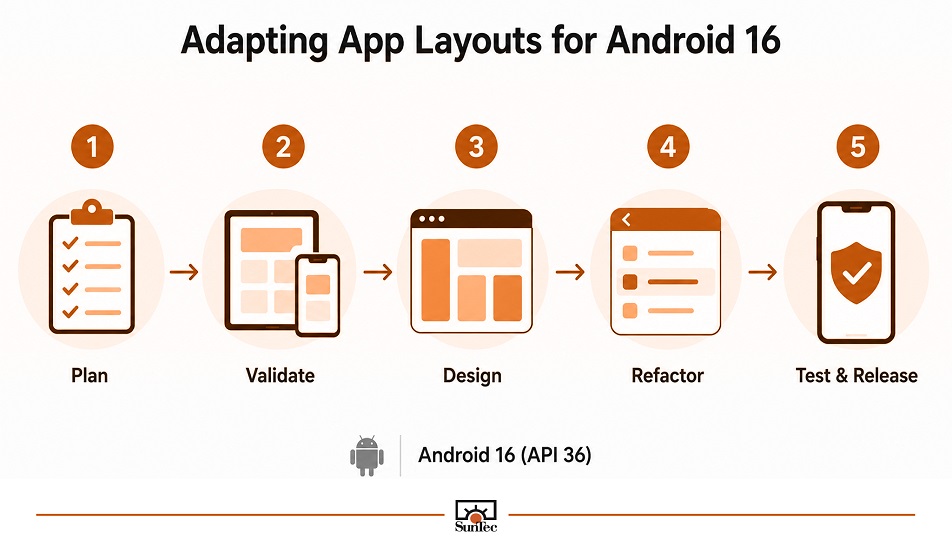
1. Plan Migration Effort Based on Application Complexity
For applications with hundreds of screens, legacy UI components, or limited internal bandwidth, adapting to Android 16 can become a broader mobile app modernization initiative. Organizations need to audit layouts, refactor fixed-screen assumptions, update navigation patterns, and complete testing across multiple device configurations. To speed up the work, organizations may hire mobile app developers with experience in adaptive layouts and large-screen optimization to support migration efforts without affecting ongoing product releases.
2. Validate Layout Behavior Before Making Changes
Use the Pixel Tablet and Pixel Fold emulators in Android Studio with targetSdkPreview set appropriately, or enable UNIVERSAL_RESIZABLE_BY_DEFAULT on your current target API. This surfaces every screen that assumes a fixed orientation or aspect ratio before you touch a single layout file.
3. Design Around Window Size, Not Device Categories
Many applications historically determine layouts by checking whether a device is a phone or tablet. This approach becomes unreliable with Android 16 because the same device can provide different amounts of usable space depending on split-screen mode, resizing behavior, orientation, or fold state. Therefore, hire mobile app developers who can build layouts around current window dimensions using:
- Compact width: Below 600dp for phone-like layouts
- Medium width: 600dp to 839dp for intermediate experiences
- Expanded width: 840dp and above for larger workflows
- WindowSizeClass in Jetpack Compose applications
- WindowMetricsCalculator for View/XML applications.
4. Adapt Navigation for Larger Screens
Navigation patterns designed for smartphones often become inefficient on tablets and foldable displays. Android 16 adaptive apps should use additional screen space to improve navigation efficiency rather than simply expanding existing mobile components. Mobile application developers should consider:
- Bottom navigation for compact windows
- Navigation rails for medium layouts
- Persistent drawers or side navigation for expanded layouts
- NavigationSuiteScaffold for adaptive Compose navigation
- Dynamic switching between BottomNavigationView, NavigationRailView, and drawer components in View-based applications.
5. Introduce Multi-Pane Layouts Where Workflows Require More Space
Large screens provide opportunities to improve user productivity by displaying related information together. Instead of stretching a phone interface across a tablet display, developers should introduce the following:
- List-detail layouts for applications such as email, CRM, and content management systems.
- Supporting panes for dashboards, analytics applications, and enterprise workflows.
- ListDetailPaneScaffold from Material 3 Adaptive for Compose applications.
- SlidingPaneLayout for View-based applications requiring gradual modernization.
6. Constrain Content Width Instead of Stretching Mobile Layouts
A common issue during tablet adaptation is allowing existing phone layouts to expand without content constraints. While the interface may render, excessive width can reduce readability and create an inefficient user experience. To avoid this, developers should review:
- Text-heavy screens that require maximum width limits
- Forms that become difficult to scan on expanded displays
- Single-column layouts that could benefit from secondary content areas
- Fixed component dimensions that prevent flexible rendering.
7. Preserve State During Resizing and Configuration Changes
Android 16 API 36 makes resizing, orientation changes, and multi-window scenarios more common. Mobile applications should treat these events as expected user interactions and must ensure:
- User input remains available after configuration changes
- Navigation state is preserved when layouts transition
- Workflow progress is maintained during window recreation
- Compose applications use mechanisms such as rememberSaveable
- View-based applications use ViewModel and onSaveInstanceState appropriately.
8. Handle System Insets Explicitly for Edge-to-Edge Layouts
Android 16 introduces stronger edge-to-edge requirements for applications targeting API 36, making explicit inset handling necessary across application screens. Components that previously relied on implicit system spacing may now overlap with status bars, navigation areas, or input controls. Therefore, the following should be implemented:
- WindowInsets.systemBars and WindowInsets.ime handling in Jetpack Compose
- ViewCompat.setOnApplyWindowInsetsListener in View/XML applications
- Proper spacing adjustments for toolbars, floating action buttons, dialogs, and multi-pane interfaces
- Validation across different screen sizes and navigation modes.
Android 16 Tablet Layout Readiness Checklist
Before moving your app to Android 16 API 36, Android app developers should use this checklist to validate layout behavior, compatibility, and user experience across large-screen devices.
Before you Submit to Google Play
- Confirm targetSdkVersion is set to 36, or file for the extension to November 1, 2026 if more time is genuinely needed
- Audit every android:screenOrientation, resizableActivity, and aspect-ratio manifest entry for screens that assumed portrait-only or fixed-ratio behavior
- Remove reliance on windowOptOutEdgeToEdgeEnforcement and confirm every screen applies insets explicitly.
Test matrix
- Pixel Tablet emulator (≥600dp large screen)
- Pixel Fold emulator, both inner and outer displays
- Rotation testing across every primary user flow, not just the home screen
- Multi-window, split-screen, and freeform desktop windowing modes
- Gesture navigation and 3-button navigation, to confirm inset handling in both.
Code-Level Fixes
- Window size class breakpoints implemented for navigation, panes, and content width
- List-detail or multi-pane layout in place for any screen with a natural primary/secondary content relationship
- UI state persisted through configuration changes and window resizing, not just orientation changes
- material3-adaptive (Compose) or SlidingPaneLayout / ConstraintLayout (Views) adopted at the relevant breakpoints.

Android 16 Requires a Shift Toward Adaptive App Design
As the article above shows, Android 16 API 36 marks a shift from fixed-screen app design to adaptive application experiences. By removing reliance on orientation locks, aspect-ratio controls, and restricted resizing on large displays, Android requires developers to build layouts that respond to available window space across tablets, foldables, and other large-screen environments. Teams that adopt adaptive navigation, multi-pane layouts, proper state management, and explicit inset handling will be better positioned not only for Android 16 but also for future platform changes, including the continued evolution of Android 16 vs Android 17 large screen changes.
For applications with extensive screen libraries, legacy layouts, or complex enterprise workflows, this transition can involve significant testing and engineering effort. In such cases, hiring experienced Android app developers can help accelerate layout updates, compatibility testing, and migration efforts while maintaining existing delivery commitments. The focus should remain on building applications that adapt reliably as Android continues expanding across new device categories and usage scenarios.
Frequently Asked Questions (FAQs)
New app submissions and updates must target API 36 starting August 31, 2026. Android developers can request a short extension through Google Play Console, valid until November 1, 2026. After that, Google rejects non-compliant updates, and apps below API 35 lose visibility to new users on newer Android devices.
It affects any app running on a display with a smallest width of 600dp or greater, including tablets, foldable inner screens, Chromebooks, and desktop windows. The devices under that threshold, and apps flagged as games via appCategory, keep the legacy orientation and resizability behavior.
Not by default on large screens, as the system ignores screenOrientation and aspect-ratio manifest settings once an app targets API 36 on a ≥600dp display. Users can manually opt an app back into its requested behavior through system settings, but that’s a user choice, not a guarantee your app can rely on.
Android 16 (API 36) introduces the enforcement, and Android 17 (API 37), since June 2026, extends it. Android 17 pushes large-screen resizability further as the platform default and closes more compatibility paths teams used to delay adaptive work.
No. Views-based apps can comply using SlidingPaneLayout, ConstraintLayout, and manual inset handling. Compose with the material3-adaptive library enables this with less custom code, which is why mobile app developers treat this migration as a natural point to start moving screens to Compose.
Use the UNIVERSAL_RESIZABLE_BY_DEFAULT compatibility flag on your current target API, alongside the Pixel Tablet and Pixel Fold emulators in Android Studio. This surfaces the exact screens that will break under Android 16 behavior before you commit to the API bump in production.


Rohit Bhateja, Director - Digital Engineering Services & Head of Marketing
Rohit Bhateja, Director of Digital Engineering Services and Head of Marketing at SunTec India, is an award-winning leader in digital transformation and marketing innovation. With over a decade of experience, he is a prominent voice in the digital domain, driving conversation around the convergence of technology, strategy, customer experience, and human-in-the-loop AI integration.