Fix Common Amazon Seller Central Issues to Drive Sales Growth

As the primary hub for Amazon business operations, Seller Central involves managing multiple critical functions, including product listings, pricing, inventory, and customer interactions. While the platform provides necessary tools to control day-to-day operations, it also presents recurring hurdles, like ASIN merges, listing errors, inventory management issues, account health concerns, and pricing discrepancies. These issues lead to disruptions in sales, reduce product visibility, and threaten overall account performance.
In this blog, we’ll address the most frequent Seller Central issues and share practical solutions to drive long-term growth.
10 Common Amazon Seller Central Issues and Solutions
1. Incorrect ASIN Merges
An ASIN merge occurs when Amazon’s automated system mistakenly combines two distinct Amazon Standard Identification Numbers (ASINs) under one parent ASIN. Conversely, it can also separate products that should be together under one main listing, causing variations to be fragmented into separate listings.
Common Causes:
- UPC Misassociations: Each product is assigned a unique Universal Product Code (UPC). When sellers accidentally use the same UPC for different products, or when invalid or fake UPCs are used, Amazon’s system incorrectly identifies them as the same item.
- Brand Name Discrepancies: Variations with inconsistent brand names will be listed separately, rather than grouped under a single parent ASIN.
- Differences in Product Attributes: Amazon may merge listings if it identifies products with identical attributes, such as color, size, or packaging, even when they represent different products.
- Similar Titles and Descriptions: Products with nearly identical titles or descriptions can trigger unintended merges.
- Duplicate Product Images: Using the same featured image across different products can cause Amazon to treat them as identical items.
Troubleshooting Methods:
- Use Amazon’s “Split Product Details Pages” Tool: This tool allows you to unmerge products that have been mistakenly grouped. Enter the affected ASINs, and the tool will verify if they can be separated.
- Contact Seller Support: If the tool doesn’t resolve the issue, reach out to Amazon Seller Support for manual assistance. Provide proof of unique UPCs and any other relevant information to expedite the resolution.
2. Listing Update Delays
Amazon does not always reflect listing updates, such as changes to titles, bullet points, product descriptions, images, or pricing, in real-time. Although minor edits often appear within a few hours, delays extending beyond 24 hours typically indicate underlying issues that require troubleshooting.
Common Causes:
- Policy Violations: Amazon blocks updates that violate content guidelines for titles, bullet points, descriptions, or images.
- Interface Limitations: Amazon locks specific attributes that cannot be updated through the standard “Manage Inventory” interface.
Troubleshooting Methods:
Verify Content Compliance: To fix Amazon listing errors, ensure your updates meet Amazon’s policies by keeping titles under 250 characters, using proper bullet point formatting, writing plain text descriptions, and uploading compliant image specifications.
-
Use Flat File Upload: This method bypasses interface limitations, allowing you to make bulk updates to restricted attributes, such as brand names, product types, or category-specific fields, that cannot be changed through the standard editing interface.
- Go to Inventory in Seller Central
- Select Add Products via Upload
- Choose Download an Inventory File
- Select the appropriate category template
- Fill in only the columns you want to update (leave others blank)
- Select “PartialUpdate” in the update_delete column to avoid overwriting existing data
- Upload the completed file
- Monitor processing status under Spreadsheet Upload Status
When interface limitations prevent listing updates, Amazon Seller Support recommends deleting the existing listing, implementing a 24-hour waiting period, and subsequently relisting the product with corrected information. This methodology enables system reset and facilitates acceptance of updated product details. However, this delete-and-relist procedure preserves existing FBA inventory, ASIN sales history, and customer reviews when the original seller SKU is maintained throughout the process.
Escalate to Amazon Support: If the issues don’t resolve after 24 hours, contact Seller Support with your ASIN, SKU, issue description, and flat file Batch ID.
3. Suppressed or Suspended Listings
A search-suppressed listing occurs when your product is removed from Amazon’s search results while remaining technically active and accessible via a direct link, while suspended listings are completely deactivated and inaccessible.
Common Causes:
- Listing Policy Violations: All listings must comply with Amazon’s product listing guidelines. For example, images with logos or promotional text are prohibited.
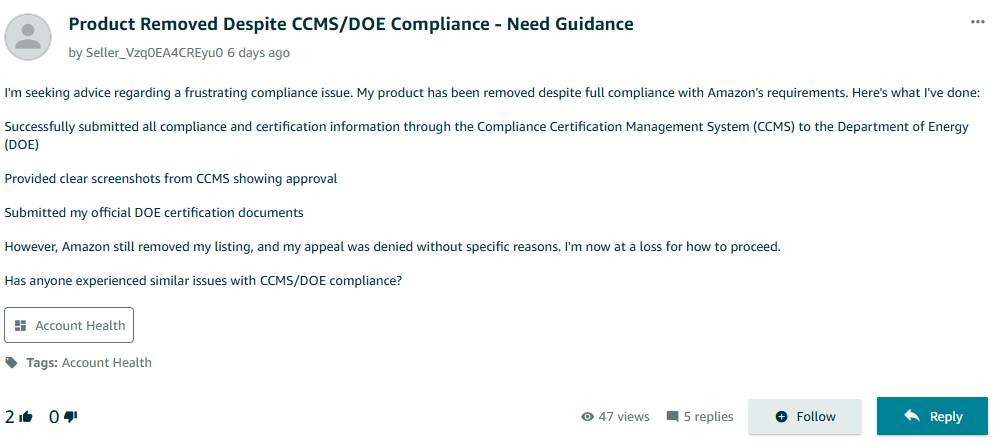
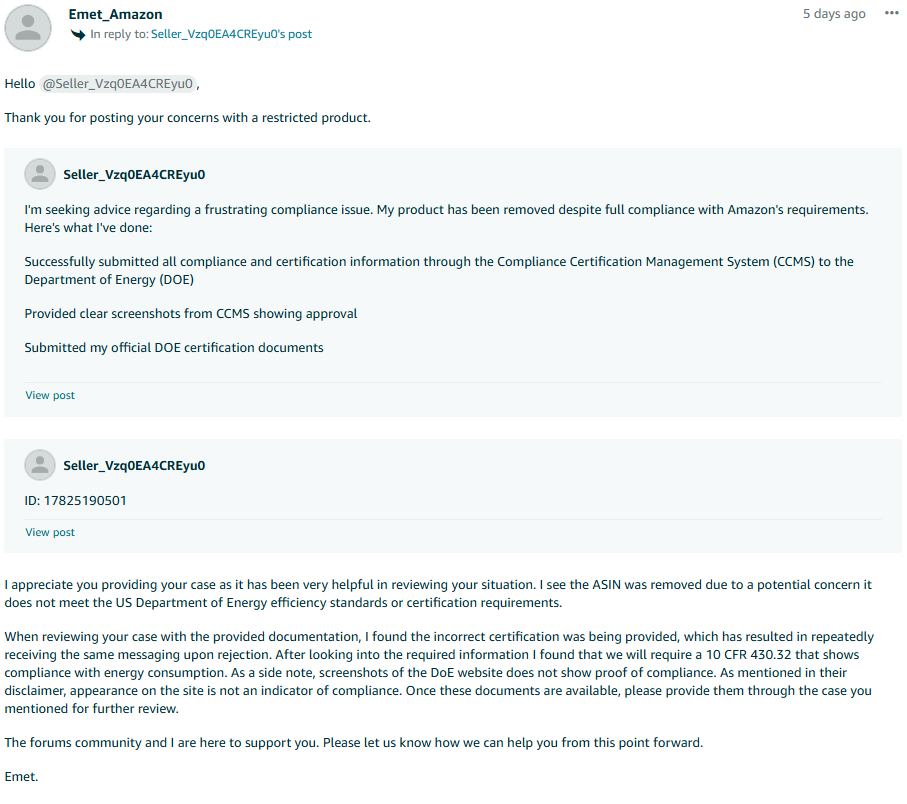
- Compliance Issues: If a product fails to meet safety or regulatory standards, such as lacking necessary certifications, the listing can be suppressed. For example, a seller’s listing was removed even after submitting certifications through CCMS because they provided an incorrect or inadequate certification type.
For further context, please refer to the discussion below.
Following the seller’s query, Amazon’s team provided this explanation.
Troubleshooting Methods:
- Adhere to Amazon Listing Standards: Follow Amazon’s listing guidelines carefully. Ensure your product images have a white background, clear titles, concise descriptions, relevant keywords, and comply with Amazon’s policies on prohibited items.
- Fix Compliance Issues: If you receive a suspension notification related to product safety, certifications, or other legal requirements, provide the necessary documentation to Amazon for reinstatement.
4. Account Health Issues
Account health measures your overall seller performance through Order Defect Rate (ODR), Late Shipment Rate (LSR), Cancellation Rate, and Policy Violations. Amazon enforces penalties for poor account health to trigger listing suppression, suspend selling privileges, or deactivate accounts.
Common Causes:
- Poor Customer Service: Sellers who respond slowly to inquiries or fail to resolve complaints increase negative feedback and A-to-Z claims, thereby pushing ODR above the 1% threshold
- Shipping Delays: Sellers who ship late exceed the 4% limit, triggering account health warnings.
- Order Cancellations: Frequent seller-initiated cancellations push cancellation rates above the 2.5% threshold.
- Policy Violations: Product, listing, or selling policy infractions directly damage account health scores.
Troubleshooting Methods:
- Monitor Account Health Dashboard: Go to Performance > Account Health in Seller Central and track ODR, LSR, Cancellation Rate, and policy violations in real-time.
- Improve Customer Service: Respond to customer messages within 24 hours, process refunds promptly, and resolve complaints quickly to reduce negative feedback and A-to-Z claims.
- Optimize Fulfillment: Set realistic handling times, ship within stated timeframes, and upload tracking information promptly. Alternatively, consider switching to FBA for improved delivery performance and lower LSR.
- Submit Appeals with Documentation: When metrics exceed thresholds due to extraordinary circumstances, provide detailed appeals with supporting evidence through Performance Notifications.
Struggling with account compliance and performance metrics?
Our Amazon account health management services proactively monitor critical indicators and ensure your account stays protected from penalties and suspensions.
5. Negative Reviews
Amazon’s algorithm considers review ratings and volume when ranking products in search results. Negative reviews directly impact your product’s visibility and potentially harm sales conversion rates.
Common Causes:
- Misleading Product Information: Inaccurate product descriptions, images that don’t accurately represent the actual product, or missing key specifications lead to customer disappointment and negative reviews.
- Fulfillment Issues: Late shipments, damaged packaging, or incorrect items shipped result in operational-based negative feedback.
- Quality Control Problems: Product defects, missing components, or items not matching descriptions generate legitimate quality complaints.
Troubleshooting Methods:
- Improve Product Accuracy: Update product descriptions to match actual specifications, upload high-resolution images that showcase all product features, and include detailed measurements and material information.
- Address Review Issues: Use Amazon’s “Report a Violation” feature for reviews that violate Amazon’s Community Guidelines (personal attacks, promotional content, or unrelated complaints).
- Enhance Customer Communication: Respond to customer messages within 24 hours and proactively address potential issues before they result in negative reviews.
- Monitor Product Performance: Track review patterns to identify recurring issues and implement product improvements or listing corrections as needed.
6. FBA Stranded Inventory Issues
Stranded inventory occurs when your products are stored in Amazon’s fulfillment centers but are not linked to an active listing, making them unavailable for sale. This inventory sits in Amazon’s warehouses, generating storage fees without producing any revenue.
Common Causes:
- Deleted Listings: Sellers accidentally delete product listings, leaving inventory in Amazon’s warehouses, which breaks the connection between the inventory and the ASIN.
- Listing Suppression: Amazon suppresses listings due to policy violations, missing product information, or restricted product categories, resulting in stranded inventory.
- Account Issues: Account suspensions or restrictions prevent listings from remaining active while inventory stays in fulfillment centers.
- SKU Mismatches: Changes to SKUs or product identifiers create disconnections between listings and existing inventory.
Troubleshooting Methods:
- Identify Stranded Inventory: Navigate to Inventory > Manage Inventory > Stranded Inventory in Seller Central and review the reason codes for each stranded item.
- Relist Products: For deleted listings, create new listings using the same SKU to reconnect the inventory to an active ASIN.
- Fix Policy Violations: Address listing issues such as missing product information, restricted categories, or compliance problems, then resubmit for approval.
- Use Amazon’s Fix Tool: Access the Fix Stranded Inventory tool in Seller Central, follow the suggested actions, and implement the recommended solutions.
- Monitor Regularly: Check your stranded inventory report weekly to identify and resolve issues before they accumulate storage fees and impact cash flow.
7. FBA Storage Type and Dimension Changes
Amazon categorizes FBA inventory into storage types (standard-size, oversized, apparel, and dangerous goods) based on product dimensions, weight, and content. Storage type changes occur when Amazon reclassifies products, often leading to increased storage fees, reduced warehouse space allocation, and fulfillment delays.
Common Causes:
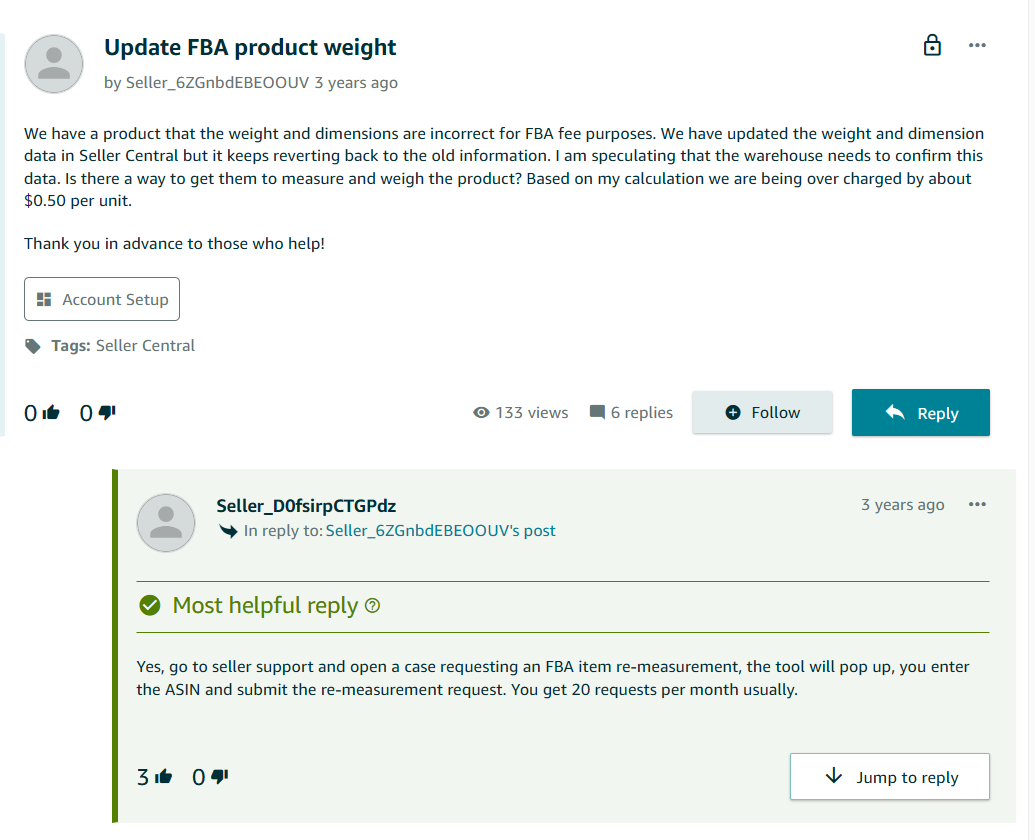
- Inaccurate Product Dimensions: Sellers provide incorrect size and weight details during listing creation, causing Amazon to reclassify products when the actual measurements don’t match the listed specifications. For example, a seller updated their product measurements multiple times, but the system continued reverting to incorrect weight and dimensions, causing ongoing FBA fee overcharges. For more details, refer to the following discussion forum:
- Packaging Changes: Modifying product packaging without updating listing dimensions can trigger reclassification from standard-size to oversized categories.
- Product Mislabeling: Incorrect labeling during shipment preparation leads to storage errors during Amazon’s inbound checks, resulting in reclassification.
- Missing Compliance Documentation: Products containing hazardous materials or regulated items get reclassified if safety certifications or regulatory documents are missing or outdated.
Troubleshooting Methods:
- Verify Product Specifications: Use precise measurements for all listings and regularly audit product details to ensure dimensions and weight match current packaging specifications.
- Monitor Storage Reports: Review FBA storage reports in Seller Central regularly to identify unexpected storage type changes and address them promptly.
- Update Compliance Documents: For regulated products, maintain current safety certifications and upload required documentation to Seller Central to prevent compliance-related reclassifications.
- Request Measurement Verification: If you suspect incorrect classification, contact Amazon Seller Support with supporting evidence, such as shipping records or photos, to request remeasurement and fee adjustments.
- Audit Packaging Changes: When modifying product packaging, update the listing dimensions immediately to prevent automatic reclassification during warehouse processing.
8. Pricing Anomalies and Comparison Issues
Amazon’s algorithm scans for pricing anomalies and flags listings that exceed a certain price threshold compared to competitors or the price history.
Common Causes:
- Price Inconsistencies: Sellers may unintentionally list products at higher-than-usual prices without realizing the impact of competitor pricing.
- Seasonal Price Adjustments: Sellers often increase prices during peak seasons (e.g., holidays) but forget to adjust them back afterward, triggering Amazon’s pricing alerts.
- Repricing Errors: Sellers using automated repricers may have set incorrect rules, resulting in prices that are too high.
How to Fix It:
- Monitor Pricing Regularly: Set up Amazon’s Price Alerts tool within Seller Central to track the prices of your listings and ensure they stay within the acceptable ranges.
- Price Adjustment: Review the pricing history of your product and adjust your price to remain competitive without sacrificing your margins. Aim to align with the Buy Box price or set a price within Amazon’s suggested range.
- Open a Support Case: If you believe that Amazon has mistakenly flagged your pricing, contact Amazon Seller Support with evidence of your pricing rationale. This can include screenshots of competitor prices or invoices that justify your pricing strategy.
9. Price Discount Issues
Amazon’s price discount system validates promotional campaigns every 24 hours to ensure eligibility requirements are met. When price discounts fail validation or encounter errors, promotions stop displaying to customers, causing lost sales and reduced promotional effectiveness.
Common Causes:
- Seller Performance Below Minimum: Accounts with seller feedback rating below 3.5, Late Shipment Rate above 4%, Order Defect Rate above 1%, or Pre-Fulfillment Cancel Rate above 0.5% become ineligible for promotional campaigns.
- Insufficient Discount Amount: Amazon requires a minimum discount of 5% for coupons and certain promotions, calculated against the current price, the 30-day lowest price, or the reference price. Promotions offering less than 5% off will fail Amazon’s minimum discount validation and will not be eligible to run.
- Invalid Discount Pricing: Discounted prices don’t meet Amazon’s requirements or fall below seller-set minimum prices, causing promotions to fail validation.
- Missing Reference Prices: Products without validated reference prices can’t display strike-through pricing, and Prime Exclusive Discounts require validated reference prices to show savings comparisons.
- Inventory and SKU Issues: SKUs become inactive, go out of stock, or get deleted after creating price discounts, resulting in the product losing visibility for its promotional offers.
- Price Conflicts: Multiple promotions run simultaneously on the same ASIN, causing Amazon to display only the most compelling offer and suppress others.
- Product Eligibility Issues: Products lack required 3+ star ratings, aren’t in “New” condition, or don’t offer free shipping for seller-fulfilled items.
Troubleshooting Methods:
- Monitor Price Discount Dashboard: Check the Price Discounts Dashboard regularly for warning icons and filter by “Needs attention” status to identify failing promotions.
- Improve Account Performance: Maintain seller feedback rating above 3.5, Late Shipment Rate below 4%, Order Defect Rate below 1%, and Pre-Fulfillment Cancel Rate below 0.5% to remain eligible.
- Open a Case with Amazon Seller Support: Submit a detailed support case that includes the affected ASINs/SKUs, screenshots, batch IDs, and a summary of all troubleshooting steps taken. If the issue remains unresolved, request escalation to a higher-level team and follow up regularly for updates.
- Visit Seller Forums: Check Amazon Seller Forums for recent discussions or announcements about technical glitches, system-wide issues, or other sellers experiencing similar problems, which may provide additional context or solutions.
- Review Recent Amazon Policy Updates: Monitor Seller Central News and Amazon’s Promotions Help Pages for any updates or changes in promotion policies, eligibility requirements, or system processes that could impact your offers.
10. Amazon Seller Account Suspension
When Amazon suspends your seller account, you lose access to Seller Central, and your listings are removed from search results. This results in revenue loss, stranded FBA inventory, and potential business closure. Amazon notifies suspended sellers via email and through the Account Health section in the Seller Central dashboard.
Common Causes:
- Poor Seller Performance: Consistently high Order Defect Rate, late shipments, high cancellation rates, and frequent customer complaints trigger performance-based suspensions.
- Product Quality Issues: Selling restricted, counterfeit, or substandard products; misclassifying products; or providing inaccurate product descriptions that violate Amazon’s quality standards.
- Policy Violations: Intellectual property infringement, trademark misuse, copyright violations, and failure to adhere to Amazon’s selling guidelines and advertising policies.
- Unauthorized Multiple Accounts: Operating multiple seller accounts without Amazon’s approval or creating new accounts after suspension without resolving the original issues.
- Banking Information Changes: Updating banking details without proper documentation or notification can trigger fraud prevention suspensions.
Types of Suspension:
- Suspended: Amazon temporarily pauses selling privileges and requests a Plan of Action (POA) for reinstatement with a specified timeframe for appeal.
- Deactivated: Amazon stops all selling activities and makes listings invisible due to policy violations or incomplete verification. You have 90 days to appeal.
- Denied: Amazon rejects your appeal and requires a revised POA with more detailed supporting information and corrective actions.
- Banned: Amazon permanently and irreversibly removes your account with no further appeals process accepted.
Troubleshooting Methods:
- Analyze Suspension Notice: Carefully review the suspension notification to identify specific policy violations, performance issues, or account problems that triggered the suspension.
- Create Comprehensive POA: Write a detailed Plan of Action that addresses root causes, documents corrective actions taken, and outlines preventive measures to avoid future violations.
- Submit Supporting Evidence: Include documentation, performance improvements, policy compliance measures, and any relevant evidence that supports your corrective actions.
- Appeal Through Proper Channels: Submit your POA via Seller Central > Performance Notifications and follow up with Seller Support for guidance to seek Amazon account suspension help.
- Monitor Account Health: Regularly check Account Health metrics, maintain ethical business practices, and stay updated with Amazon’s Terms of Service changes to prevent future suspensions.
While resolving these operational challenges maintains account stability, achieving significant sales growth goes beyond basic problem-solving. The performance gap between sellers stems from the implementation of data-driven optimization strategies for maintaining a competitive advantage.
How to Increase Conversion Rate on Amazon
1. Optimize Product Listings for Maximum Conversion
Amazon’s A10 algorithm evaluates listings based on relevance with buyer intent, seller authority, and performance metrics, including sales velocity and customer engagement. Optimizing core listing elements directly impacts both conversion rates and organic visibility, creating a compounding effect for sales growth.
- Use Strategic Keywords: Integrate relevant search terms naturally throughout titles, product descriptions, and backend search terms to match customer search intent by focusing on contextual relevance.
- Optimize Product Images & Video: Use high-resolution, visually-appealing images with white backgrounds and supplement with a product video that demonstrates product benefits and use-cases.
- Add A+ Content: Include detailed product information with bullet points, comparison charts, and brand storytelling.
- Design for Mobile-First: Structure listings with concise bullet points and vertically-optimized images, as mobile displays truncate content differently than desktop.
- Manage Customer Reviews: Respond promptly to negative feedback, report potentially fake or malicious reviews through Amazon’s violation reporting system, and utilize Amazon’s “Request a Review” button within 30 days of delivery to drive customer engagement.
2. Advertising Strategy Implementation
#1 Amazon’s Full-Funnel Advertising Strategy Framework
Claire Pull (Vice President, Global Marketing, Amazon Ads), in her recent statement, said, “In 2025, our priority is ensuring customers understand and experience the impact of our full-funnel advertising strategy. For small and medium-sized businesses, we focus on products such as Sponsored Products and Sponsored Display to drive conversions. For larger enterprises, Prime Video ads is an effective solution for building brand awareness and deepening customer engagement. We will continue to demonstrate how our full-funnel approach drives engagement at every stage of the customer journey by showcasing real customer success stories and measurable outcomes for businesses of all sizes.“
Here’s How These Advertising Solutions Benefit Sellers:
Sponsored Products for Direct Sales:
- Appear directly in search results alongside organic listings.
- Target customers with high purchase intent (commercial or transactional), actively searching for products.
- Cost-effective advertising due to average CPC of $0.98 to $1.50, significantly lower than Google Ads ($2-4 CPC for similar keywords), capturing bottom-funnel traffic.
- Target competitor listings by advertising on competitor ASINs.
Sponsored Display for Retargeting:
- Retarget customers who viewed your products but didn’t purchase.
- Reach audiences both on Amazon and external websites.
- Target based on shopping behaviors, not just keywords.
#2 Advanced Advertising with Demand-Side Platform
Kelly MacLean (Vice President, Amazon DSP) gave a statement that “The future of programmatic, full-funnel media buying will be defined by the transformative power of AI. As advertisers seek to maximize the efficiency and effectiveness of their campaigns across the digital landscape, innovative AI-powered solutions will be essential. By leveraging advanced machine learning algorithms to uncover granular insights, optimize media allocation, and drive real-time decisioning, the next generation of programmatic services will enable advertisers to seamlessly navigate the complexities of the modern media ecosystem and achieve their full-funnel marketing objectives with unparalleled precision.“
How Amazon DSP’s AI Capabilities Work:
Amazon DSP uses machine learning to analyze customer shopping patterns and automatically uses real-time bidding (RTB) to purchase ad inventory, allocating ad spend to the highest-converting opportunities across awareness, consideration, and purchase stages. For Amazon sellers, DSP identifies customers who viewed similar products but didn’t convert, then shows them targeted ads on external websites, social media platforms, and mobile applications. This helps sellers build brand recognition before customers actively search for products on Amazon.
3. Drive External Traffic to Amazon Listings
Amazon’s A10 algorithm prioritizes external traffic, since it recognizes it as an indicator of product popularity and conversion potential. Driving traffic from multiple sources signals broader market appeal and can improve organic rankings.
How to Increase Conversions Through External Traffic:
- Collaborate with influencers for product endorsements on social media channels, including Instagram, Facebook, and YouTube.
- Participate in niche Reddit forums and industry Facebook groups for product recommendations.
- Promote Amazon products during peak seasons through email marketing.
4. Featured Offer Optimization (Formerly Buy Box)
The Featured Offer accounts for 80-90% of Amazon conversions, making its optimization critical for maximum conversions.
How to Win the Featured Offer for Higher Conversions:
Performance Metrics Optimization:
Amazon evaluates seller performance ratings, shipping speed, and competitive pricing for Featured Offer.
- Keep Order Defect Rate below 1% by ensuring accurate product descriptions and quality fulfillment.
- Achieve a Late Shipment Rate below 4% by shipping within promised timeframes or using FBA.
- Maintain seller feedback rating above 95% through prompt issue resolution and customer communication.
- Monitor competitor pricing changes and adjust dynamically using repricing tools. Factor in total cost, including shipping, when setting prices for seller-fulfilled orders.
FBA Optimization for Featured Offer Advantage:
- Enroll in FBA for automatic Prime eligibility, which significantly improves Featured Offer win rates.
- Maintain optimal inventory levels – avoid both stockouts and excess inventory that incur long-term storage fees.
- Use Amazon’s Inventory Performance Index (IPI) to monitor inventory health and prevent storage limitations.
- Ensure proper product preparation and labeling to avoid FBA receiving delays that impact availability.
- Leverage FBA’s faster delivery times and Amazon’s customer service handling to improve seller metrics.
Account Health Maintenance:
- Process returns and refunds promptly to avoid A-to-Z claims
- Monitor Account Health Dashboard regularly for early detection of performance issues
Success on Amazon requires understanding the common issues and implementing effective solutions before they escalate. However, Amazon’s technical complexity and time-sensitive requirements can be challenging to manage effectively. Leveraging professional Amazon seller account management services enables you to focus on core business activities while maintaining a compliant and optimized account to drive high conversion rates.
Amazon store optimization experts understand the platform’s evolving requirements and help prevent costly mistakes and improve your Amazon product visibility.
Need help with Amazon Seller Central?
Contact us to resolve your issues and improve your account’s performance.


Rohit Bhateja, Director - Digital Engineering Services & Head of Marketing
Rohit Bhateja, Director of Digital Engineering Services and Head of Marketing at SunTec India, is an award-winning leader in digital transformation and marketing innovation. With over a decade of experience, he is a prominent voice in the digital domain, driving conversation around the convergence of technology, strategy, customer experience, and human-in-the-loop AI integration.