
Your LinkedIn company page looks professional. Your executives have profiles on LinkedIn. Yet your sales pipeline shows zero contribution from the platform.
This disconnect exists because most B2B companies treat their LinkedIn company page as a brochure—a static display of company information rather than an active system designed to attract, engage, and convert prospects.
94% of marketers now identify trust as the single most crucial factor in building a successful brand. Your LinkedIn presence, i.e., the company page and the profile of executives, can earn that trust when optimized strategically.
Here’s a systematic approach to LinkedIn page optimization (for your company page) and LinkedIn profile optimization (for executives), transforming both into B2B lead generation assets. Discover what to optimize, why each element matters for lead generation, and how to leverage this professional social network to turn passive browsers into qualified prospects.
How B2B Buyers Actually Discover Your Company on LinkedIn
Before diving into LinkedIn company page optimization frameworks, you need to understand a fundamental truth about how B2B buyers discover companies on LinkedIn.
They do not start with your company page unless they are familiar with your brand name.
When a decision-maker searches for B2B solutions on LinkedIn, they encounter people first—in search results, in their feed, in comments on industry posts. They see your founder’s perspective on market trends, your CMO’s take on strategy, your VP of Sales sharing client insights, and more. Only after these individuals establish credibility does the prospect click through to your company page.
The Buyer Journey in Practice
Consider how this unfolds in a real scenario:
A VP of Marketing searches “B2B data enrichment solution” on LinkedIn. In the results, she sees a CEO’s post discussing how his company helped a client achieve 60% faster lead acquisition through B2B data enrichment services. Intrigued by the specific insight, she clicks through to the CEO’s profile.
What happens next determines whether your company enters her consideration set.
If the CEO’s profile is optimized—clear headline communicating value, compelling ‘About’ section with proof points, featured case studies—she gains confidence. This person understands her challenges. She clicks through to the company page to learn more.
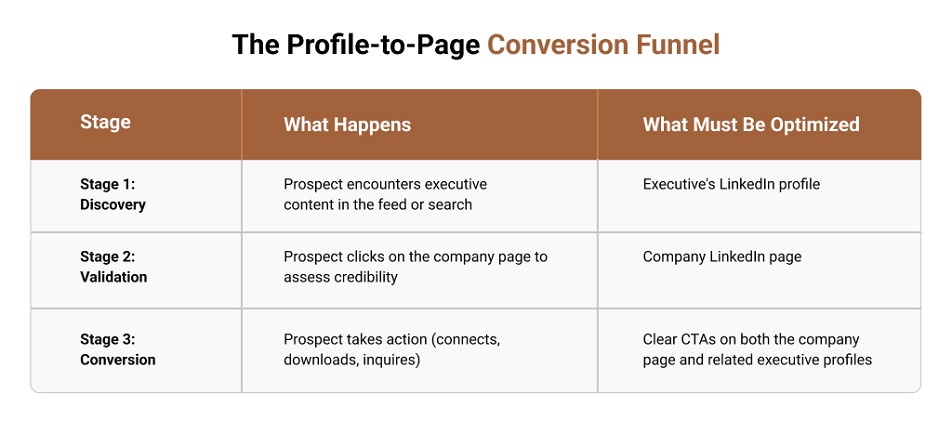
This is the Profile → Page → Conversion funnel. Your executive profiles are the entry point, and your company page is the validation point. Skip optimizing either, and you break the chain.
Your Founder, CEO, CMO, VP of Sales, and other C-suite and executive-level personnel are not peripheral to your LinkedIn lead generation strategy. They are the front line. Research over the years supports this idea: 92% of stakeholders are more likely to trust a company when its senior leaders are active on social media.
The Two-Tier System for Smarter LinkedIn Lead Generation
Effective LinkedIn lead generation operates on two tiers:
Tier 1: LinkedIn Profile Optimization: Optimize the profiles of executives as landing pages that build trust and drive traffic to your company page.
Tier 2: LinkedIn Page Optimization: Optimize LinkedIn company page as a conversion engine to capture and convert warm traffic from executive profiles and from direct activity.
Both tiers must function in synchronization: A brilliant company page means nothing if your executives’ profiles fail to generate traffic, and optimized executive profiles waste potential if your company page cannot convert visitors.
LinkedIn Profile Optimization: Transforming Executive Profiles into Lead Magnets
An effective LinkedIn profile optimization plan treats each executive’s profile as a landing page—a conversion-focused asset designed to move visitors toward a specific next step. This mindset shift distinguishes profiles that generate leads from profiles that merely exist.
The Profile-as-Landing-Page Mindset
When a prospect lands on your CEO’s profile after seeing their post, they are asking four questions:
- Is this relevant to me?
- Is this person credible?
- Do they understand my challenges?
- Should I engage further?
They form their opinion about the profile within seconds. If the profile fails to establish credibility in that window, the prospect leaves—and likely never returns to that profile or discovers your company page.
This is why LinkedIn profile optimization should be a focused activity. Instead of having a “general resume” feel, every part of the executive’s profile (headline, about section, featured links) should act like a signpost pointing the reader toward a specific action: to follow, connect with, visit your company page, or click a featured resource.
Tips to Optimize LinkedIn Profile for Executives
1. The Photo: Your First Trust Signal
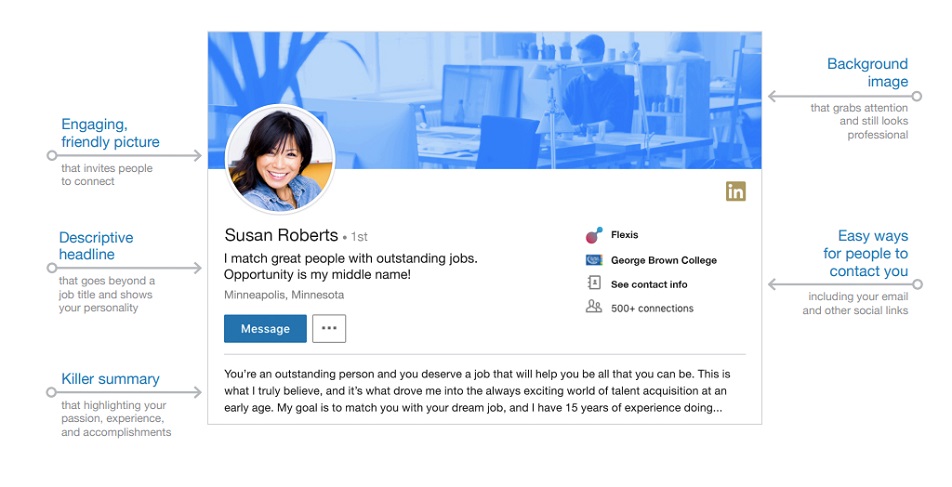
A profile photo answers the visitor’s first unconscious question: “Is this a real person I can trust?”
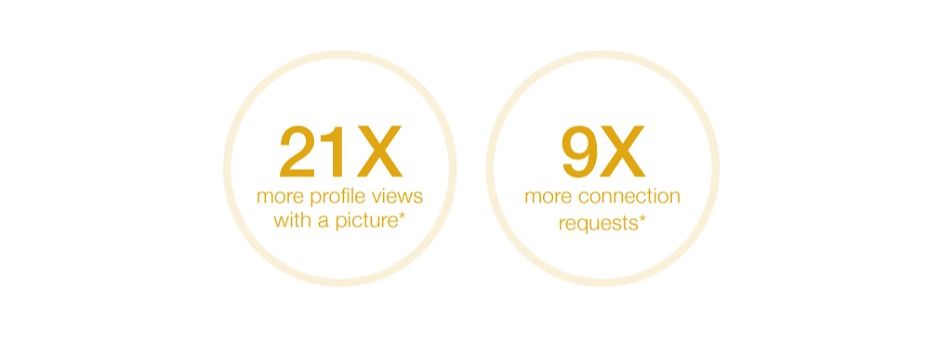
For maximum impact:
- Your face should fill approximately 60% of the frame.
- Use professional lighting and a high-resolution image.
- Maintain an approachable expression—this is a conversation starter, not a passport photo.
- Update the photo if it no longer resembles your current appearance.
2. The Banner: Wasted by Most, Valuable to You
The banner (1584 x 396 pixels) represents the most significant visual element on any profile, yet most executives leave it as the default blue gradient or upload their company logo.
Both approaches waste a huge opportunity. Your company logo belongs on your company page, not your profile. The banner should communicate what outcomes you deliver and who you help. Think of it as a billboard that reinforces your headline.
Practical banner approaches include:
- A value proposition statement with supporting visuals
- Client logos demonstrating credibility (with permission)
- A specific outcome or metric you deliver
- A current lead magnet or resource offer
Example: A B2B SaaS founder’s banner reading “Helping B2B Companies Build Predictable Pipeline” with a subtle client logo bar beneath communicates more value in one glance than a company logo ever could.
3. Custom URL: A Small Detail that Signals Professionalism
LinkedIn assigns a default URL with random numbers (linkedin.com/in/briansmith-8a7b6c5d). Customizing this to a clean format (linkedin.com/in/briansmith) signals professionalism and attention to detail.
The custom URL also makes your profile easier to share in email signatures, on business cards, and in proposals. It takes a few seconds to change and creates a permanent improvement in how your profile is represented.
4. Headline: Determine whether Anyone Clicks through to Your Profile
Your headline carries disproportionate weight in LinkedIn profile optimization. It appears everywhere: search results, comments you leave, connection requests you send, and posts in the feed. This 220-character field shapes first impressions across every LinkedIn interaction.
Most executives waste it on job titles alone: “Founder & CEO at TechMaster Solutions.”
This answers who you are but ignores what the prospect needs to know: Can you help solve my problem?
The optimization structure: [Who you help] + [Outcome you deliver] + [Role]
| LinkedIn Profile Headline Optimization Example | |
|---|---|
| Before | After |
| Founder & CEO at TechMaster Solutions | Helping B2B Companies Reduce Customer Acquisition Costs by 40% ǀ Founder, TechMaster |
| VP Sales at DataWorld | I Help SaaS Sales Teams Close Enterprise Deals 2x Faster ǀ VP Sales, DataWorld |
This LinkedIn profile optimization technique allows you to appeal to the target audience, promise a specific benefit, and establish your role—all within the character limit. A prospect scanning search results understands what you do, who you help, and why they should click through. To improve search visibility, you can also include one or two relevant keywords naturally in the headline.
5. About Section: Build Trust and Drive Action
The ‘About’ section provides 2,600 characters to make your case. However, only the first 265-275 characters appear before the “See More” button. This visible portion is your hook—it must compel visitors to continue reading.
Here’s a conversion-focused structure for creating an optimized ‘About’ section.
| Section | Purpose | Character Guidance |
|---|---|---|
| Hook | Capture attention with the problem you solve or the outcome you deliver | First 265-275 characters |
| Problem | Articulate the specific challenge your target audience faces | 300-400 characters |
| Solution | Explain your approach without being salesy | 400-500 characters |
| Proof | Provide specific results, metrics, and client outcomes | 500-600 characters |
| CTA | Direct the visitor to a clear next step | 200-300 characters |
Writing Guidelines:
- Write in first person. This is a conversation, not a corporate bio.
- Avoid empty descriptors: “Experienced,” “Passionate,” “Results-driven,” “Thought leader.” These words occupy space without communicating value.
- Use short paragraphs and line breaks for mobile readability.
- Include relevant keywords naturally within the narrative.
6. Featured Section: Your Proof Portfolio
The Featured section pins posts, articles, links, and media directly to your profile. Positioned prominently, it serves as a curated portfolio of your strongest evidence.
Most executives leave this empty—a competitive gap you can exploit.
What to Feature:
- Lead magnets (guides, frameworks, assessments)
- High-performing posts that demonstrate expertise
- Case studies or client success stories
- Links to valuable company page resources
- Media appearances or podcast features
What not to feature:
- Generic company brochures
- Outdated content (more than 12 months old)
- Posts with low engagement that undermine credibility
Every ‘Featured’ item should either build credibility or drive a specific conversion action. If an item does not belong in either category, it does not belong in the section.
7. Experience Section: Outcomes over Responsibilities
The ‘Experience’ section is not the executive’s resume. Listing responsibilities (“Managed a team of 12”) tells visitors nothing about the impact they had. Focus on outcomes instead, for example:
- “Led go-to-market strategy that increased qualified pipeline by 47% in 8 months”
- “Built and scaled sales organization from $2M to $18M ARR”
- “Reduced customer acquisition cost by 35% through revised channel strategy”
8. Skills and Recommendations: Reinforcing Credibility
LinkedIn allows you to list up to 100 skills on your profile. You should list at least five relevant skills as a baseline. The ‘Skills’ section affects search visibility, so choose terms that target prospects are likely to search for. Rather than adding generic skills (“Microsoft Office”), include industry-specific skills (“B2B Lead Generation,” “Account-Based Marketing,” “SaaS Sales Strategy”).
The ‘Recommendations’ section provides narrative social proof—specific testimonials from people who have worked with you. Here, always prioritize quality over quantity: three detailed recommendations on specific projects and outcomes outweigh twenty generic “great to work with” statements.
When requesting recommendations, provide context. Ask the recommender to address specific projects, outcomes, or working relationships. This produces recommendations that actually influence prospects.
9. Creator Mode
For executives who post regularly, ‘Creator Mode’ changes profile dynamics in favor of audience building. When enabled:
- The “Connect” button changes to “Follow,” making it easier to build an audience.
- Your ‘Featured’ section moves higher on the profile.
- You gain access to LinkedIn newsletters, LinkedIn Live, and creator analytics.
It works best for executives who post regularly and want to build a following. For executives who rarely post, the benefits are minimal. Evaluate your content commitment before enabling.
Content Strategy: What Executives Should Post for Lead Generation
LinkedIn profile optimization establishes credibility with visitors. Content strategy determines whether visitors arrive in the first place.
What to post:
- Industry insights with a specific, defensible point of view
- Lessons from client engagements (anonymized where necessary)
- Data-backed observations about market shifts
- Behind-the-scenes perspectives on solving real problems
What to avoid:
- Generic motivational content without substance
- Constant self-promotion offering no value to readers
- Engagement bait (“Comment YES if you agree!”) that attracts low-quality interactions
The algorithm rewards sustained quality, not volume, so two to three high-value posts per week outperform daily low-value posts.
LinkedIn Company Page Optimization: Techniques for Converting Warm Traffic into Qualified Leads
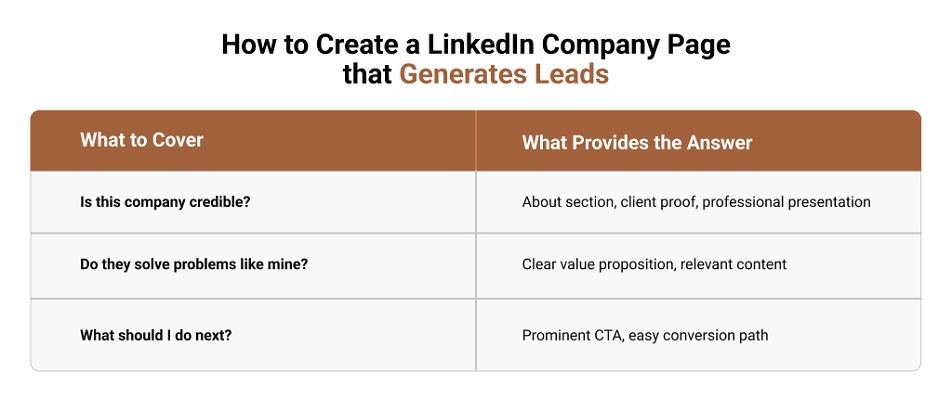
By the time a prospect reaches your company page, most probably, they have already encountered your executives in the feed, clicked through a profile, and formed an initial impression. They arrive with one question: Is this company capable of meeting my requirements?
You must optimize LinkedIn business page to answer that question immediately and clearly outline the next step.
Most company pages fail at this stage. They function as digital brochures: static information, occasional announcements, no clear conversion path. With 71+ million companies on LinkedIn, a passive approach leads to invisibility. Data from LinkedIn suggests that pages with complete details are expected to receive 30% more weekly views. This is why LinkedIn company page optimization becomes crucial.
1. Logo and Banner: The Visual First Impression
Your logo requires proper sizing (400×400 pixels) and high resolution. A pixelated or poorly cropped logo signals carelessness before any content is read.
The banner (1,584 × 396 pixels) deserves more strategic attention than most companies provide—generic office photos, abstract graphics, and decade-old brand imagery waste space that could be used to communicate value.
What your banner should convey:
- Your core value proposition in scannable text
- Client logos demonstrating who trusts you (with permission)
- A current offer or campaign that gives visitors a reason to engage
Update your banner quarterly to keep messaging fresh and aligned with current campaigns.
2. Tagline: Bring Clarity
The tagline appears directly under your company name—prime positioning for communicating what you do and for whom. Aim for fewer than 7 words for mobile scanability.
| Vague Tagline Examples | Specific Tagline Examples |
|---|---|
| Innovative Solutions for Modern Businesses | B2B Pipeline Generation for SaaS Companies |
| Empowering Organizations to Achieve More | We Help Manufacturers Reduce Procurement Costs |
The vague taglines could describe any company in any industry. The specific taglines immediately signal relevance to the right audience. As a general rule, if your current tagline could apply to your competitors, rewrite it.
3. About Section: Build the Trust
The About section provides the longest text-based opportunity on the company page. Use it to address the skeptical decision-maker who needs substance, not slogans.
Structure for conversion:
- Client Challenge: Open with the problem your audience faces
- Your Solution: Explain how you address it—approach over features
- Proof: Include specific results, client counts, recognizable names
- CTA: Close with a clear next step
Avoid jargon and self-congratulatory language. Phrases like “industry-leading” mean nothing without substantiation. Include your primary keywords naturally within this section to support search visibility, but prioritize readability over keyword density.
4. Custom CTA Button: Direct the Next Step
LinkedIn offers several CTA button options, including Contact Us, Learn More, Register, Sign Up, and Visit Website.
“Learn More” wastes this opportunity. Select an action-oriented alternative that aligns with your conversion goal: “Book a Demo,” “Get Free Audit,” or “See Pricing.” Link this button to a dedicated landing page—not your homepage. Visitors who click have expressed interest; send them to a page designed to convert that interest into action.
5. Pinned Posts: Prioritizing High-Value Content
The pinned post occupies the top of your page’s content feed. Every visitor sees it first.
Pin content designed to convert: lead magnets like case studies, webinar registrations, or high-performing posts that demonstrate expertise.
Do not waste this position on company announcements, holiday greetings, or self-congratulatory content. Every pinned post should either build credibility or capture leads.
6. Native Lead Gen Forms: Frictionless Conversion
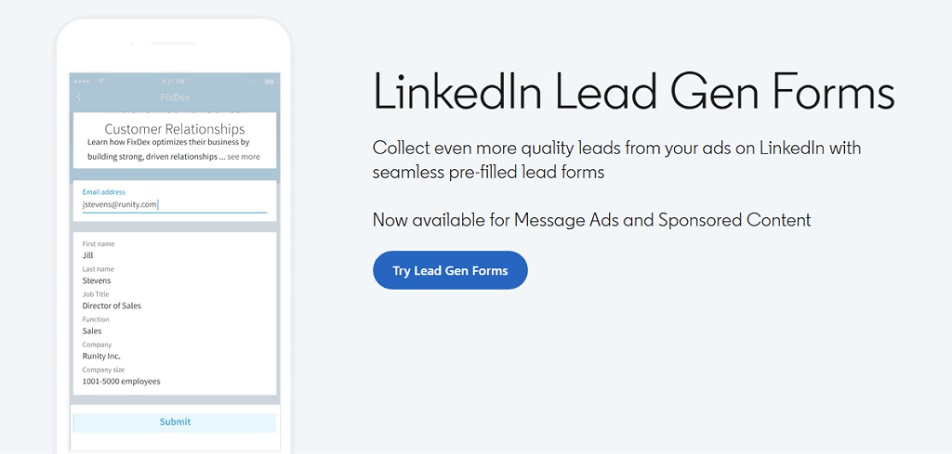
LinkedIn’s native Lead Gen Forms are among the platform’s most underutilized features for B2B lead generation.
How they work:
These forms auto-populate with user data from LinkedIn profiles. Prospects submit without leaving the platform, without manual form filling, and without redirect delays.
Why they matter:
By minimizing the steps required to submit information, LinkedIn Lead Gen Forms reduce friction, resulting in higher completion rates than traditional landing pages. Previous LinkedIn surveys have shown that Lead Gen Forms achieve a 13% conversion rate. On the contrary, the average landing page conversion rate across all industries is around 6.6%.
How to deploy them effectively:
- Attach forms to organic posts offering genuine value (guides, assessments, consultations)
- Keep form fields minimal—every additional field reduces completion
- Follow up quickly; these leads are warm and expect a rapid response
7. Company Page Newsletters: Building an Owned Audience
LinkedIn newsletters remain one of the most underutilized organic features for B2B companies. They allow company pages to publish directly to subscribers, who receive notifications for each new issue.
Why newsletters deserve attention:
In 2024, Keren Baruch, Director of Product at LinkedIn, shared that the number of people publishing newsletter articles on the platform increased by 59%, while newsletter engagement increased by 47%. A year prior, daily newsletter readership had more than doubled year over year, with over 500 million subscriptions across 146,000+ newsletters.
While LinkedIn has not released updated aggregate newsletter statistics for 2025, the company continues to invest in the format — adding new metrics such as email sends and open rates — indicating how much it values this medium.
Strategic advantages:
- Direct notification access: Bypasses algorithm constraints
- First-issue distribution: Sent to all existing page followers at launch
- Google indexing: Creates discoverability beyond LinkedIn
- Owned audience: Builds an asset within LinkedIn’s ecosystem
Launch approach:
- Enable newsletters through the company page admin settings
- Publish consistently—weekly or bi-weekly to maintain engagement
- Focus on genuine value: industry insights, actionable frameworks, trend analysis
- Avoid company news and promotional content; newsletters that provide value retain subscribers
Content Strategy for LinkedIn Company Page Optimization
Effective LinkedIn page optimization extends beyond static elements to the content you publish. The right content strategy reinforces credibility and generates ongoing lead opportunities.
The 4-1-1 Framework
The 4-1-1 Framework helps structure LinkedIn content to balance value, education, and promotion, ensuring your company page delivers insightful, engaging, and relevant content.
| Content Strategy for LinkedIn Using the 4-1-1 Framework | ||
|---|---|---|
| Content Type | Ratio | Examples |
| Value-Add | 4 | Industry insights, practical frameworks, curated resources |
| Educational | 1 | How-to guides, process explanations, trend analysis |
| Promotional | 1 | Service announcements, case studies, offers |
Content Formats That Perform
Different formats serve different purposes:
- PDF carousels: Effective for frameworks, step-by-step guides, and visual content
- Native video (under 90 seconds): Higher engagement than static posts, optimized for mobile viewing
- Text posts with strong hooks: Still effective when the opening line compels continued reading
Content Repurposing
Maximize return from each content investment by using the same content across multiple formats. A single article can become:
- A PDF carousel highlighting key points
- A text post expanding on one insight
- A quote graphic for visual engagement
- Newsletter content for subscribers
This approach maintains a consistent publishing streak without requiring constant content creation.
What to Avoid
- Self-congratulatory posts that provide no value to visitors
- Stock photos with generic captions
- Posts without clear takeaways or next steps
- Content that could apply to any company in any industry
Optimize LinkedIn for Organic Lead Generation with These Techniques
This two-tier approach—LinkedIn profile optimization to drive traffic to a company page, and LinkedIn company page optimization to filter prospects from that traffic—creates a complete organic lead-generation engine.
Start by auditing what you have. Look at your executives’ profiles — do they speak to your buyers or list job titles? Look at your company page — is there a clear next step or just a wall of updates? If the gaps are apparent, the path forward is too.

