Amazon A+ Content Guide

Table of Contents
- Introduction to Amazon A+ Content
- 1. Amazon A+ Content Fundamentals
- 2. Amazon A+ Eligibility
- 3. Amazon A+ Content Groundwork
- 4. Developing Amazon A+ Assets
- 5. Developing Premium A+ Assets
- 6. Developing Brand Stories
- 7. Copywriting Support for Amazon A+
- 8. Quality Control Beyond Accuracy
- 9. Best Practices for Uploading A+ Content
- 10. A+ Content Performance Optimization
- 11. Common Amazon A+ Troubleshooting
This guide provides a comprehensive view of Amazon’s A+ Content, covering its fundamentals, creative execution, and ongoing management. It is intended for brand-registered sellers, vendors, ecommerce agencies, and especially the people responsible for designing A+ Content. The guide covers everything from understanding A+ Content types and choosing relevant A+ modules to managing published A+ listings for maximum efficiency.
Introduction to Amazon A+ Content
Amazon A+ Content began life as two separate tools.
Earlier, vendors (suppliers who directly sell to Amazon) had access to creating A+ pages in Vendor Central, while third-party sellers were permitted to create Enhanced Brand Content (EBC) in November 2016. The intent was simple: let vendors and sellers grab a buyer’s attention with images, video, and interactive elements on their product listing pages. In July 2019, Amazon merged the two into a single A+ Content Manager. Premium A+ (often called A++) came in later – it began as an invite-only program for selective merchants and opened to Brand Registered owners in 2022 with certain eligibility thresholds.
Today, sellers and vendors have access to Basic and Premium A+ Content as long as they meet the eligibility criteria for creating these visually appealing product detail pages.
The latest updates from Amazon highlight that Basic A+ Content can increase sales by up to 8%, and well-implemented Premium A+ Content by up to 20%
Visuals Influence Buying Decisions
Online marketplaces limit a shopper’s ability to physically examine a product. The product detail page must communicate the information a customer would typically seek from typical in-store displays, packaging, or interactions with sales staff.
This is the problem A+ Content tries to address with its immersive content.
A+ Content harnesses the power of visual product display in various ways to overcome the challenges of online retail and prepares product listing pages for ecommerce success:
- Displays a product in action: A+ Content videos & lifestyle-inspired banners instantly communicate how a product is intended to be used, helping shoppers assess what makes the product a good prospect to purchase.
- Builds confidence: A+ Content creates a website-like product listing page that clearly highlights the brand, instilling more confidence in first-time buyers.
- Answer questions before being asked: A+ Content uses graphics to display usage steps or the installation process, reducing chances of returns or poor reviews.
- Converts existing traffic: A+ Content creates a greater probability of converting organic visitors without the need to participate in exclusive/paid Amazon programs.
- Helps to cross-sell: A+ Content elements like Shoppable Comparison Charts and the Brand Story point shoppers to other products in the catalog.
- Boosts Social & AI-assisted shopping: A+ Content offers rich media, interactive modules, and brand storytelling that complement AI-driven search results and make listing pages social media friendly.
1. Amazon A+ Content Fundamentals
1.1 What is Amazon A+ Content
A+ Content is Amazon’s primary content publishing tool for adding videos, large-format images, customized text placements, and lifestyle appeal banners, apart from other graphically rich elements, to a product detail page.
Overview: A+ Content creation & publishing process:
- Enroll the brand in Brand Registry, or have a Brand Representative or Reseller role assigned on an enrolled brand.
- Sign in to Seller Central with an active Professional selling plan.
- Access A+ Content Manager and use it as the main dashboard.
- Within the Content Manager, navigate to Advertising.
- Choose a content type and start adding the A+ modules.
- Apply the content to brand-owned ASINs.
- Bulk upload if the A+ Content has to be applied to multiple ASINs or a catalog.
- Preview on desktop and mobile, then submit.
- Approved content starts appearing in the chosen language within a few days.
Amazon lists A+ Content as a recommended step in its New Seller Guide.
1.2 When is A+ Content worth the investment?
Publishing A+ Content may have no upfront costs, but production includes product photography, copywriting, subscription-based AI tools, design, video editing, and expertise in using Amazon’s Content Manager dashboard. A seller should be clear about investing time and resources in creating A+ Content. If the clarity is missing, it might be a good idea to consult an ecommerce agency with experience in this domain.
Some important considerations when starting the A+ journey:
- Product-level Readiness: Is the product truly ready without any changes expected soon in its design, packaging, packaged contents, or technical updates?
- Brand-level Readiness: A+ is one of the strongest branding differentiators on Amazon. Without a brand registry, the process can’t even be started. A prudent approach lies in getting the brand registered first and then starting the A+ Content creation.
- Profitability: If the A+ Content production is outsourced to an ecommerce agency, the expected sales should be able to repay the production cost within a reasonable period.
A parameter often ignored: Existing Traffic
A+ Content is likely to convert more visitors, but its impact on ASINs with negligible organic traffic can be less than enthusiastic. It might be a good idea to diagnose what ails an ASIN despite accurate product details and clear branding literature. A+ Content can be the next step to take an ASIN’s performance to the next level.
Some clear signals indicating that an ASIN is ready for A+ Content:
- Organic clicks are consistent, but the actual sales are slow.
- A sustained pattern of cart additions, followed by cart abandonment.
- There have been some buyer queries about the product.
- The brand is seeing healthy sales for other ASINs in the catalog.
- Competitors are driving sales via A+ Content in the product category.
- A+ Content Manager shows A+ recommendations at the top of the page.
1.3 A+ Content versus Main Product Image Gallery
This often confuses Amazon sellers and even product listing page designers – the primary image gallery and A+ Content should work together, but they are meant to do different jobs.
The main image gallery comes up right at the top of a product detail page, whereas the A+ Content needs the browser to scroll down a bit.
The gallery earns the clicks upfront – it is imperative to have clear, high-resolution images in the primary image gallery to enable the listing to perform at any level.
A+ Content builds on this first impression, further engaging a curious shopper and increasing the likelihood that the page visit turns into a sale.
| Element | Image gallery | A+ Content |
|---|---|---|
| Role | First impression and quick visual scan | Explanation, comparison, and brand confidence |
| Location | Top of the page beside the title and price | Lower on the page, under “Product description” |
| Format | Images and video | Modules combining images, text, and charts |
| Limits | Up to nine images, with strict main-image rules | Up to five modules (Basic) or seven (Premium) |
| Availability | Every listing | Eligible brands only |
When deciding which images to choose for the main image gallery or A+ Content, sellers should remember:
A+ Content prefers:
- Images with text, logos, bylines, or captions
- Product benefit or usage detailing infographics
- Lifestyle-appeal images that look like website-scaled banners
- In-use product snapshots with animated or lively backgrounds
Gallery images are better served with:
- Silo shots of the product in plain, white, or neutral backgrounds
- Product display with the product positioned at different angles
- Quick benefit callouts rather than detailed infographics
- Product feature-focused images rather than comparisons
1.4 Different Types of A+ Content
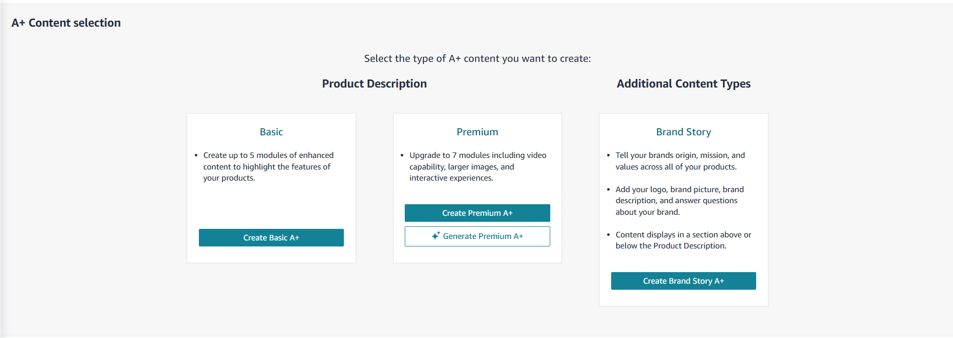
There are three types of graphically enhanced A+ Content on Amazon available for vendors and brand-registered sellers:
- Basic A+
- Premium A+ / A++
- Brand Story
A. Product-level A+ Content [Premium and Basic A+]
Product-level A+ Content focuses on an ASIN or a product family. This includes Basic and Premium A+ Content. The use of images, videos, banners, or text boxes is driven by explaining a product and helping browsers quickly understand the standout features, usage recommendations, or technical specifications.
Basic A+ Content
Basic A+ is the entry point, allowing sellers to progress beyond highly textual product pages. Replacing traditional Amazon listing page product descriptions, Basic A+ Content provides the room to incorporate images, customized text placements, and product-comparison charts.
Standard Product Listings vs Basic A+ Content
| Element | Standard listing | Basic A+ Content |
|---|---|---|
| Description format | Plain text | Modules combining images and text |
| Images in the description | None | Yes, placed beside the copy |
| Comparison charts | Not available | Shoppable charts |
| Layout | Single text block | Up to five modules, 14 module types |
| Cost | Included | Free for eligible sellers |
| Access | Any seller | Professional selling plan plus an eligible brand role, or generic products in the catalog |
Premium A+ Content
Premium A+ is seated a notch above Basic A+ Content, opening up more creative avenues to make the product detail page more visually detailed. Premium content offers options like images with feature-rich hotspots and smooth-sliding carousels, giving browsers a deeper walkthrough while its Q&A module addresses common & technical shopper queries.
Premium A+ Content vs Basic A+ Content
| Element | Basic A+ | Premium A+ |
|---|---|---|
| Modules per project | 7 | 7 |
| Module types | 17 | 19 |
| Images | Varied sizes | Much larger, high-resolution images |
| Video | Not listed | Yes |
| Interactive hotspots | Not listed | Yes [2 formats to choose from] |
| Carousels | Not listed | Image and video carousels |
| Q&A modules | Not listed | Yes |
| Comparison charts | Yes | Yes [3 formats to choose from] |
| Best for | New sellers, simple products | Similar products shoppers compare, detail-heavy or technical products |
B. Brand-level A+ Content [BRAND STORY]
Amazon Brand Story is on par with a brand’s ecommerce website’s About Us page. Amazon Storefront comes close at second place, blending the role of showcasing the catalog diversity and shopping options along with brand messaging.
A brand story can carry images, text, carousels, and links to the brand’s products or the Brand Store itself. It can display the brand’s mission, design philosophy, quality control heritage, or standout product-level details.
While the primary space reserved for A+ branding content is the Brand Story, some A+ Content designers also recommend using the Hero [headlining/header] banner to carry the brand’s logo, tagline, or elements like its inception year along with the featured product.
Benefits of a well-crafted Brand Story
An impressive Brand Story helps to build more confidence among first-time shoppers and drives more organic clicks via brand recall and recommendations.
- Streamlines brand presence: A consistent logo and color palette across ASINs help shoppers recognize the brand, delivering a consistent brand experience.
- Makes brand relatable: Sharing the story behind a brand’s creation helps shoppers connect with the products on display, making them pause and consider a purchase.
- Opens up the catalog: Brand Story links to bestsellers, new additions, or the brand store/Storefront, helping shoppers navigate deeper into the catalog, boosting organic sales.
1.5 What are A+ Content modules?
Modules are the building blocks of Amazon A+ Content.
Each module fits in like a well-aligned brick, together creating the A+ layout. Available modules vary, including images, text, logos, text-and-image, and technical product specs.
How are A+ Content modules usually configured?
- Basic A+ Content: This layout can include up to 7 modules, with up to 17 to choose from.
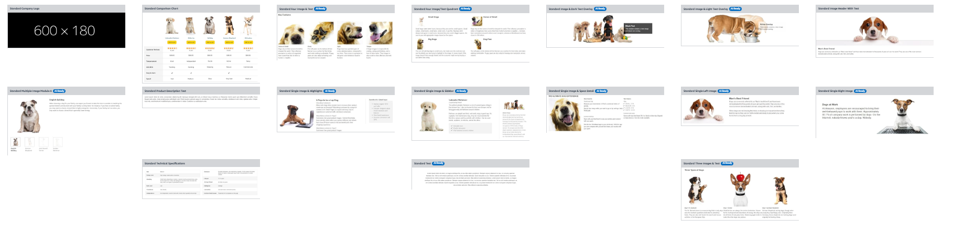
- Premium A+ Content: This layout can include up to 7 modules, with up to 19 to choose from.
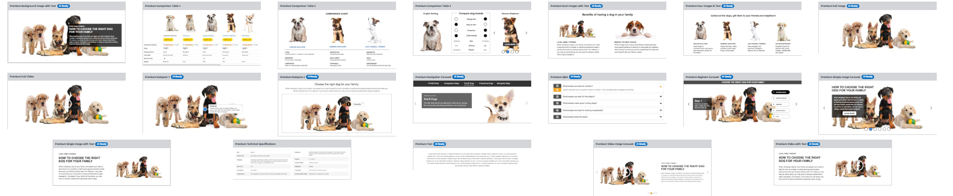
- Brand Story: This layout can accommodate up to 19 modules, with 4 to choose from.
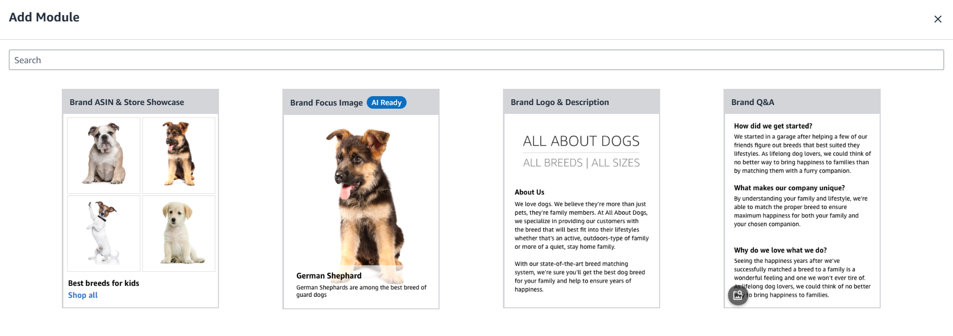
The selection & sequence of modules shape the overall design and visual flow of the content–the big reason why Amazon sellers often choose ecommerce agencies to design A+ pages.
AI Modules that look “AI Ready”
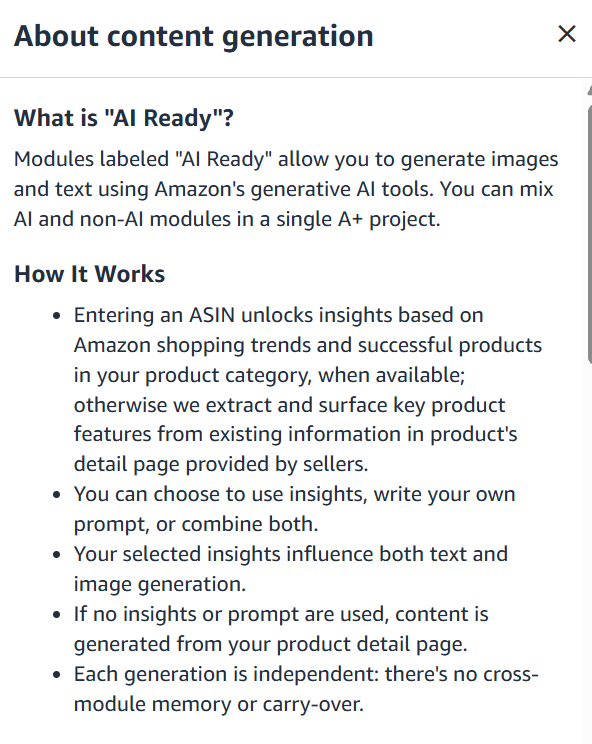
Some modules have an “AI Ready” badge.
Choosing this option means Amazon’s native AI can draft text and image content for sellers, but AI-compiled designs need a step-by-step review for accuracy.
1.6 Where is Amazon A+ Content Placed/Located?
This image-heavy content appears in different places as per the seller’s Amazon status – Vendor or Seller.
When published through a Vendor Central account, Amazon A+ Content appears in the ‘From the Manufacturer’ space.
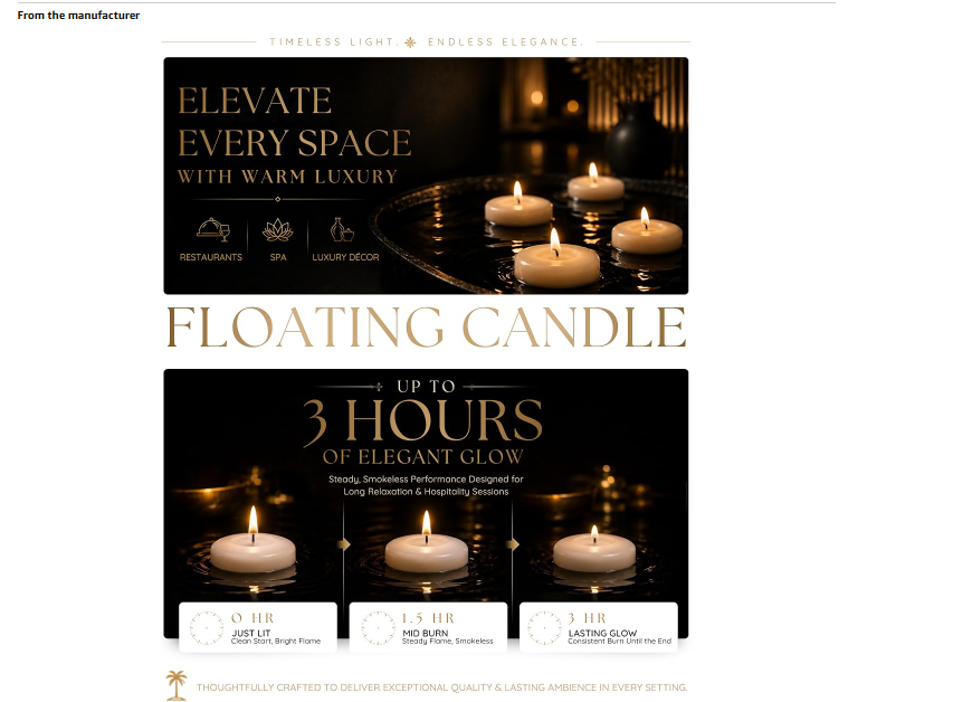
When published through a Seller Central account, Amazon A+ Content appears in the space reserved for text-only Product Description.
FAQ
In practice, yes. EBC was the name for the same tool/option available to Brand Registered third-party sellers, while A+ pages served Vendors. In July 2019, Amazon merged them into one A+ Content Manager, and Amazon’s own pages now use the term “A+ Content”.
Amazon A+ Content complements the core elements of a product detail page. A+ Content does not compete with the title or the bullet points. It provides more context to the product details via images, comparison charts, and infographics.
Amazon A+ Content is free to publish for eligible sellers. However, businesses may incur costs for copywriting, graphic design, product photography, video production, and ongoing content management. Actual expenses depend on the scope of work and whether content is developed in-house or outsourced to an ecommerce agency.
A+ Content can support product discoverability by creating more space for providing relevant product information, descriptive image alt text, and additional context for shoppers. A+ Content can drive more shopper recommendations, boosting organic traffic and visits. However, it should not be treated as a direct ranking boost or a substitute for optimizing product titles, bullet points, and other listing attributes.
Sellers need an active selling account [Vendor Central or Seller Central] and an eligible brand enrolled in Amazon Brand Registry along with meeting other criteria, to publish basic or premium A+ content. Sellers can create the A+ content themselves or hire ecommerce agencies. A professional or agency is likely to seek access to Amazon’s central dashboard to create, upload, preview, and publish the A+ content.
A+ Content is not a one-time task. Sellers must review it periodically to ensure product information remains accurate, images reflect the current product, and content complies with Amazon’s changing guidelines. Updates may also be necessary when search patterns change, or new customer questions emerge.
Amazon A+ Content can provide relevant product information to search engines, but its indexing and ranking effects are not guaranteed. Content visibility depends on how search engines access and process the page, and Amazon does not guarantee that A+ text will always improve organic rankings. However, dedicated text fields within A+ designs might help with relevant product data and smart use of keywords. This, along with descriptive image alt text, can boost the effect of optimizing the title, bullet points, and other data listing fields.
2. Amazon A+ Eligibility
A+ Content eligibility depends on multiple factors, starting with an active, professional selling account with Amazon, followed by getting the brand registered.
Sellers should not assume that high sales volume, increasing brand popularity, or repeatedly winning the Buy Box will quickly unlock access to Basic or Premium A+
2.1 Brand Registry for A+ Content
Brand Registry alone does not automatically authorize every seller to create A+ Content.
The user must have the appropriate role to create A+ Content, and the ASIN must be eligible for A+ Content.
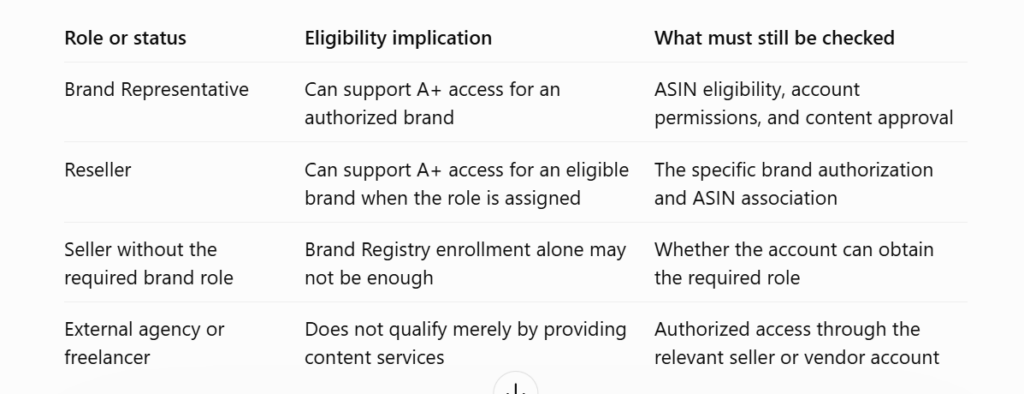
A registered brand opens the gateway to both Basic Amazon A+ Content and developing Premium A+ listings.
2.2 Working with A+ Content Eligibility
After a successful brand registry, sellers should work on their A+ strategy before developing any A+ Content:
- Confirm the ASIN-level eligibility for applying A+ Content
- Ensure preparedness for A+ Content, particularly high-quality images
- Regularly check A+ Content Manager for premium-level access
- Create an A+ Content checklist to avoid any listing-level suppression or penalization
2.3 Premium A+ Eligibility
Premium A+ eligibility does not happen right away.
In general, sellers start their journey with Basic A+ Content, gradually taking up Premium A+ access.
The eligibility criteria are: a published Brand Story across brand-owned ASINs and at least 5 approved and published A+ Content product detail pages in the preceding 12 months.
2.4 Category-level Criteria
Category-level A+ Content eligibility differs from brand registry or brand story requirements.
A seller may meet all the general account requirements for A+ Content but still be unable to use A+ Content in the intended format in an excluded category.
Category considerations are important because eligibility also needs to be checked against Amazon’s product-category rules. Some A+ features are not supported for products sold through Seller Central in the Books, Music, Video, and DVD categories.
FAQ
No. Brand ownership alone does not automatically grant access to A+ Content. Sellers generally need to meet Amazon Brand Registry requirements. Access to Premium A+ features has additional requirements, including a published Brand Story and Basic A+ content listings.
High sales volume alone does not guarantee access to Premium A+ Content. Eligibility depends on Amazon’s current requirements and the features available to the seller’s account. Rather than assuming that sales performance automatically unlocks Premium A+, check A+ Content Manager in Seller Central for current eligibility criteria.
Yes. A+ Content can help newer brands communicate product features, explain differentiators, and establish a consistent brand identity on Amazon product detail pages. It can be particularly useful when shoppers are unfamiliar with the brand and need clear information to evaluate the product.
No. Brand Registry enrollment does not automatically make every ASIN eligible for A+ Content. The product must meet Amazon’s applicable requirements, and the seller or vendor must have the necessary permissions to submit content for it. Check ASIN eligibility and assignment options in A+ Content Manager before developing or publishing content.
3. Amazon A+ Content Groundwork
A+ Content development begins with research, asset evaluation, and planning the layout. A+ Content requires various skills:
- Copywriting
- Graphic designing
- Image editing
- AI image generation
- A+ module design expertise
Amazon sellers can use in-house skills for the task or seek the service of an ecommerce agency that specializes in A+ Content development. Either way, collaboration between the brand or inventory owner and the A+ designer is important. Their communication upfront defines the process and gives shape to the A+ project, including:
- Creative direction [brand-owned designs vs. the marketplace & competitors]
- Creative approvals that define the A+ designs
- Quality standards for images and text [to be upheld across the project]
- Any AI image generation or editing requirements [including choice of AI tools]
- Brand-specific content [to be used as a standard across the A+ project]
This preparedness ensures full-scale A+ Content production without:
- Approval-level delays
- Extensive reworking due to creative ambiguities
- Inconsistent brand messaging
- Listing-level rejections or account-level penalization by Amazon
3.1 High-Quality Image Libraries [A+ Essentials]
Clear, high-resolution images are central to any A+ Content development project. Amazon’s module-based format relies on visual assets that brand owners can provide and ecommerce agencies can create.

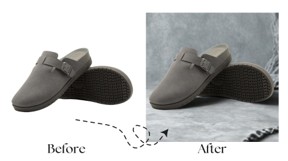

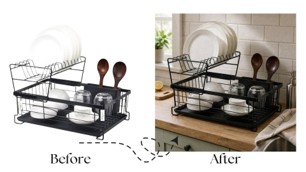
The objective is to create an image library for every product family that can:
- Explain product features
- Demonstrate product use
- Communicate product safety
- Reinforce the brand’s positioning
- Accurately represent product scale, size, or dimensions
- Communicate technical data in an easy-to-understand manner
Creating Product Image Database Begins with Collating Data
All available product images have to be gathered and categorized, including those from:
- Product brochures or flyers
- Brand media kits
- Brand ecommerce site
- Seller/brand-owned content management system
- Photography archive
- Drawings or sketches [converted into images using AI transformations]
- Any type of product artwork from manufacturer or supplier portals
Collating images establishes clarity about:
- Does the seller have sufficient product images for A+ product listings?
- Will the existing images require extensive editing or AI recreation?
- Is there sufficient product coverage for a big inventory?
- Do the images seem suitable to comply with Amazon’s publishing guidelines?
While gathering product images, check for:
- Relevant camera angle or product staging
- Accuracy in representing the functional details or technical data
- Images for all models, sizes, colors, configurations, or ASIN-level variations
- Image quality parameters such as backgrounds, lighting, or accuracy of texture
Basic Image Categorization
Every image addresses a different A+ Content requirement. The images can be categorized as different assets:
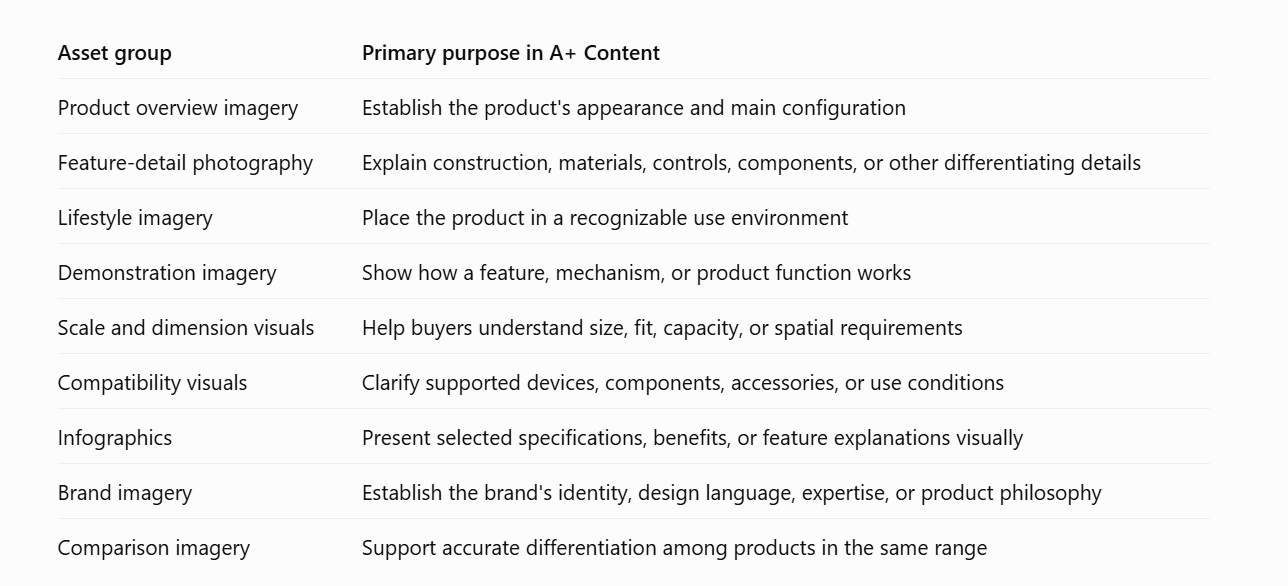
Images should be approved for extensive editing or AI recreation when they address a clearly defined requirement, such as:
- Basic, smartphone-captured images / No professional photoshoots
- Sufficient product-detailing images but no brand-specific visuals
- Outdated images for a product with new features or functionalities or bundles
3.2 Branding Standards [Brand Guide]
A+ Content should present a consistent brand identity across the catalog to drive visual uniformity. However, consistency does not mean making every product page identical. It means applying a shared set of branding elements when explaining a product’s category, features, intended usage, and important purchase considerations.
The brand guide provides the rules for this, defining which visual elements remain consistent, which can vary by product family, and which are required to stand apart from the branding standards.
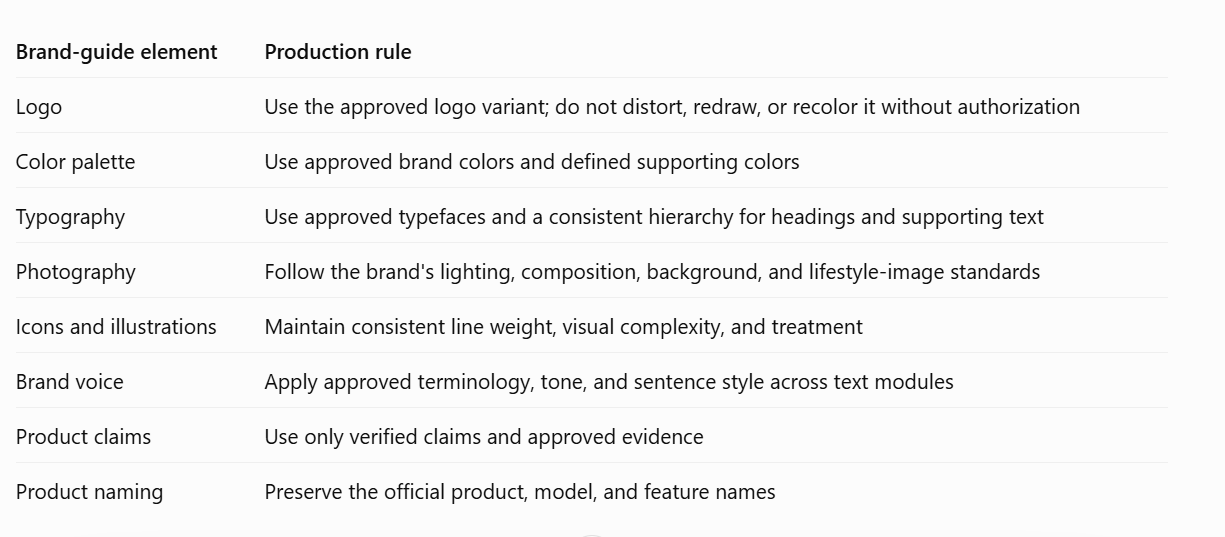
High-authority assets that can be included in the Brand Guide include:
- Icon styles
- Company logo
- Product packaging layout
- Typography and approved font files
- Brand tone and naming conventions
- Brand colors or preferred shade/hue
- Standardized product imagery backgrounds
- Any preferred and prohibited product-explaining terminology
- Restrictions on logo placement, compression, or enlargement
- Approved claims, certifications, awards, and supporting evidence
- Product-focused variations permitted, deviating from the approved layout
3.3 Taking Cues from UGC
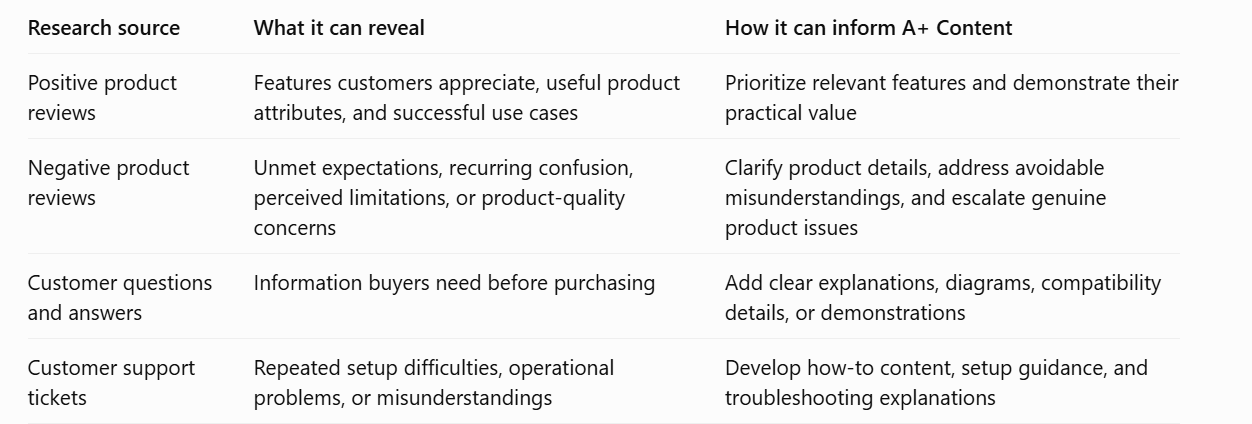
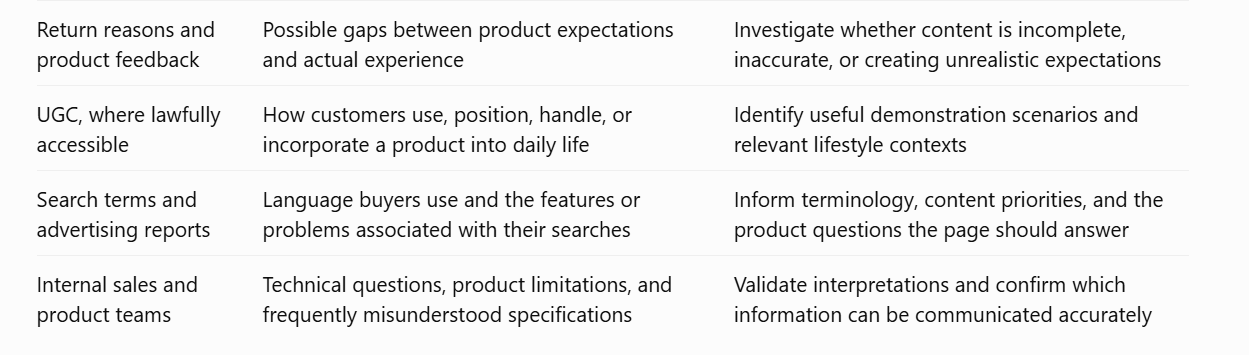
Customer-generated content provides a practical source of information for A+ Content development. This includes:
- Product reviews
- Customer questions
- Recurring complaints
- Support interactions
User-generated content (UGC) can reveal what customers:
- Misunderstand – highlights a product detail that needs more explanation
- Find difficult – underlines things that actual product users are struggling with
- Appreciate – confirms attributes driving repeated purchases & recommendations
Regularly studying customer feedback at different levels is the moment of truth for sellers, who can then use this research to update their A+ Content.
But Sellers Should Be Careful
- Recurring customer feedback is the real insight and not a random comment
- UGC is a part of A+ Content strategy, but it does not define the eventual A+ layout
- Customer-generated content needs constant tracking as ongoing research
- Dramatically explained comments don’t always mean well-informed feedback
UGC can be further categorized to understand which part of customer feedback inspires A+ Content development:
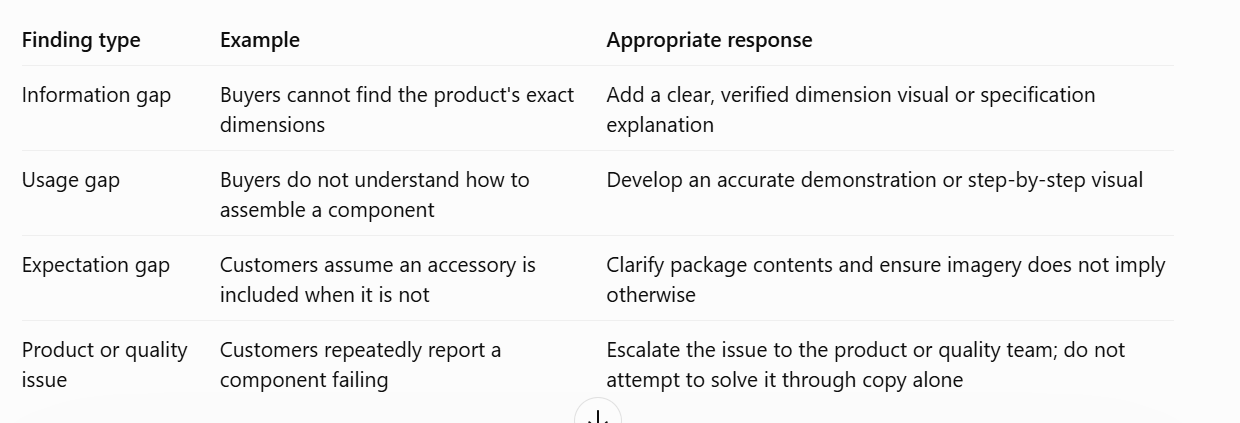
If the seller has a brand website, they can also collate customer feedback from it and use it to improve different A+ components to maximize buyer satisfaction.
3.4 Category-Level A+ Listings [Competitor Research]
Competitor research should examine the complete product detail page and not just specific A+ modules. A strong listing experience depends on how the title, bullet points, image gallery, product video, A+ Content, and other available information work together.
A+ focused competitor research should include:
- Direct competitors: Highly similar products at a comparable price level.
- Growing alternatives: Emerging brands with advanced features garnering sales or clicks.
- UGC performers: Products engaging regular customer feedback and organic clicks.
Sellers should track competing listings with A+ Content for:
- Regularity of revising A+ pages
- Brand-specific messaging vs product-focused content
- Thematic banners used during high sales seasons
- Type of messaging used – informational, emotive, or technically detailed
3.5 Reusable Content Strategy [Content Standardization]
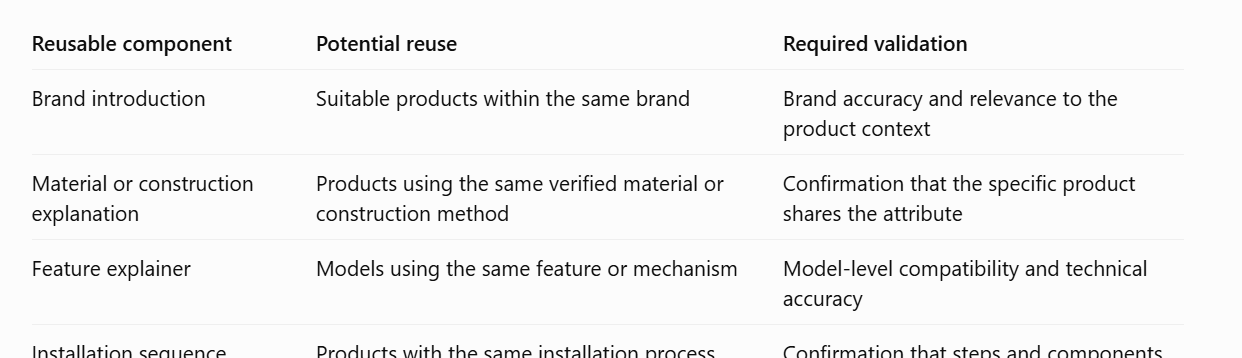
For brands managing multiple catalogs, A+ Content development can be a demanding process. To make this easier, many sellers choose content standardization. This means defining an A+ layout that uses fixed, standardized, or constant elements along with dynamically changing, product-specific content.
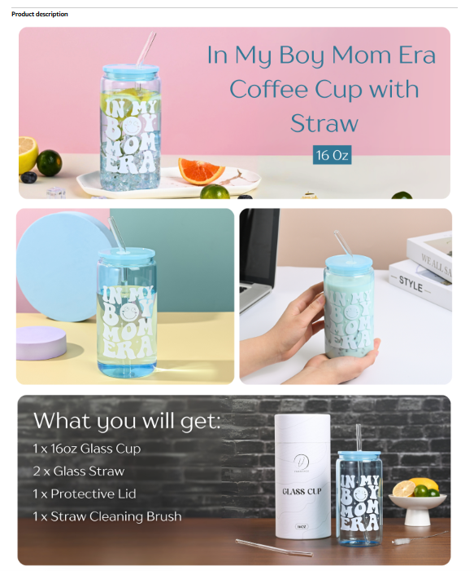
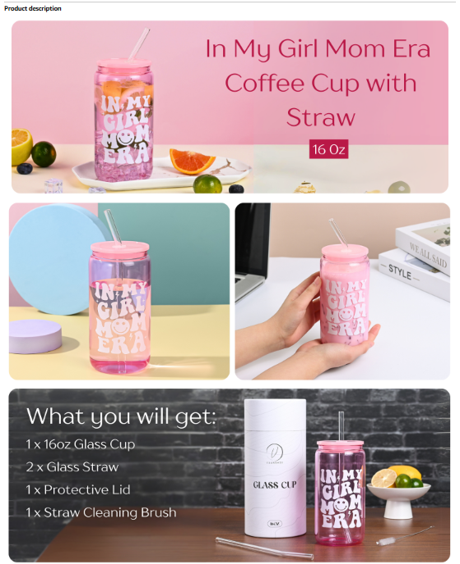
A+ Content standardization yields many benefits such as:
- Lesser investment in developing A+ pages at the ASIN level
- Streamlined, visually cohesive product listings with a stronger brand appeal
- Faster design-to-publish cycles with preapproved A+ elements across all listings
Example: Sellers can use a standard banner explaining the technology powering a product’s usability – the same banner can be used across all A+ pages within that product family
A+ Content standardization can happen in many ways, including:
- Fixed module sequencing
- Space reserved for brand-focused banners
- Dedicated space for product-specific images
- Fixed parameters to compare alternatives in product comparison charts
- Standard text-only blocks for: user precautions, certifications, purity standards, etc.
Examples of Reusable Content | Standardized A+ Listing Elements
FAQ
Amazon displays A+ Content on mobile devices, but effective mobile presentation depends on the modules and assets used. Designers should prioritize readable text, clear product imagery, concise messaging, and layouts that work on smaller screens. A+ content creators should view the mobile version before submitting the A+ designs.
Product explainer videos are not essential for Basic A+ Content. Sellers can use high-quality images, descriptive text, comparison charts, and other modules. For Premium A+, videos become more important. Vendors can transform product images into short videos using image and video editing tools/software or AI.
Amazon does not impose an outright prohibition on AI-generated imagery across A+ Content. However, images must comply with Amazon’s content policies, accurately represent the product, and avoid misleading shoppers. Amazon requests to tag AI-generated or AI-enhanced images as a part of the metadata for every image uploaded.
Customer reviews, product questions, and complaints can reveal what shoppers value, what they find confusing, and which pain points regarding the listing’s overall quality influence their purchase decisions. Sellers use these insights to identify information gaps in their A+ content.
Yes, but Amazon does not simply convert an existing Basic A+ project into Premium A+. If Premium A+ is available to a seller account, create a Premium A+ project in A+ Content Manager, select the appropriate modules, and apply the content to the relevant ASINs.
4. Developing Amazon A+ Assets
Once the image library, brand guide, and buyer research are in place, creative production begins. This stage turns that groundwork into finished assets for the A+ modules.
Most A+ pages rely on five core asset types: lifestyle images, infographics, technical specification visuals, comparison tables, and product feature videos.
The table below compares the two tiers.
| A+ Content type | Basic A+ | Premium A+ |
|---|---|---|
| Modules allowed on the detail page | 7 | 7 |
| Modules to choose from | 17 | 19 |
| Comparison chart | Yes | Yes |
| Video and hotspots | No | Yes |
| Navigation carousel | No | Yes |
Space on an A+ page is tight because the layout is built for a quick scroll. With limited room, every module has to earn its slot.
Available Modules in Basic A+
Available Modules in Premium A+
All modules have their own template specifications, displayed beside each upload box in A+ Content Manager. Amazon automatically scales down oversized images to fit the template, while rejecting undersized images rather than enlarging them.
4.1 Lifestyle-inspired Product Images
Lifestyle-inspired images show the product in different usage environments. They highlight how a product works best using different backgrounds, props, and human elements. This helps shoppers quickly understand a product’s relevance and special features.
What a Strong Lifestyle Image Does
- Scale: Includes a hand, a kitchen countertop, or a familiar everyday object to give an immediate sense of physical size.
- Right buyer: Reflects the actual people who buy and use the item, informed by customer reviews and listing Q&A.
- Brand fit: Matches the color palette, lighting tone, and styling rules in the brand guide.
Build a Complete Set
- Hero scene: The product in the hands of its intended buyer.
- Scale image: The product beside a hand, a person, a doorway, or a desk.
- Use-case set: Three to five distinct scenarios—such as gym, travel, office, kitchen, or outdoor use—depending on the category.
- Detail close-ups: Shots of stitching, control panels, or material texture.
- Outcome image: The finished result of using the product (such as a blended smoothie or an organized drawer).
Balancing Images with Text
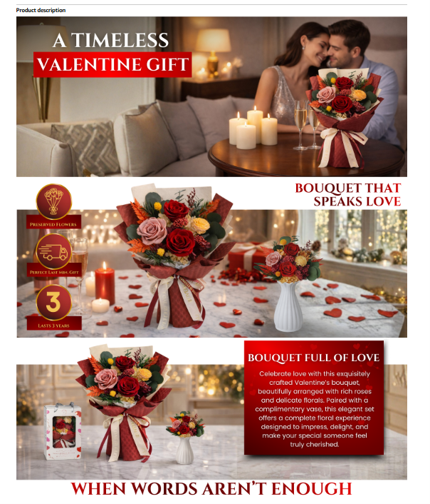
Photos grab attention, but they cannot carry technical detail on their own. Pair each lifestyle photo with a short live-text block: a clear benefit headline followed by one to three concise sentences or a tight bullet list.
Amazon’s A+ Image Standards
- Quality: Sharp, well-lit images, showing multiple angles.
- Format: High-resolution static images only. Animated GIFs, watermarks, and blurry or pixelated files are rejected.
- File specs: JPG, BMP, or PNG in RGB color mode, at least 72 dpi, and under 2 MB per file. CMYK files are not supported.
- Sizing: Built to the exact pixel dimensions listed beside each module slot in A+ Content Manager so images do not blur when rendered.
- Usage rights: Valid commercial rights held for every photo, video clip, and line of copy.
EXAMPLES OF LIFESTYLE IMAGES PAIRED WITH SHORT TEXT BOXES

Examples of Matching the Scene to Product
| Product type | Scene to show | What the text partner adds |
|---|---|---|
| Electronics and gadgets | On a desk, in a bag or on a commute, with a hand for scale | Dimensions, weight, battery or connectivity detail |
| Kitchen and home | On a real countertop or table, mid-task | Capacity, materials and cleaning steps |
| Clothing and accessories | On a model, in the setting where it is worn | Fit, fabric and care |
| Parts and tools | Installed or in use on the item it fits | Compatibility range and what is in the box |
Sorting Image Database – Ready for A+ vs. Needs Rework
| Ready for A+ | Needs rework |
|---|---|
| Product clearly visible and accurately shown | Product small, cropped, or hidden by props |
| Natural setting for the intended buyer | Generic scene with no link to product use |
| Open area beside the image for a text box | Busy background that forces text over the product |
| Colors, finish, and details match the real item | Colors, ports, buttons, or textures differ from the real item |
| Consistent look across the product family | Different lighting and styling on every ASIN |
Things To Monitor
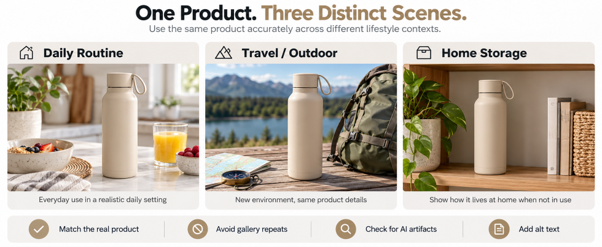
- No gallery repeats: Amazon requires A+ visuals to be distinct from the top-of-page image gallery.
- AI hangover: Check closely for distorted hands, warped backgrounds, or mismatched shadows that make a listing look untrustworthy.
- Alt text: Enter descriptive alt text (up to 100 characters) for every uploaded image. Aside from helping screen readers, missing image keywords can trigger submission errors
4.2 Product Highlights Explained as Infographics
A shopper scrolling on a phone rarely stops to read a dense paragraph about product engineering. An infographic pairs a clear visual detail with a short callout so the practical benefit registers in two seconds.
Limit the text
Amazon advises against inserting small text directly into image files because mobile scaling blurs embedded type and makes it hard to read on phones. Instead of crowding a photo with paragraphs, badges, or tiny labels, build the graphic around a clean view of the product and let the adjacent text box carry a bit of text.
| Element | The image carries | The text box carries |
|---|---|---|
| The feature | The product or the exact part, shown clearly | A benefit headline and one to three short sentences |
| The proof | Icons, arrows or a simple diagram | The measurement, material or standard behind the claim |
| The steps | Numbered visual panels with minimal labels | One line of instruction per step |
| The details | Hover hotspots over image areas (Premium A+) | Short hotspot text explaining how the feature solves a need |
Write Every Callout with a Formula
State what the shopper gets first, then back it up with technical data or material spec. Use plain words that state what the item measures, holds, fits, or does, and avoid idioms or slang that translate poorly across marketplaces.
| Generic Statement | Explained |
|---|---|
| Premium insulation technology | Double-wall stainless steel keeps drinks cold for 12 hours |
| Powerful long-lasting battery | Runs for 14 hours on one charge, then recharges fully in 90 minutes via USB-C |
| Easy to clean design | Three parts twist apart by hand and rinse clean under a tap |
| Fits all your needs | Fits standard 13- to 15-inch laptops without an extra sleeve |
| Durable design | Double-stitched nylon straps rated to 20 kg carry without stretching |
| Advanced formula | Each serving delivers 25 g of whey isolate; 30 ml measuring scoop included |
Creating A+ Content Infographics
- Feature callouts: Pointers highlighting 3 to 6 details on the product, tied to a benefit.
- How-to-use steps: 3 or 4 visual frames showing setup or product in operation.
- Size and fit: External dimensions drawn alongside a person or a familiar object.
- Compatibility: Simple icons showing which devices or attachments work with an item.
- In the box contents: Every part laid out neatly reduces “missing part” returns.
- Icons: Use icons only when they clarify an action (such as “Dishwasher safe” or “USB-C”.
EXAMPLES OF INFOGRAPHICS PAIRED WITH TEXT-ONLY BOXES




4.3 Simplifying Technical Specifications
While lifestyle photos pull shoppers in, buyers still need hard facts before making the purchase. This can be about exact dimensions, weight, power ratings, or compatibility. Amazon advises displaying every detail that affects a buying decision—for electronics, that can mean battery ratings, plug type, or wireless connectivity options.
Decide Which Specs The Shopper Needs
The specs shoppers check depend on the category:
| Category | Specs shoppers usually check |
|---|---|
| Electronics | Dimensions, weight, battery type, plug type, Wi-Fi or Bluetooth, compatible devices |
| Kitchen and home | Dimensions, capacity, materials, power rating, cleaning method |
| Clothing and accessories | Size range, fabric, fit, care instructions |
| Parts and tools | Compatibility range, dimensions, material, what is included |
Sort specs by purpose
| Group | What it covers | How to present it |
|---|---|---|
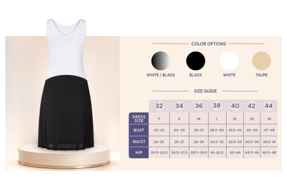
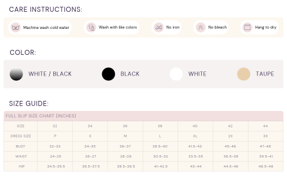
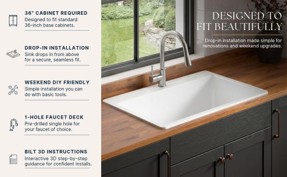
| Decide | Dimensions, weight, capacity, compatibility | Up front, in an icon grid or a short table |
| Confirm | Certifications, safety standards, included components | In a dedicated text block, with documentation on file |
| Reference | Details few shoppers need | Lower on the page, or left to the detail page attributes |
Tip for Premium A+ Content Developers / Ecommerce Agencies
In Premium A+, Amazon’s dedicated Technical Specifications module holds up to 16 entries, supporting bold spec labels of up to 30 characters and definitions of up to 500 characters. Check whether the 1-column or 2-column layout fits the data better inside the module before drafting the copy.
Simplify Before Publishing
- Group by buyer question: Organize rows around what the shopper is trying to confirm: Will it fit my space? Does it work with my device? What is in the box?
- Translate numbers into everyday terms: Pair raw numbers with a practical frame of reference, such as matching “1.8 kg” with “light enough for overhead cabin bags”.
- Keep critical specs: Always insert key dimensions and compatibility notes into live text fields rather than locking them solely inside a diagram image.
Present Specs Clearly
- Choice of Units: Stick to one primary unit system, adding a secondary conversion in parentheses, such as 750 ml (25.4 fl oz), where the marketplace expects it.
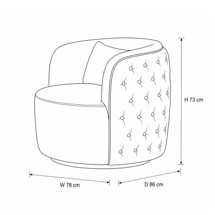
- Dimension Diagrams: For furniture, bags, and appliances, pair the spec list with a clean line drawing that labels height, width, and depth directly on the silhouette.
Here’s how a plain-language version might look for a smart bottle:
| Specification | In plain terms |
|---|---|
| Capacity: 750 ml | About three glasses of water |
| Insulation | Keeps drinks cold for up to 12 hours |
| Charging: USB-C | Full charge in 90 minutes |
| Cleaning | Hand wash the bottle; the lid is dishwasher-safe |
EXAMPLES OF SPECIFICATION MODULES (ICON GRID, TABLE AND DIMENSION DIAGRAM)
4.4 Shoppable Comparison Tables [Cross-selling]
A shopper weighing similar models needs a fast way to tell them apart. Comparison charts line up the dimensions and key features side-by-side, making the decision-making easier. Both Basic A+ and Premium A+ comparison charts are shoppable—complete with pricing, review ratings, and Add to Cart buttons—while Premium A+ adds wider layouts and explanatory tooltips.
Amazon’s internal testing shows how well shoppable charts perform: in 2023 Amazon research, Premium comparison charts with interactive shopping toggles converted to cart at roughly 2x the rate of static charts, and over 25% of shoppers who clicked the chart added an item to their cart.
Basic
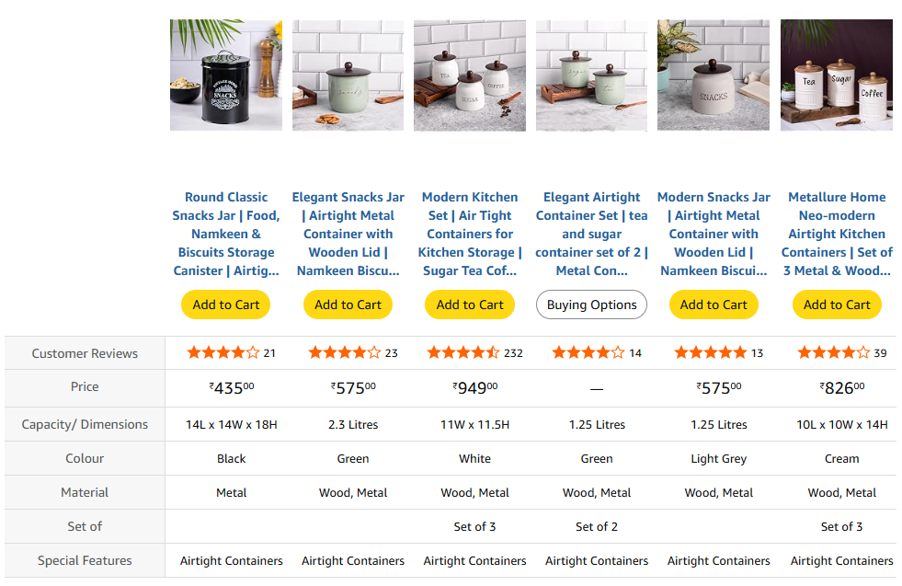
Premium
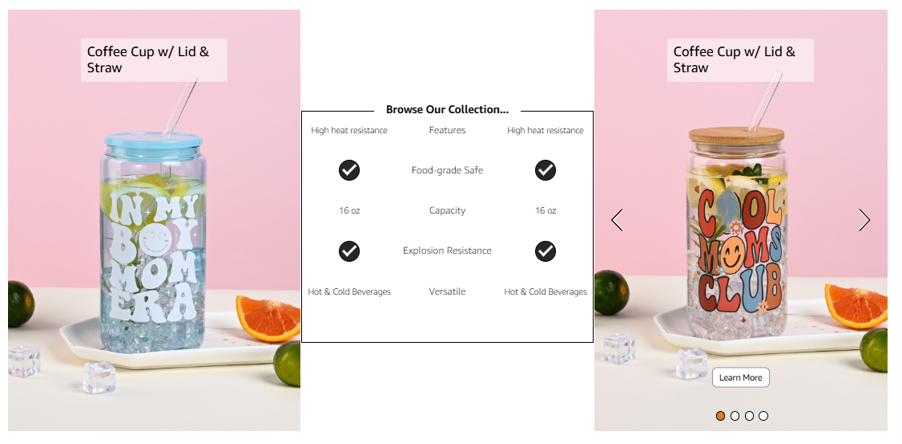
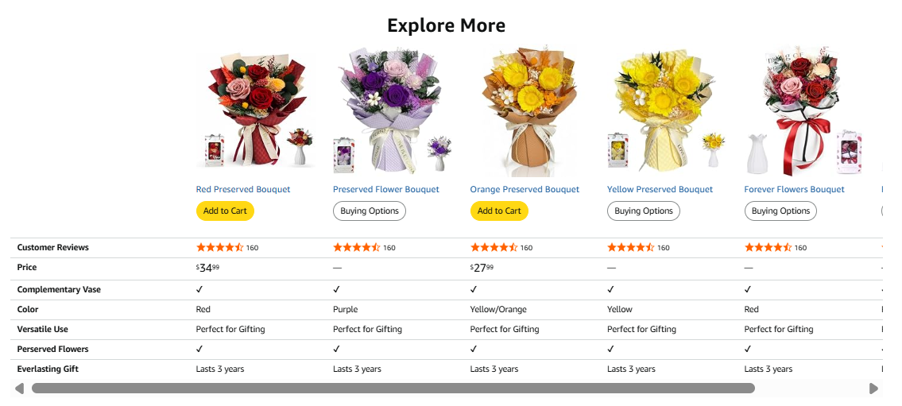
To capture such clicks, the core difference between models must be obvious in the top two rows without forcing phone shoppers to scroll.
How a Comparison Chart Earns Its Slot
- Keeps shoppers on a listing: Undecided buyers can compare sizes or tiers right on the page instead of clicking back to the search results where competitor ads wait.
- Cross-sells the catalog: A shopper who realizes the current item is too small can add the larger model straight from the chart.
- Stays relevant: Once built, the same comparison module can be applied across every child or parent ASIN in a product line.
Choose Comparison Parameters Carefully
- Variants: Compare capacities, resistance weights, pack counts, or wattage outputs.
- Model tiers: Step shoppers clearly through Entry, Pro, and Max versions of the same line.
- Bundles: Show a standalone unit next to a two-pack or an all-in-one starter kit.
- Use cases: Create a “Made for” row that matches each column to a buyer need (such as Beginners, Home Gym, or Studio Travel).
Which Products to Include?
Amazon’s guidelines require comparison charts to feature the brand’s own catalog items.
| Group | Role in the chart | Drives a Goal |
|---|---|---|
| Established sellers | Anchor comparison with products shoppers already know | Consistent sales in the brand’s own data |
| Rising products | Give newer products visibility and a chance to become bestsellers | Growing clicks or sales for handpicked items |
| Step-up and step-down models | Help shoppers move to a higher or lower tier | Display differences in size or features to show sufficient options to shop from |
Quick Check for Comparison Charts
| Include | Avoid |
|---|---|
| Real differences in size, capacity, or features | Rows where every product has the same value |
| A short “Made for” line for each model | Superlatives such as “best” or “top choice” |
| The brand’s own products only | Competitor products or brand names |
| Matching units and terms across columns | Prices, offers, or promotions typed into chart text |
4.5 Product Feature-focused Videos [Trust Builders]
A+ Content promises superior visual presentation of the product as compared to standard, text-heavy Amazon product detail pages. Product explainer videos are an example of how A+ pages interact with buyers. These videos instantly communicate how a product is meant to be used without the need to read or spend time understanding product assembly or maintenance from static images.
According to Amazon data, 96.3% of shoppers say video is vital when researching a purchase, and shoppers who watch a product video convert 3.6x more often than those who do not.
Note: Basic A+ does not include video modules like Premium A+ content. Brands using Basic A+ upload their product videos directly to the main, top-of-page image gallery instead.
Build Each Video Around One Feature
Each A+ clip should answer a single buyer question.
Match the camera treatment to the feature:
| Feature type | Video approach |
|---|---|
| A feature that moves or changes | Close-up demonstration, start to finish |
| A feature that solves a problem | Short before-and-after use, without exaggeration |
| A feature that needs setup | Step-by-step first-use walkthrough |
| A feature shoppers misunderstand | Plain demonstration of the exact question raised in reviews |
| A product with several uses | Short montage of two or three realistic scenarios, each tied to one benefit |
| A choice between the brand’s own models | Side-by-side clip of two of the brand’s own models, without pricing or competitors |
How Long Should The Clip Be?
The module accepts files up to 180 seconds (and 200 MB), but Amazon recommends shorter videos. Edit the clips for shorter durations without compromising the visual continuity.
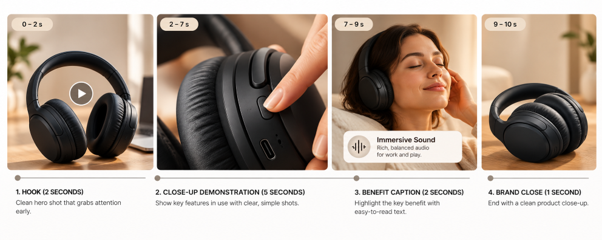
Example: Simple 10-Second Video Structure for A+ Listings
- Hook (Seconds 0 to 2): Open immediately with the product in motion—skip slow fade-ins or logo intros.
- Demonstration (Seconds 2 to 7): Keep the mechanism centered in the frame using real live-action footage rather than a Ken Burns pan across static photos.
- Benefit callout (Seconds 7 to 9): Display one high-contrast on-screen text label stating the practical benefit.
- Brand close (Second 10): Finish on a clean product shot or brand mark that matches the brand guide.
Types of Amazon Product Details Page Videos
Sellers should know about the different types of videos allowed within A+ modules.
- Product Overview Video: Quickly explains key benefits, core features, and practical use cases.
- Lifestyle Video: In-use product videos showcasing the product in a real-world environment being used by intended buyers to build an emotional connection.
- Unboxing Videos: Capture the package opening experience, what is inside the box, and the initial presentation of the physical product.
- Product Assembly Video: Step-by-step instructions for a product with technical details, attachments, or components. Communicates how the product is put together, installed, or configured in different user environments.
- Brand Story Video: Focuses on the mission, values, and background of the brand behind the product.
- Troubleshooting Video: Addresses common user questions, maintenance tips, or solutions for issues customers might face.
- Comparison Video: Visually contrasts your product against common choices or older versions (without naming competing brand names).
- UGC-style Videos: AI avatar or creator-style videos with high social media impact recycled to meet A+ Content requirements.
Check if an Amazon A+ Product Detail Page Needs Videos
- Every product has slightly different video-creation requirements.
- Complex appliances might need more technical details explained, along with an emphasis on user safety protocols.
- Some products have negligible technical data, and video creation is more focused on human models using the item.
- Some videos might not be suitable across different Amazon geographies/regions.
Common inspirations for creating A+ Content Videos:
- Video concepts used by competitors
- Product showcase viral in social media promotions
- Questions customers have constantly asked in their reviews
- Feedback accompanying recent returns
Parameters for Repurposing a Product Video
A video can originate from a brand’s social media space or the manufacturer’s recent press release. It can be further moderated to meet new A+ Content standards.
- Any recent rebranding exercises
- Changes in product performance certifications over a period
- Any product performance updates/upgrades/new versions
Checklist for the Video Production Team
- Single focus: Keep the pacing brisk and centered on one product question.
- Muted playback: Assume every viewer has their phone muted; use clear visual action and high-contrast burned-in captions.
- Mobile framing: Shoot and crop tightly so small parts and text labels stay legible on a 6-inch phone screen.
- Make sure it works without sound: Burn in captions or clean on-screen labels so the message survives on a muted phone too, without losing its effectiveness.
- Describe in plain terms: Use the title and description fields to fill out what the video shows, ensuring simple descriptions without marketing jargon.
- Tag AI-generated models: If a video features human models generated using AI, Amazon requires the keyword “contains-synthetic-performer” in the XMP field. Real human models, even if edited with AI tools, don’t need this update.
FAQ
Product close-ups help shoppers evaluate details that may not be apparent in standard product images, such as material texture, surface finish, stitching, controls, connectors, or construction quality. They are particularly useful for products whose value depends on specific features or craftsmanship.
Not necessarily, but A+ Content should add information rather than simply duplicate the main product gallery. Gallery images typically help shoppers identify the product and assess its key features, while A+ banners provide broader context.
Image editors prepare product visuals for A+ Content modules, ensuring they meet Amazon’s technical specifications and the brand’s standards. Their work may include background cleanup, color correction, cropping, resizing, retouching, adding feature callouts, and adapting images for desktop and mobile layouts.
Not really, but it is the recommended approach, as buying decisions are made quicker and with greater clarity if the display information is easy to understand. Clearly shown technical data in the form of product comparison banners and infographics paves the way for such clarity, and A+ content provides ample space for incorporating such designs.
Product photography is often the primary choice for accurately representing the product, including its appearance, features, materials, and proportions. But it is often expensive for many sellers. AI-generated imagery can help by recreating lifestyle scenes, conceptual visuals, or creative backgrounds. Before using AI-generated assets, check Amazon’s current content policies and any applicable disclosure requirements.
5. Developing Premium A+ Assets
Premium A+ is for listings that need to do more than introduce a product. It offers top-tier formats that Basic A+ omits: full-width images, video, interactive hotspots, carousels, expanded comparison charts, and Q&A modules.
Amazon calls the tier Premium A+, though ecommerce agencies and sellers often shorten it to “A++”. Amazon doesn’t charge a fee to use these modules, but producing the extra images, copy, and video takes real time and budget.
Premium A+ Content At A Glance
- Modules allowed: up to 7 (the same as for Basic A+)
- Module types to choose from: 19 (as compared to Basic A+: 17)
- Full-width image options: 1464 x 600 (as compared to Basic A+: 970 x 300)
| Format | Counts and character limits (max) | Minimum image and video sizes |
|---|---|---|
| Full-width image | Full Image: headline 80, body 300 (optional). | Desktop: 1464 x 600 Mobile: 600 x 450 |
| Video | Premium Full Video: title 80, description 300 Video with Text: header 40, sub header 80, description 500 Premium Video & Image Carousel: header 50, sub header 80, description 500 |
Full Video: 960 x 540 Other two: 800 x 600 File: MP4, up to 200 MB and 180 seconds |
| Image carousel | Simple: 2–6 panels Navigation, Regimen: 2–5 panels |
Each panel: 1464 x 600 desktop, 600 x 450 mobile |
| Comparison table | Table 1: 4–7 products, 5–12 features
Table 2: 2–3 products, 2–5 features Table 3: 2–5 products, 3–7 features |
Table 1: 200 x 225 Table 2: 300 x 225 Table 3: 488 x 700, plus 600 x 450 mobile |
| Hotspots | Count: 2–6 hotspots Hotspots 1: headline 50, body 200 Hotspots 2: module headline 80, body 300, hotspot headline 50 |
Desktop: 1464 x 600 Mobile: 600 x 450 for each hotspot |
| Q&A | Count: 2–5 pairs Text: question 120, answer 250 |
|
| Premium Dual Images with Text | Full Image: headline 50, body 300 (optional). |
5.1 Larger Image Formats for Website-like Feel
A+ Premium’s two full-width formats, Full Image and Background Image with Text, allow a single, but bigger, 1464 x 600 image. This makes the listing look like the top of a dedicated brand site rather than a standard marketplace page.
Using the Canvas Well
- Show scale: Place the product beside a person, a doorway, or an everyday object of known size. A shopper looking at a coffee maker next to a standard 12-ounce mug will know if it will fit under a kitchen cabinet.
- Keep words within text fields: Amazon advises minimal text inside images and recommends using text fields and alt text.
- Craft the words & numbers: Say “40-liter main compartment” rather than “spacious” to instantly convey the capacity.
- Compose mobile images separately: Keep the subject in a central zone that works for both, and upload the mobile version as a separate file, as the module guide requires.
EXAMPLES OF FULL-WIDTH HEROES WITH DESKTOP AND MOBILE CROPS
| Desktop Version | Mobile Version |
|---|


5.2 More Room for Videos
Just having videos as a part of the Premium A+ layout does not promise more clicks or sales. Every video has to be prepped for performance.
In Baymard’s 2019 testing, 41% of test users watched product videos, and videos placed below the main image gallery were often overlooked.
Premium A+ Offers More Space for Integrating Multiple Videos
- Premium Video with Text: Combines video (minimum 800 × 600 px) with supporting text. Includes a preview image (800 × 600 px), subheadline (40 characters), headline (80), body (500), video title (50), and description (200).
- Premium Video-Image Carousel: Supports up to 6 panels featuring images or videos with 800 × 600 px thumbnails. Includes a header (50 characters), subheader (80), and description (500).
- Premium Full Video: Full-width video in MP4 format, 16:9 ratio, minimum 960 × 540 px resolution, maximum 200 MB and 180 seconds. Requires a preview image of at least 1464 × 600 px (PNG, JPG, or JPEG).
Decide Which Job Each Premium A+ Video Is Doing
- Explanation clip: Shows one mechanism in close-up, such as unclipping and sliding the back-length adjustment, and ends as soon as the action finishes.
- Branding clip: Usually placed in the Full Video hero slot; sets the tone and shows the product in the environment it was built for.
- Preview image: The cover frame shoppers see before pressing play. Give it a clear view of the product and a high-contrast play cue.
5.3 High-resolution Image Carousels [Sequential Storytelling]
Use a carousel when shoppers need to compare parallel options, follow a sequence, or view one product from several angles.
Choosing the Format
- Navigation Carousel (2 to 5 panels): Built for parallel alternatives such as colors, sizes, or use cases, with clickable tab labels of up to 25 characters. Named tabs tell shoppers what each panel holds before they tap.
- Regimen Carousel (2 to 5 panels): Built for step-by-step sequences, with tab labels of up to 20 characters. Suits setup, care instructions, and multi-step routines.
- Simple Image Carousel (2 to 6 panels): Built for angles or close-up details of one subject, with a headline of up to 50 characters and body copy of up to 200 characters.
Designing the Panels
- Make Panel 1 stand out: Shoppers use the first frame to judge whether the rest of the deck is worth swiping.
- 2 images per panel: Every slide requires one 1464 x 600 px desktop file and one 600 x 450 px mobile file.
5.4 Expanded Product Comparison Tables
A shopper comparing backpacks [example of a product] should be able to spot the main difference without reading every row.
A comparison table should do this at a glance, and in Premium A+ it also lets shoppers add items directly to the cart. Since smartphone shoppers engage with these tables too, the top rows must show the most important differences immediately.
Creating The Rows [using ‘backpacks’ as an example]
- Make every row count: Focus on capacity, weight, fit, and included accessories. Omit or condense attributes that seem identical.
- Don’t make 7 columns a target: Most retail sites limit comparison views to three to five items so the chart stays readable – applying the same to an Amazon product details page is a good idea!
- Compare same-brand products only: Cross-sell within a brand’s own catalog and stay away from direct brand comparisons.
Here is what a comparison table can look like for backpacks [as an example]:
| Feature (illustrative) | Trail 30 | Trail 40 | Trail 50 | Trail 65 |
|---|---|---|---|---|
| Capacity (liters) | 30 | 40 | 50 | 65 |
| Weight (grams) | 1,050 | 1,280 | 1,490 | 1,820 |
| Adjustable back length | No | Yes | Yes | Yes |
| Rain cover included | No | Yes | Yes | Yes |
| Made for | Day hikes | Weekend trips | Three-day treks | Longer expeditions |
Revising Comparison Charts
Comparison tables go out of date when a model is added, retired, or changed. Review the chart whenever the catalog changes, and check that every listed ASIN is still available.
5.5 Interactive Hotspot Modules
Premium A+ hotspots function like markers placed over a product image. When shoppers interact with a marker, the hotspot instantly reveals a short headline & some explanatory text, which is usually a product specification or a feature. A hotspot can be useful to explain:
- Compartments of a pack
- Control functions of an appliance
- Internal layers of a mattress
Two Premium A+ Hotspot Formats
- Hotspots 1: Carries a 50-character headline and 200-character description on each individual hotspot. Suits mechanical or design features that need explaining.
- Hotspots 2: Carries one overall module headline (80 characters) and body (300 characters), with a short 50-character headline on each hotspot. Suits parts that need naming rather than detailed explanation.
Important: Account for the mobile image multiplier effect
On most smartphones, each hotspot has a dedicated 600 x 450 px cropped view rather than a tappable pin on the full image. A 6-hotspot module therefore requires seven separate image files (1 desktop master + 6 mobile crops). Build around this count of the image files needed.
Tips for Acing the Hotspots
- Lead with the benefit: Explanatory text should highlight a primary benefit or something unique about the product before mentioning anything technical or generic.
- Take cues from customer questions: Buyer reviews and listing Q&A show what shoppers want to know before buying.
- Make the markers easy to find: Place each marker on the feature it describes, so shoppers can see there’s something to tap.
EXAMPLES OF HOTSPOT IMAGES WITH THEIR MOBILE CROPS
5.6 Preparing Q&A Modules
A Q&A module answers the final doubts that would otherwise stop a purchase. This module also helps buyers who don’t read through the bullet points. Brand-owned answers should be fact-based and short without getting too technical.
How It Works
The module holds two to five question-and-answer pairs over a 1464 x 600 px background image (120 characters max for questions, 250 characters max for answers).
With five slots to fill, the main task is selecting the right questions!
Gather Information Before Copywriting
- Gather real questions: Customer reviews, questions posted on the listing page, buyer-seller support messages, and return reasons provide useful information to draft questions that address real buyer concerns.
- Frame them by themes: Themes could be compatibility, size, fit, what is in the box, product setup, or care instructions.
- Leave out numeric data: Plain numbers such as weight and raw dimensions belong in the Technical Specifications module, while features that need visual proof belong in a hotspot or a video.
- Don’t hide a restriction: Stating what a product does not do—such as noting that a water-resistant product is not submersible—is often the most persuasive way to build buyer trust.
Understand with an example: Here is how raw customer wording translates into compliant data for this Premium A+ module. The raw question carries personal context, while the edited version leads with the exact measurement:
| Raw shopper question | Edited for the module |
|---|---|
| Will this fit as cabin baggage?? Flying to Goa next month | Q (47 characters): Does the 40-liter pack fit in an airline cabin? |
| A (146 characters): Its packed size is [X] x [Y] x [Z] cm, which fits most airline cabin spaces. |
5.7 Sequencing the Modules
An Amazon product detail page that spends all seven slots on lifestyle images and video leaves shoppers without the hard facts that are as important to enable a successful purchase.
Sellers should sequence the modules around the questions shoppers ask as they scroll, moving from “What is this?” at the top to “What is still stopping me?” as the downward scroll continues.
Note for an A+ Content Creator
Include the Technical Specifications module toward the bottom to hold the plain measurements that would otherwise crowd a hotspot or a Q&A answer.
| Slot | Module | Question the shopper is asking | Files to produce |
|---|---|---|---|
| 1 | Full Image | What is this and is it for me? | 2 images (desktop and mobile) |
| 2 | Premium Full Video | How does it work? | 1 video, 1 preview image |
| 3 | Hotspots: 1, 5 hotspots | What do the features do? | 6 images (1 desktop, 5 mobile) |
| 4 | Navigation Carousel, four panels | Which use or option is mine? | 8 images (4 desktop, 4 mobile) |
| 5 | Comparison Table 1, four products | Which model should I buy? | 4 product images |
| 6 | Technical Specifications | Will it fit and perform? | Copy only |
| 7 | Q&A, 5 pairs | What is still stopping me? | 1 background image |
The order is illustrative, not mandatory.
For a product whose dimensions or compatibility seem to determine its suitability, technical information may need to appear earlier.
For a product that is difficult to understand without seeing it in operation, the video may deserve greater prominence.
The sequence should follow the buyer’s decision process rather than a fixed template.
Avoid Rejection: watch out for unacceptable content
- HTML tags
- Watermarks
- QR codes
- External redirects
- Time-sensitive references
- Shipping details
- promotional offers
- Names of competing brands
Finalizing Premium A+ Module Sequence
- Sketch the page: Write the purpose of each of the seven slots. If two slots seem to add the same value or address a similar shopping concern, reconsider retaining both.
- Audit via mobile: Check whether opening modules of the approved design communicate the product’s value upfront on a smartphone. Can shoppers locate important facts without navigating through several layers of content?.
- Keep claims & specifications consistent: If a feature is introduced in a video, explained in a hotspot, and repeated in a comparison table, verify that the wording and factual details agree.
- Review the page as a continuous story: Inspect the modules in their intended order, looking for abrupt changes in message, and information that appears too late to help the shopper make a decision.
For an Amazon A+ content developer or an ecommerce agency, the objective is not to fill all seven slots simply because they are available. It is to build a sequence in which each module answers a meaningful shopper question and helps to sustain the shopper’s interest… collectively, influencing a purchase.
FAQs
No. Hotspots are an optional interactive feature in Premium A+ Content, not a requirement for every image or module. They allow shoppers to explore specific product features through clickable points on an image, making them useful for products with multiple components or technical details.
Amazon generally prohibits promotional language in A+ Content, including time-limited offers, discounts, pricing, and claims such as “limited-time deal” or “buy now.” Premium A+ Content does not exempt sellers from these restrictions. Instead, use A+ modules to explain product features, benefits, and differentiators.
Yes, provided the video is moderated as per Amazon’s content publishing policies. This includes over-the-top call-to-action phrases or actions that denote massive savings or mention competing brands. Smart video editing ensures social media videos are easily repurposed for A+ product-level and brand-level videos.
Carousels are useful when several related images or messages need to be presented within a single interactive module. They can help explain multiple product features, demonstrate different use cases, or walk shoppers through a brand’s story. Amazon A+ content uses carousels in brand stories and as part of the A+ layout.
6. Developing Brand Stories
A+ Content tells shoppers why a specific product fits their needs. Brand Story tells them who stands behind it. Displayed in its dedicated “From the brand” section, in proximity to the A+ content, Brand Story works best when planned alongside Basic or Premium A+ Content so the two sections complement each other
Brand Story at a Glance
- Format: 19 modules arranged in a scrollable carousel.
- Access: Built inside A+ Content Manager.
- Separate content: Amazon requires Brand Story modules to live in their own content document – they cannot be combined with A+ modules in a single file.
6.1 Brand Story Placement and Display
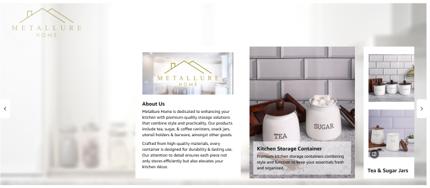
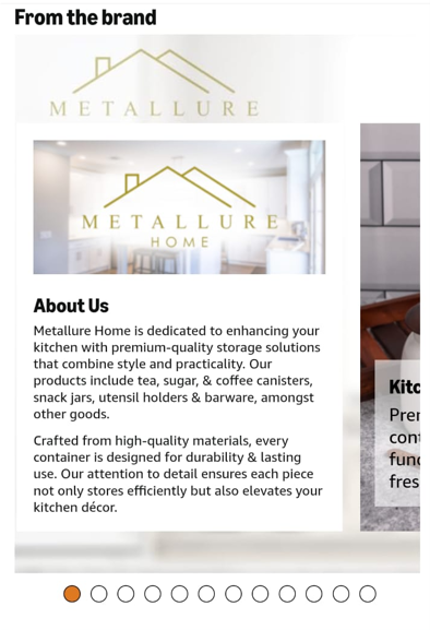
Brand Story renders as a horizontal carousel. It must communicate a complete thought on its own, with the first set of images making an impact. This is because shoppers often scroll down the page without swiping sideways to read further into the Brand Story.
What This Means for the Design:
- Build two distinct canvases for the background banner
The desktop background is wide (1464 x 625 px) while the mobile background is a tall portrait frame (463 x 625 px). - Make the opening view self-contained
The banner visible upfront should name the brand, show its flagship products in use, and give shoppers a clear reason to swipe. - Link outward to the catalog
Brand Story creates a clickable bridge to other ASINs in the catalog and directly to the Amazon Brand Store. - Account for layout variation
Amazon controls the spacing and overlay positioning across screen sizes, so inspect both the desktop and mobile preview tabs before submitting.
| Desktop Version | Mobile Version |
|---|
6.2 Building Brand Story
Amazon’s Seller Central help page refers to multiple layouts for building the Brand Story:
| Module type | Best used for | Amazon’s limits |
|---|---|---|
| Background Module (image with logo) | The full-scale opening banner. Every Brand Story requires exactly one. | Desktop: 1464 x 625 px
Mobile: 463 x 625 px Title: up to 30 chars (optional) Description: up to 135 chars (optional) |
| Brand Logo & Description | Founding story, mission, and core values in the brand’s own voice | Logo image: 315 x 145 px Title: up to 30 chars Body text: up to 450 chars |
| Brand Focus Image | A single brand differentiator, a product family, or a manufacturing proof point. | Image: 362 x 453 px Title: up to 30 chars Description: up to 135 chars |
| Brand ASIN & Store Showcase(Four-product showcase) | Cross-selling top catalog items, plus an optional clickable Brand Store link. | Four ASIN images: 166 x 182 px each Title: up to 30 chars (required) Brand Store ID: optional |
| Questions (Brand Q&A) | Answering company-level questions shoppers ask before trusting a new brand. | Count: 3 Q&A pairs Question: up to 100 chars Answer: up to 600 chars Image: none |
What Each Module Should Say:
- Opening visuals: Pair a high-impact image showing the product in its intended application. Real-world usage is easily understood.
- Origin and mission: Explain a problem the company was founded to solve, or its core principles – the founding philosophy can be summarized here.
- What sets the brand apart: Name one concrete identifier—such as an in-house testing lab, a specific material standard, or specialized engineering.
- Product lines: Introduce whole product families or categories. Individual product specs can be moved over to the A+ Content.
- Cross-sell: Give shoppers a direct path to complementary items in the lineup. There is an option to create a link to the Amazon Brand Store.
Things to Remember
- Regulated categories: For dietary supplements, topical wellness, and medical or life-science brands, keep disease, therapeutic, and efficacy claims out of Brand Story.
- Brand Story variations: Use the carousel to highlight scientifically chosen ingredients, third-party lab testing, GMP facilities, or packaging sustainability in a different sequence each time.
Building the Brand Story
Amazon sets no ideal module count, so match the deck length to the breadth of the catalog.
| Slot | Module | Question the shopper is asking |
|---|---|---|
| 1 | Background | Who is this brand? |
| 2 | About the brand | Why does it exist? |
| 3 | Focus image | What makes it different? |
| 4 | Four-product showcase | What else do they make? |
6.3 Collaborating with Brand Owners
A Brand Story is not a spec sheet; it is the founder’s account of why the company exists, and it only rings true if the brand owner recognizes their voice in the copy. It is a good idea to align the Brand Story with the company’s own website or the site’s ‘About Us’ page so the mission reads consistently across every channel.
Example of a Brand Story workflow:
| Stage | What you do [as the Brand Story creator] | What the brand owner approves |
|---|---|---|
| 1. Discovery | Interview the founder or brand lead on the origin story, core values, manufacturing standards, and non-negotiable brand rules. | Factual accuracy and voice |
| 2. Narrative | Distill one central brand promise, three concrete proof points, and the primary catalog path for shoppers. | The hierarchy of messages |
| 3. Assets | Gather vector logos, in-use photography, lab or factory certifications, top-selling ASINs, and the Brand Store URL. | Image selection and commercial usage rights |
| 5. Catalog rollout | Bulk-apply the approved Brand Story across all eligible catalog ASINs (up to 500,000 ASINs via bulk upload). | Target ASIN list and rollout sequence |
| 6. Refinement | Monitor performance and swap out seasonal or out-of-stock showcase ASINs. | Ongoing catalog updates |
Keeping it Consistent Across the Catalog:
- Apply it broadly: Brand Story can be applied to multiple ASINs. Sellers can choose which ASINs complement the Brand Story. They can choose ASINs with higher sales or those with better A+ Content.
- Refresh on purpose: Amazon asks brands to update content regularly so details don’t go out of date. Refresh for new launches, a larger Brand Store, or a change in the brand’s standards.
6.4 How Brand Story Complements A+ Content
Treat the two sections as halves of a single conversation:
- A+ Content answers: “Why should I buy this specific product?”
- Brand Story answers: “Why should I trust this company—and what else do they make?”
| Dimension | Basic/Premium A+ Content | Brand Story |
|---|---|---|
| Question answered | Why this product? | Why this brand? |
| Focus | Features, uses, specifications, comparisons | Origin, mission, quality standards, product range |
| Where | Product description area | “From the brand” section |
| Links out | Comparison charts can point to related products | Other products and the Brand Store |
| Updates | When the product changes | When the brand or catalog changes |
Keeping the Two Sections from Overlapping
- Don’t insist on individual product specs: Listing pocket counts for a single SKU inside a catalog-wide Brand Story wastes space and confuses shoppers looking at other items in the catalog.
- Skip detailed company history: Product modules have limited slots; spending a valuable A+ module on a founder bio crowds out the size charts and feature demos buyers need to make a decision.
- Design a deliberate handoff: Let the Brand Story showcase introduce the broader product families and Brand Store at the top, and let the A+ comparison table at the bottom help shoppers pick between specific sizes or tiers.
- Unify the visual identity. Use the same typography, color palette, and photography lighting across both sections so the listing feels like a customized storefront.
Why Every Brand Needs a Live Brand Story in 2026
On February 27, 2026, Amazon permanently discontinued its Shoppable Collections (Beta) content type and reinstated the last published Brand Story as the sole branded carousel in the “From the brand” section. Brands that relied only on Shoppable Collections without a published Brand Story were left with a gap—making a live, catalog-level Brand Story has become essential.
FAQ
There is no fixed schedule for updating an Amazon Brand Story. Review it periodically and revise it when the brand’s positioning, product portfolio, messaging, or visual identity changes. Updates may also be warranted when the existing story no longer reflects the brand accurately or supports its current catalog.
Yes. Amazon Brand Story modules can include clickable elements that direct shoppers to relevant brand destinations, including an Amazon Store, where the selected module and available features support this functionality. These links can help shoppers explore the wider product range and learn more about the brand.
An Amazon Brand Story should reflect the brand’s established visual identity, including its colors, typography, imagery, and tone of voice, but it does not need to replicate the website’s design. Maintain recognizable brand elements while adapting the content to Amazon’s formats, emphasizing the brand’s identity, values, and product range.
7. Copywriting Support for Amazon A+
Copywriting support covers every live text field across the A+ modules and data fields at the backend: headlines, body paragraphs, captions, comparison metrics, hotspot callouts, Q&A blocks, and backend image alt text.
A+ Copywriting at a Glance
| Copy Element | Primary Function | Things to Remember |
|---|---|---|
| A+ module & Image captions | Explains what the visual shows and turns factory specs into practical benefits. | Do not repeat the top bullet points – keep the text as short as possible |
| Brand/product features | Explains a product highlight or something special about the brand, like an artisanal or handcrafted process | Exactly match Brand Registry spelling. Maintain consistent naming standards across parent and child ASINs |
| Image alt text | Describes the image for shoppers using screen readers. | No keyword stuffing or generic file names. |
| Product claims | Validates performance numbers, certifications, and industry awards. | Do not include warranties or competitor names. |
| Brand Story | Informs about the brand’s history, design approach, or purity standards | Don’t go overboard with adjectives, superlatives, or claim-to-fame phrases |
7.1 Clear Captions, Bylines, and Brand Phrases
Captions and headlines are often the only content a mobile shopper reads. When someone skims a product listing via a phone, their eyes land on the image and the headline – these text fields should be easy to understand.
- Captions (up to 12 words): State what the image demonstrates without copying the listing’s bullet points.
- Headlines (4 to 8 words): Lead with the practical benefit or use case. “Cold drinks for a full day outside” tells a shopper much more than “Premium Quality Bottle.”
- Taglines: When A+ layout includes a recurring founder note or brand slogan, keep the text and punctuation identical across every ASIN.
| Element | Weak (vague and promotional) | Improved (specific and benefit-led) |
|---|---|---|
| Headline | Premium Quality Bottle | Cold Water for an Entire Day Outdoors (38 characters) |
| Body copy | Our high-quality bottle is the best choice for everyone who loves the outdoors. | Double-wall vacuum insulation keeps liquids cold on long trail days. The lid seals with a quarter turn, and the slim base slips into your pack pocket. (158 characters) |
| Caption | Our bottle in use | A hiker clips the 24-ounce bottle to a daypack strap (10 words) |
7.2 Image Alt Text Audit
Amazon requires descriptive alt text (up to 100 characters) on every image uploaded to the A+ Content Manager. Seller Central previously labeled this field “Image Keywords,” leading many brands to pack it with backend search terms.
Alt text serves as an accessibility tool for visually impaired customers using screen-reading software. Amazon flags and rejects submissions containing generic labels, repetitive phrasing, or keyword strings.
Clean & Compliant Alt Text
- Describe the physical image
- Do not reuse the same alt text on multiple images
- Omit subjective marketing terms and long keyword lists
- Eliminate placeholder text like “product photo” or “image”
- Stay within the character limit
| Rejected (Keyword-Stuffed or Generic) | Compliant (Descriptive & Accessible) |
|---|---|
| High-quality bottle | Insulated stainless steel water bottle with screw-on lid on a granite countertop (80 characters) |
| Product image | Runner holding an insulated stainless steel bottle during an outdoor workout (76 characters) |
| Best bottle for hiking cold drinks insulated stainless | Hiker clipping a stainless steel bottle to a daypack strap (58 characters) |
7.3 Turning Technical Data into Benefits
Technical specifications tell a buyer what a product is made of/made with–this is important to inform and maintain factual accuracy. Benefits explain how those materials solve daily problems–this is what most shoppers seek.
A Three-Part Formula
Move logically from the specification, to what it does, to the benefit to the shopper:
| Specification | Functional Mechanism | Customer Benefit |
|---|---|---|
| Borosilicate glass | Resists thermal shock from sudden heat changes | Lets you pour boiling coffee directly into an iced container without cracking the glass. |
| Double-stitched nylon seams | Prevents thread separation under heavy pulling loads | Withstands daily work commutes and fully packed travel duffels without tearing. |
| Removable silicone seal ring | Pulls out cleanly without tools | Disassembles in seconds so you can clean trapped residue thoroughly. |
| USB-C charging port | Uses universal power cords | Powers your device using the same charging cable as your phone or laptop. |
Keep an A+ module informative and easy-to-read
- Limit long sentences: When a sentence uses “and” to join two distinct concepts, break it into two separate statements.
- Lead with the outcome: Put the practical result before the mechanical or technical explanation.
- Drop vague modifiers: Replace “large capacity” with “24 ounces”. Replace “featherlight” with “210 grams”.
- Cut out the filler: Drop words like “premium” or limit their use. State the material grade instead: “18/8 stainless steel” or “600D ripstop polyester.”
7.4 Moderating Product Claims
Amazon defines a claim as any statement regarding the product performance, certifications, awards, health benefits, or environmental impact, and product claims are a recurring reason for listing-level rejections.
| Policy Area | What To Do (Compliant) | What To Avoid (Rejected) |
|---|---|---|
| Performance & certifications | State the certifying body, standard number, and year directly in the copy. | “Best-selling,” “#1 rated,” “highest quality,” or vague claims like “lab-tested” and “doctor-approved.” |
| Awards | “Best-selling,” “#1 rated,” “highest quality,” or vague claims like “lab-tested” and “doctor-approved.” | Awards won over two years ago, or generic badges stating “Award-Winning Product.” |
| Health & supplements | Focus on physical materials, dimensions, and maintenance instructions. | Promises to cure, treat, diagnose, or prevent any medical condition. |
| Sustainability | Cite the specific certified standard and year alongside the exact component. | Unsubstantiated terms such as “eco-friendly,” “green,” “biodegradable,” or “compostable.” |
| Promotions & guarantees | Keep all content educational and focused strictly on product use. | References to warranties, money-back guarantees, discounts, pricing, shipping, or off-Amazon customer service. |
FAQ
Yes. Amazon sets character limits for individual text fields in A+ Content, and the limits vary by module and field type. Headline, body text, image keywords (alt text), and other fields may have different restrictions. Keep the copy concise, check the requirements for each selected module in A+ Content Manager, and validate the content before submission.
Not too much because A+ is driven by pictorial appeal. Keep the embedded text brief and limited to information that benefits from appearing directly within the visual, such as feature labels or short callouts. Stay away from using text-only modules that can clutter the overall A+ design. Avoid detailed explanations and use easy-to-understand phrases.
Writers should make claims relevant and always supported by verifiable information. They should explain what a product feature does/why it matters without relying on excessive use of adjectives, unverified claims, or disparaging comparisons. Experienced copywriters rephrase typical product information into phrases that comply with Amazon’s content publishing policies, staying clear of verbiage that creates conflicts.
8. Quality Control Beyond Accuracy
Quality control goes beyond reviewing each element of A+ Content when developing or submitting it for publication. It also includes:
8.1 Checking for New Amazon Guidelines
It is safer to follow Amazon’s current A+ Content guidelines for the relevant marketplace as the basis for approving any A+ copy. Do not assume that content is acceptable because it appeared on another sales channel or was approved in an earlier submission. An older listing of a competing brand might flout the latest guidelines without being taken down from the marketplace – this cannot be a reason to risk the A+ for a possible rejection.
8.2 Working with High-risk Product Categories
Some product categories present a higher risk of rejections. The A+ Content might repeatedly get flagged, or basic product information might be escalated as a prohibited claim. Some products might warrant substantially more safety-related documentation and user-safety assurances.
Sellers can assume more follow-ups and communication with the Amazon Seller Support team when creating A+ Content for such product categories.
- Not just the wording; even an image implying a product to be a cure, possible treatment, or guarantee of quick recovery can lead to escalations.
- Having applied for a certification usually does not amount to safely quoting it without the risk of the content being flagged or removed by Amazon.



FAQ
Amazon typically reviews submitted A+ Content within 7 – 10 business days, although the actual review time may vary. Content that does not meet Amazon’s guidelines may be rejected and require corrections and resubmission, extending the publication timeline. Sellers can monitor the submission status in A+ Content Manager.
Common image-related issues include unsupported file formats, CMYK color profiles, files exceeding Amazon image size limits, low resolution, blurry or low-quality visuals, watermarks, and text that is too small to read on mobile devices.
Yes. Sellers can manage published A+ Content through A+ Content Manager, including editing content, resubmitting it for approval, or removing its association with eligible ASINs. Amazon can also stop showing the A+ content on the product detail page if any element of the A+ content has violated an Amazon policy.
Yes, where permitted by Amazon’s current content policies. Certificates and quality credentials can help communicate relevant product standards, but they must be authentic, current, applicable to the product, and presented without misleading claims.
9. Best Practices for Uploading A+ Content
Uploading A+ product details goes beyond handling bulk uploads. Clear images & text across desktop & mobile views, or videos playing seamlessly across digital devices, are just one of the many aspects that need attention when managing A+ uploads.
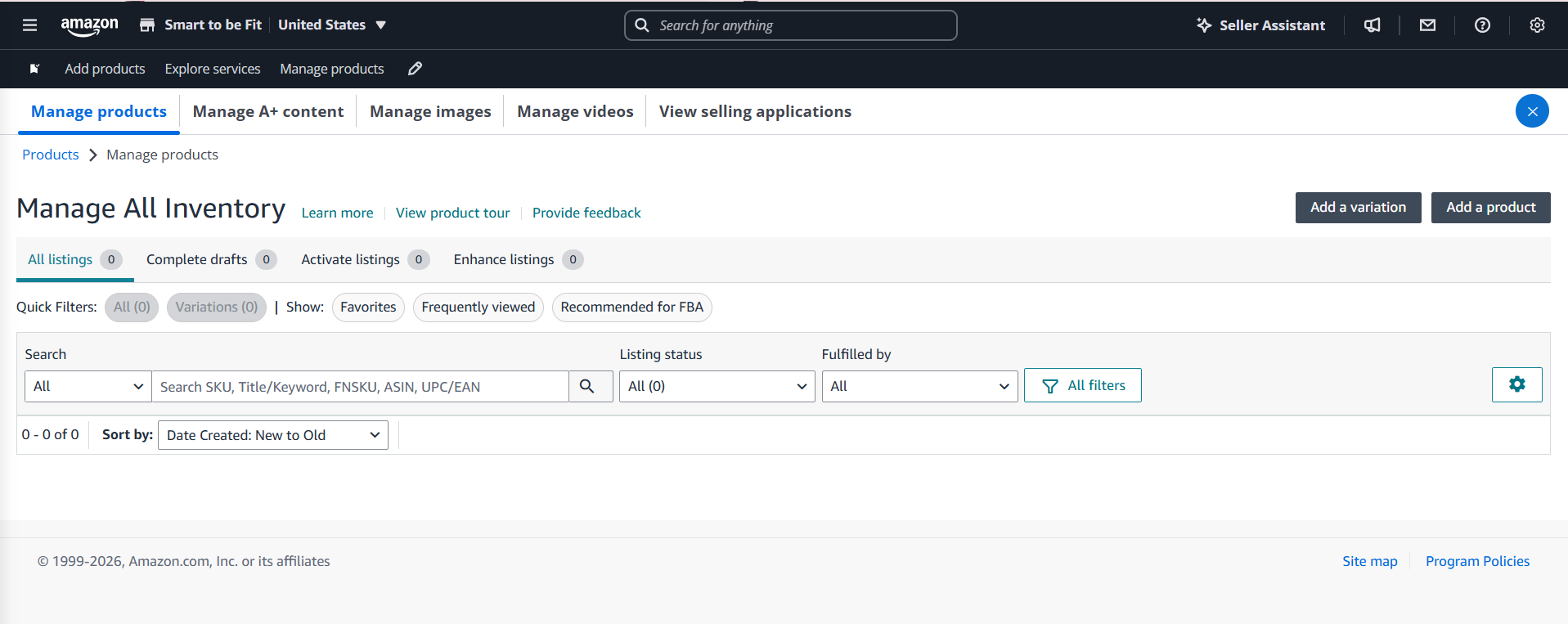
Uploading A+ Content requires:
- Selecting the appropriate content type
- Ensuring the module sequencing is not distorted
- Assigning content to the correct ASINs
- Validating presentation across devices and marketplaces
Quality-checked A+ Content uploads ensure fewer chances of:
- Critical errors in published product listings
- Listing-level penalizations by Amazon
- ASIN-level A+ Content mismatches
- Display inconsistencies
9.1 Best Practices for A+ Data Upload
1. Prepare an upload-ready library of project assets
- Product images
- Infographics
- Lifestyle-appeal banners
- Brand logos
- Video files
- Thumbnails
- Q&A text
- Brand story
- Content for text-supporting modules
2. Use a file-naming convention that identifies:
- Product or product family
- Amazon marketplace – regionally different marketplaces
- Language
3. Managing Video Assets
- Amazon might have marketplace-specific video-upload instructions, such as specifying MOV or MP4 files up to 1080p.
- Amazon A+ video files must also meet the standards for video titles, ASIN mapping, language selection, and thumbnail configuration.
4. Take Precautions for HTML
- Amazon does not allow arbitrary HTML in A+ Content.
- Do not attempt to reproduce a custom layout through pasted HTML.
- Avoid using scripts to replicate the theme of a brand’s ecommerce site.
9.2 Previewing & Validating A+ Content
A+ Content can look correct inside an individual editing field, but still have layout problems when the modules are assembled on the product detail page.
Be Careful When Validating Content for A+ Uploads
- Make sure to validate the complete page, not just individual modules
- Watch out for excessive blank or white spaces between modules
- Flag abrupt transitions between product & brand-specific content
- Text should always be readable, even within images or captions or bylines
- Flag images with unwanted borders created by last-minute image cropping
FAQ
It is not a rule that parent and child ASINs should always reflect identical A+ content. Sellers can assign A+ content to multiple ASINs, provided the content is appropriate for each product. It also depends on the product family, which might have ASINs that share common features along with individual attributes.
Yes. A+ content can appear differently across digital devices with different screen sizes and display specifications. It is vital to use desktop and mobile previews to ensure that text, images, comparison tables, and other modules remain clear and usable on smaller screens.
10. A+ Content Performance Optimization
Amazon A+ Content optimization is not limited to uploading new images or redesigning modules. It involves measuring how A+ Content influences customer behaviour, testing alternative presentations, identifying what works better, and using verifiable data to make updates.
A+ Content should be treated as an ongoing optimization asset rather than a one-time listing enhancement.
The most effective approach combines Amazon’s:
- Experimentation tools
- Advertising and sales data
- Customer feedback
- Marketplace-specific insights
10.1 Amazon A+ Content Experiments
Amazon’s Manage Your Experiments tool allows eligible brand owners to compare two versions of product detail page content, including A+ Content.
How A+ Content experiments work
In a typical A/B experiment, Amazon randomly divides eligible customers into two groups. One group sees Version A, the existing content, while the other sees Version B, the proposed alternative.
Both versions run during the same period, reducing the risk that changes in seasonality or market conditions alone explain the difference in performance.
For A+ experiments, both versions must be approved before the experiment begins. The versions must also be assigned to the same set of ASINs.
What to test [Different Testing Parameters Sellers Can Use]
Module Selection
Test with a different order of product benefits, technical specifications, usage instructions, or lifestyle imagery. Module sequencing with reduced text might work better.
Feature Prioritisation
Create a version that highlights the primary product differentiator, like outdoor performance, and compare it with a version that highlights a secondary product benefit, such as ease of use or recyclability.
Lifestyle or explanatory imagery
Test product contextual images and lifestyle-inspired, feature-focused graphics. This is about testing whether buyers like self-explanatory product features or product-in-use visuals.
Comparison Charts
This comparison helps to find out which products engage more clicks and purchases when recommended as part of the A+ Content comparison charts. Use this space for comparing potential bestsellers with products that have negligible traffic.
Brand Storytelling
A+ Content appears adjacent to the Brand Story. Experiments can help sellers discover if their A+ Content is brand-heavy, distracting customers from completing their purchase journey, or if it is meaningfully adding more depth to the product page visit.
Setting up ‘Manage Your Experiments’
- Choose a list of parameters to run your experiment
- Choose eligible ASINs with different traffic trends to cover more products
- To create different versions, duplicate the approved content and make one big change rather than multiple changes within the same ASIN
- Choose a reasonable period to run the experiment, giving time for the changes to make an impact without strongly impacting buying trends [about 8 to 10 weeks].
- Do not terminate experiments because one version appears to be winning in the early results.
10.2 Ongoing A+ Content Revisions
Not every optimization effort requires a formal experiment. Brands can also revise A+ Content to ensure accuracy at all times or make periodic revisions to keep their product page competitive.
- Buyer complaints reflecting conflicting product claims
- Problems in display of A+ images when viewed on smartphones
- Recycling content after exiting a sales season with a theme, like Christmas sales
- Product-level changes such as a change of packaging
- Branding-level changes due to rebranding or change in brand ownership
- Discontinuation of product components or accessories
- Translation-related mistakes that need to be corrected immediately
- Updating product feature explanation to match the A+ display of competitors
10.3 Optimizing A+ Content for Campaign [Advertising] Data
After publishing A+ Content, sellers should observe the ASINs over a period. The analysis should be done for organic and advertising/promotional sales. Organic data reflects the ability of A+ Content to grab customer clicks and influence purchase decisions, while sales data reflects the A+ product listing’s campaign performance.
- Campaign click-through rate reflects how effectively the ad attracts clicks.
- Product detail page conversion is directly related to what happens after shoppers arrive.
- A+ Content is not the only parameter to evaluate product page performance
Using Campaign Data to Improve A+ Content
- High traffic but low on conversion: Examine whether the A+ page answers the questions or features highlighted raised by the ad. Check whether the advertised benefit is clearly explained. The content should complement the shopper’s likely intent.
- Strong conversion search terms: The best-performing campaign search terms can be integrated into the text-heavy A+ Content modules, explaining the feature or use case scenarios. The keywords should read naturally.
- High spend with weak sales pattern: Before overhauling A+ Content, it needs to be ascertained if the poor conversion is actually a content-related problem. The clicks might not be transforming into sales due to pricing, poor seller ratings, or inventory-related missed opportunities.
- Tracking best performers across campaigns: The search terms, the audience segmentation, and module placements for the better-performing ASINs can be used to optimize other A+ product detail pages.
10.4 Localizing A+ Content
Expanding A+ Content into a new Amazon marketplace requires more than translating the existing banner text. Content that performs well in one marketplace may be less relevant or even misleading in another.
Choosing Content Localization Over Literal Translations
A technically correct translation can still be confusing if it uses culturally inappropriate examples.
FAQ
Sellers can assess A+ Content performance through Amazon’s available sales and traffic reports. They can track metrics such as unit session percentage (conversion rate), sales, and product detail page traffic before and after publication. They can compare performance over a suitable period. Where eligible, A/B testing can help isolate the effect of different content versions.
No. Amazon’s Manage Your Experiments feature is available only for eligible brands and ASINs that meet Amazon’s current requirements. Eligibility may depend on factors such as brand enrollment, sales history, traffic, and product listing status. Sellers can check the Experiments dashboard in Seller Central to see which ASINs qualify.
Amazon does not prescribe a fixed refresh schedule for A+ Content. Review the listings periodically and update them when product specifications, branding, customer needs, or marketplace requirements change. Performance data may also indicate opportunities to improve images, messaging, or module selection.
Yes. Sellers can generally apply an approved A+ Content project to multiple eligible ASINs, provided the content accurately represents each product and meets Amazon’s requirements. This can streamline catalog management for related products, but shared content should not contain specifications or images that apply to only one item.
Advertising and campaign data can help identify product features shoppers respond to, questions that remain unresolved, and listings that may need clearer messaging. Reviewing metrics such as click-through rate, conversion rate, and sales alongside customer feedback and listing quality provides such insight. This is part of ongoing A+ Content improvements.
11. Common Amazon A+ Troubleshooting
Amazon A+ Content might not display properly despite publishing it with extreme care. Some issues are not caused by incorrect images or copy. Problems can also arise from:
- ASIN-to-brand mapping
- Incomplete product-family assignments
- Marketplace-level conflicts
- Language mismatches
- Content approval delays
Often, the product listing title and the bullet points might conflict with the A+ modules. Resolving these issues requires a structured process that checks the underlying cause rather than repeatedly editing and resubmitting the same content.
11.1 Resolving ASIN-level Issues
One A+ copy, including the graphics and text, can be applied to multiple eligible ASINs. This makes it easier to quickly publish products that share a brand, common features, or a consistent presentation. However, when the same A+ Content is applied across multiple ASINs, the same content can show up inconsistently, compromising the overall health and impact of A+ Content.
Diagnosing and Fixing Such Common Issues:
ASIN-level Problems:
- Some ASINs might have been unintentionally omitted. Some might not be eligible.
- Mistakes can happen when attempting bulk ASIN assignment for product groups.
- Using smaller parent-child ASIN assignments helps resolve such mismatches.
ASIN Brand Conflict:
- Brand name mismatches can happen due to the smallest spacing or hyphenation errors.
- Brand-level mismatches suggest issues with GTIN or product identifiers like part numbers
Consistently Tracking Progress:
- Check the status of the individual ASIN under Applied ASINs
- Regularly scan for content that is published and that is awaiting approval
- Record content versions resubmitted for approvals
- Identify and log reasons for content omissions and flagging for compliance
11.2 Replicating A+ Content
A+ Content developed for one Amazon marketplace region should not be assumed to work automatically in another region. Geographically different Amazon marketplaces may have slightly different seller-level approvals, brand permissions, catalogue structures, or content-focused regulations.
Developing A+ Content for Amazon regions:
- Get approvals or certifications specific to a country
- Obtain region-specific safety information or product usage disclosures
- Confirm any publishing limitations related to warranties or claims
- Groom a repository of neutrally toned product family facts and brand messaging
- Define creative assets that can be quickly recycled/replicated across a catalog
- Identify ASIN-specific information to be redeveloped entirely for a new selling region
11.3 Correcting AI-Generated Images
AI-generated imagery can accelerate creative production, but such visuals may contain product distortions, AI-hallucinated features, incorrect labels, or details that differ from the actual item. Even minor inaccuracies can mislead customers or create a listing-level suppression/suspension.
- AI-assisted images often lead to packaging-level, hard-to-notice inaccuracies
- AI images can misrepresent product logo, color, finish, texture, transparency
- Highly detailed technical drawings might be misinterpreted by AI
- AI images might need manual image editing for accurate product detailing
AI-generated assets should be checked against actual product photographs for maximum accuracy
11.4 Syncing Brand Owners, Designers & Content Teams
A+ Content production often involves several contributors: brand owners, content writers, graphic designers, translators to localise copy, and marketplace specialists who upload & manage the listings.
Without clear ownership, revisions can become fragmented, and conflicting versions might create marketplace friction.
A seller’s Amazon A+ troubleshooting approach should be grounded in defined roles for the project. Best practices point to a digital, interactive group where all project stakeholders, including remote resources, can share information instantly. Ownership can be set up according to immediate and long-term A+ Content requirements.
FAQ
Approved A+ Content may stop appearing if its ASIN assignment changes, the product listing becomes ineligible, or Amazon removes or suppresses the content. Check the ASIN assignments and submission status in A+ Content Manager.
Sellers can reuse existing A+ Content, but it may need to be adapted for each region. Sellers should translate the copy accurately, localize spellings, measurements, cultural references, and regulatory information.
Review the rejection notice and Amazon’s A+ Content guidelines, checking text, images, claims, certification logos, and other policy-sensitive elements. If the reason remains unclear, simplify the content, remove potentially non-compliant elements, and resubmit after making corrections.
Check whether the content has been assigned to the correct ASINs and whether the affected variations have separate detail pages or inherit content from a parent listing. Verify each child ASIN’s eligibility, assignment status, and live product page. Allow time for updates to propagate and contact Amazon Seller Support if the issue persists.

The SunTec India Blog
Brought to you by the Marketing & Communications Team at SunTec India. We love sharing interesting stories and informed opinions about data, eCommerce, digital marketing and analytics, app development and other technological advancements.