Minimize ‘No Results’ responses with internal site search optimization
Table of Contents
- Why are zero search results a problem for your business?
- What does a good site search look like?
- Why does the zero results search problem arise?
- How to handle zero search results?
- Best practices for site search
- Integrate AI for a better site search experience
- Final takeaway
- We implemented an AI-powered product discovery engine for a leading eCommerce Merchant
Have you ever found yourself typing in a show’s name on Netflix, only to be met with a disappointing “Sorry, no titles match your search” message? This frustrating experience can lead to disengagement and may even cause you to switch to a different streaming platform.
However, Netflix has a solution to keep you engaged. By offering alternative suggestions based on your previous searches or trending titles, the platform ensures that you continue browsing and potentially discover a show you might have otherwise missed. Have a look.

This strategy isn’t unique to Netflix. Websites across various industries can implement similar techniques to prevent dead ends caused by zero-search results and maintain user engagement.
In this blog post, we’ll explore how zero-result pages contribute to consumer frustration and the negative impact they can have on your business. We’ll also explore effective ways to optimize internal site search results to minimize zero search results, drive sales, and enhance the overall user experience.
Why are zero search results a problem for your business?
When users don’t find what they’re looking for, they are less likely to stay on your website, resulting in lower engagement metrics – time on site, page views, and interactions. Additionally, every zero-results search is a potentially lost sale as dissatisfied customers may move on to other business alternatives. Therefore, if your website consistently yields zero search results, it undermines the overall user experience and increases the likelihood of losing customers to competitors.
What does a good site search look like?
Coursera is a good example of a great site search. It offers multiple user-friendly UX functionalities, including search-as-you-type capabilities, misspellings, and typo tolerance. Moreover, all the functionalities extend to mobile devices as well. Here is what it looks like.

The website also offers numerous categories, filters, and a list of the most popular specializations to ensure that the user lands on a relevant course.

Why does the zero results search problem arise?
Zero search results can come up due to multiple factors, including-
1. Misspellings and typos
Typing errors and misspelled words are common, especially in user search queries. External searches, such as those conducted on Google or Bing, can often compensate for minor mistakes. However, if not optimized, internal search systems trip over the smallest mistakes. This may result in zero-results searches within your internal site search.
2. Poor search indexing
If the site’s search indexing process is inefficient, certain pages or products may not be properly cataloged. In such cases, unindexed pages/products may not appear in any search results.
3. A mismatch between user language and site terminology
People may use different search terms than those used on your website across product listings and content. Consider this: You run an eCommerce business that sells different types of shoes. A user searching for “running shoes” may not get the desired search results if your website terminology for the particular category is “sports shoes.” This discrepancy may result in a zero-results page.
4. Lack of relevant data
If your database lacks accurate and updated information such as product availability, descriptions, and technical specifications, users’ search queries may not match any items in the database. Additionally, if they’re looking for outdated or discontinued items that are no longer available, searches for those items may yield zero results.
How to handle zero search results?
The following strategies can help you reduce the likelihood of ‘no-result-found’ instances and improve the product discovery process for visitors.
1. Improve site search with synonyms and misspellings
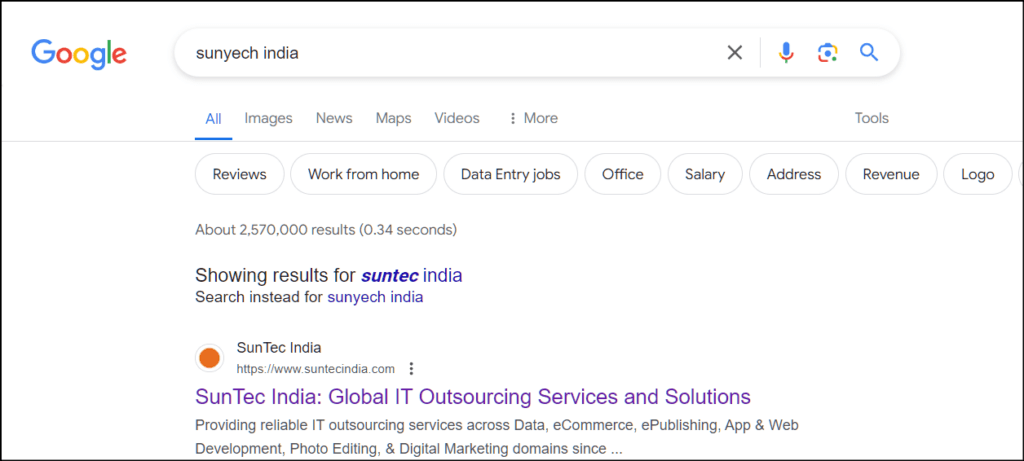
Expanding your search index with synonyms, variations, and misspellings allows the site search engine to retrieve more accurate results. Upon detecting a potential spelling error or typo in a user’s query, it can provide “Did You Mean” suggestions or alternative spellings.
Below is an example of how search engines (external searches) handle misspelled words. The same can be extended to internal search systems.
2. Customize site search results by offering more filters
Another way to customize internal site search is to provide additional filtering categories, drop-down menus, and a personal search results page with their past activity (frequently visited products, wishlist, products added to the cart, etc). These data points can later be used to offer quick search options that yield definite results, deterring zero-result pages.
3. Utilize auto-fill suggestions
Autocomplete is a prominent site search feature that allows the internal search engine to
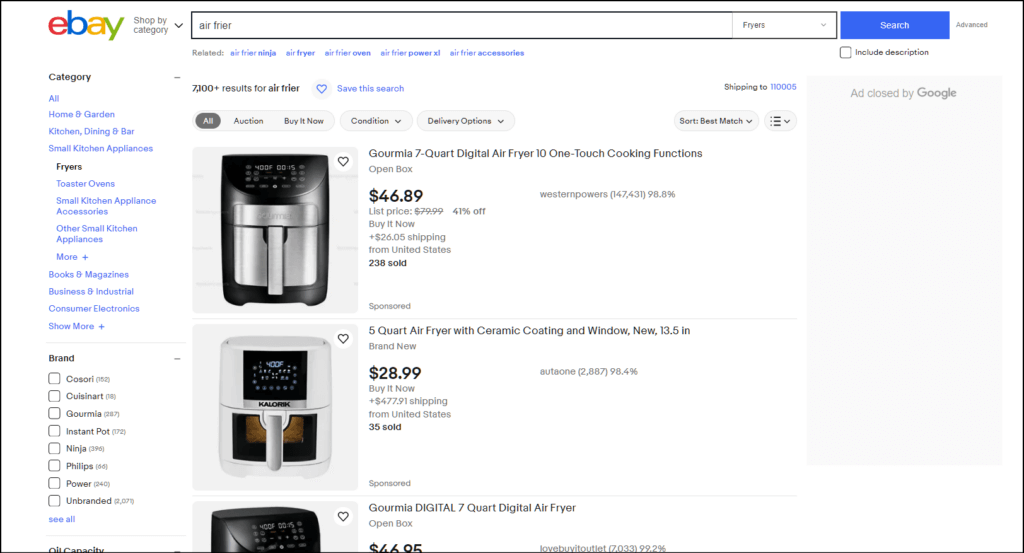
- Correct phonetic misspellings, such as keyboard proximity errors, wrong punctuations, and omitted characters. For instance, a user search query spelled “air frier” automatically gets interpreted by the search engine as “air fryer.”
As you can see below, even the incorrect spellings resulted in accurate product recommendations.
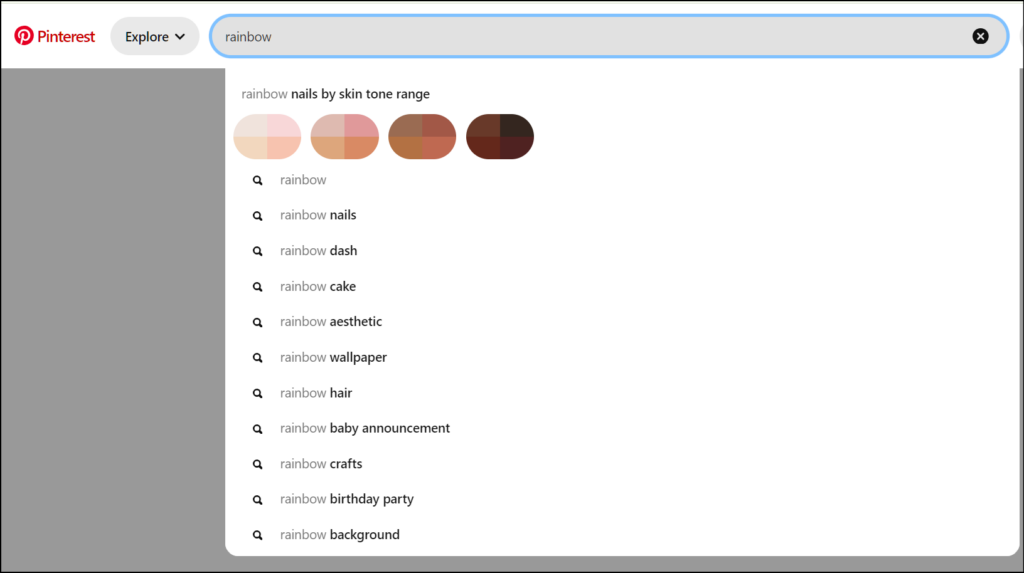
- Detect possible queries based on relevance. For instance, if someone types “rainbow” in the internal site search, the auto-fill suggestions may display “nails,” “dash,” “cake,” etc.
- Prioritize better matching keywords in a query and serve more accurate recommendations based on them. Consider an example where a user is searching for “gaming laptops with graphics cards 8GB RAM.” Here, the system should recognize “gaming,” “graphics card,” and “8GB RAM” as the words of focus. Look at the image below:
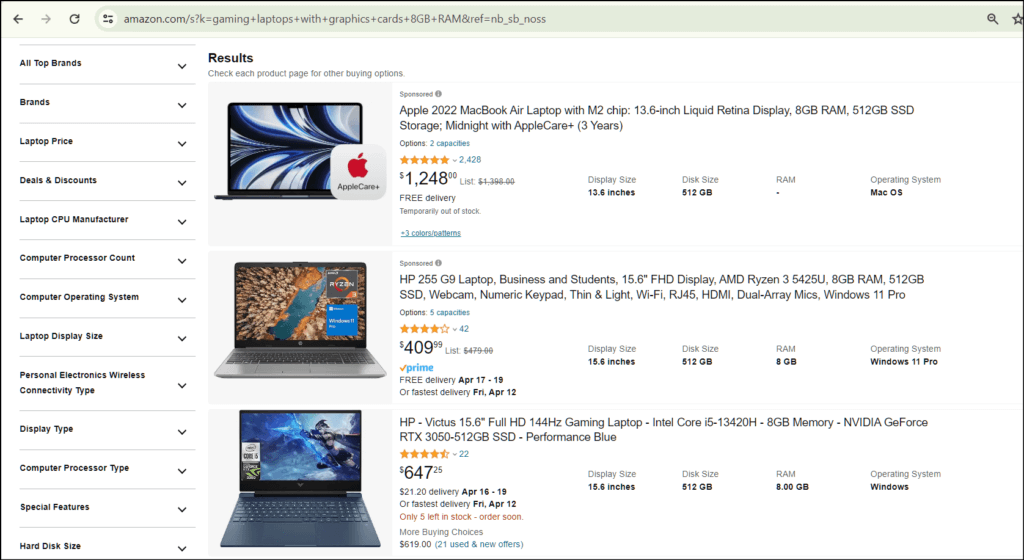
Such precision reduces the likelihood of users getting zero search results.
4. Optimize content with accurate and necessary information
Ensure your product data is up-to-date and accurate for optimal performance of the product discovery engine. This includes your product catalog, including attributes, descriptions, categories, and metadata. Additionally, enrich it with user data like browsing history, purchase patterns, and demographics to offer better contextual references for the site search system. This understanding is crucial for the site search engine to deliver the most relevant results and avoid zero-results pages.
5. Implement merchant tooling
Nowadays, many business owners leverage a combination of human insight and rule-based programs within internal site search to boost, bury, block, and group their products to offer better search results. This serves a dual purpose: Maximize all KPIs and meet customers’ needs. This practice, called “searchandising,” allows them to-
- Recommend a particular item based on buyer intent: For instance, if someone has a history of purchasing boxing-related items, the internal site search can recommend boxing gloves instead of winter gloves when the user searches for “gloves.”
- Bury certain unavailable items: If some products are currently out of stock, the internal site search can bury the results and suggest relevant alternatives.
Best practices for site search
While many site visitors have a goal in mind, several others are simply exploring your website as an option. To ensure they find the desired products, improving internal site search functionality is a great way. You can do this in the following ways.
1. Make the search box user-friendly
The search bar is where most of the website interaction happens. So make it intuitive to ensure maximum engagement. Put it where users expect to see it, like the top of the page. Keep the design simple with clear prompts.
2. Integrate dedicated query preprocessing modules with the search engine
Search query reformulation can be used to improve a customer’s product discovery experience. The query preprocessing module will receive the user’s query as input, apply various reformulation techniques (such as query expansion, spelling correction, or synonym matching), and pass the modified query to the main search algorithm for further processing. For example, if a user searches for “laptops,” the query can be expanded to include terms like “notebooks,” “portable computers,” or “ultrabooks.”
3. Optimize the internal search box for mobile devices
Mobile devices and smartphones (excluding tablets) generated over 58.67% of global website traffic in the last quarter of 2023 alone. Optimizing internal search accommodates this user behavior, making it easier for them to access your website anytime, anywhere. So ensure the search system has a responsive design to prevent lost opportunities.
Integrate AI for a better site search experience
As per Statista, 51% of eCommerce business owners are working on the deployment of AI in their business. And a significant portion of this belongs to AI-powered search, product discovery, and recommendation engines.
AI-powered search and product discovery systems possess advanced NLP (natural language processing) capabilities to understand user intent and provide intelligent auto-fill suggestions to guide them towards the most relevant products. Even if the user’s initial search query does not yield an exact match, smart search systems can provide similar product suggestions, reducing the frustration of encountering a “no results found” page.
Moreover, advanced AI algorithms such as the Porter-Stemmer algorithm can be used to remove irrelevant endings or suffixes from search terms to get their base form, enhancing the precision of matching the right product to a search query.
Mindful integration of AI can translate to higher search-to-conversion rates (>72%), more sales from upsell recommendations (>30%), and higher product listing CTR (57%) – a win-win situation for all.
Final takeaway
Addressing the “zero search results” issue has become paramount for a memorable user experience, especially in this competitive scenario where alternatives are readily available. By improving and optimizing internal searches to yield more relevant and related products, you can ensure better customer retention.
We implemented an AI-powered product discovery engine for a leading eCommerce Merchant
Business Impact
Rapid 3-month deployment of AI-powered search engine
72% higher user search to conversion rate
80% improvement in search results accuracy
30% conversions from intelligent cross-sell and upsell recommendations
57% higher product listing click-through rate
Overwhelming positive user feedback on seamless buyer journeys
Nowadays, using AI search and product discovery technologies has become fundamental to improving search functionality and providing personalized experiences to consumers and visitors. Following this trend, one of our clients, a bath and light brand operating across 55+ countries, decided to conceptualize a better site search experience. They wanted to integrate AI-powered conversational semantic capabilities into their existing system. Within 3 months of rapid deployment, they witnessed an 80% improvement in search results accuracy and overwhelmingly positive user feedback.
Connect with our experts to learn how we can help you get similar results.


Rohit Bhateja, Director - Digital Engineering Services & Head of Marketing
Rohit Bhateja, Director of Digital Engineering Services and Head of Marketing at SunTec India, is an award-winning leader in digital transformation and marketing innovation. With over a decade of experience, he is a prominent voice in the digital domain, driving conversation around the convergence of technology, strategy, customer experience, and human-in-the-loop AI integration.